

VF2WP – Simple Voiceflow Integration by TESSA AI
Integrate Voiceflow AI chatbots into WordPress effortlessly with VF2WP by TESSA, enhancing user engagement and customer support without coding.
Plugin info
Maintenance & Compatibility
Maintenance score
Maintained • Last updated 174 days ago • 2 reviews
Is VF2WP – Simple Voiceflow Integration by TESSA AI abandoned?
Likely maintained (last update 174 days ago).
Compatibility
Languages
Similar & Alternatives
Explore plugins with similar tags, and compare key metrics like downloads, ratings, updates, support, and WP/PHP compatibility.
Description
Add your Voiceflow AI agent into your WordPress site in minutes. VF2WP – Simple Voiceflow Integration by TESSA simplifies the process of adding a Voiceflow chatbot to WordPress.
This plugin offers an easy way to add interactive and intelligent chatbots to your website, improving user engagement and support.
Note: This plugin connects to the external Voiceflow platform to deliver chatbot functionality. Please see the External Service Notice section for important details regarding data sent to third-party services.
Key Features:
* Seamless Integration: Connect your Voiceflow chatbot to WordPress with no code.
* Flexible Display: Two modes—embedded inside a specific page section, or a sitewide floating chat widget.
* Rich UI Support: Works with chat, text, cards, and other advanced chat interfaces.
* Embed Targeting: Provide a section/div ID to render the bot only where that element exists; leave blank for a floating bot across the site.
Development:
VF2WP was developed by TESSA and utilized the Github repository: https://github.com/DanielRSnell/wordpress-voiceflow
Why Choose VF2WP?
VF2WP by TESSA provides a no-code solution to integrating your Voiceflow agent into WordPress. Focus on creating rich conversational experiences without worrying about technical details. Whether you are a small business owner improving customer service or a developer enhancing site functionality, VF2WP brings Voiceflow AI chatbots into WordPress quickly.
Get Started Today:
Download VF2WP – Simple Voiceflow Integration by TESSA and transform your WordPress site with intelligent chatbots. Enhance user experience, provide instant support, and engage your audience.
External Service Notice
This plugin connects to the Voiceflow platform to provide chatbot integration services.
Service Domains Used:
– https://cdn.voiceflow.com/ (loads Voiceflow scripts)
– https://general-runtime.voiceflow.com/ (handles chatbot interactions)
– https://runtime-api.voiceflow.com/ (voice features API endpoint)
What data is sent:
– When the chatbot loads and is used, data including conversation content, a user/session identifier, and technical interaction information are sent to Voiceflow servers.
– No personally identifiable information is sent by default, but any content provided by users in the chatbot may be transmitted to Voiceflow.
Third-party Terms and Privacy:
– Voiceflow Privacy Policy: https://www.voiceflow.com/privacy-policy
– Voiceflow Terms of Service: https://www.voiceflow.com/terms
By activating and using this plugin, you agree that data may be transmitted to Voiceflow as described above. Please review their policies for more information.
Installation
- Upload the vf2wp-simple-voiceflow-integration folder to the /wp-content/plugins/ directory, or install via Plugins > Add New > Upload Plugin.
- Activate the plugin through the Plugins > Installed Plugins screen.
- Go to Settings > VF2WP and complete the registration form to register the plugin.
- Enter your Voiceflow Project ID (required) and Version ID (e.g., production).
- (Optional) Enter a Section ID to embed the chatbot inside a specific element, otherwise it will appear as a floating widget.
- Click Save Changes.
Your Voiceflow chatbot is now active on your site.
Frequently Asked Questions
Activate the plugin, complete the registration form (if prompted), then go to Settings > VF2WP and enter your Project ID and Version ID. Optionally enter a Section ID to embed the bot in a specific area.
No, the plugin is free to use. Voiceflow services are governed by Voiceflow’s own plans and policies.
Yes. If you provide a Section ID, the chatbot is embedded only on pages where that element exists. If you leave Section ID blank, the chatbot appears as a floating widget on every page.
Review feed
Screenshots
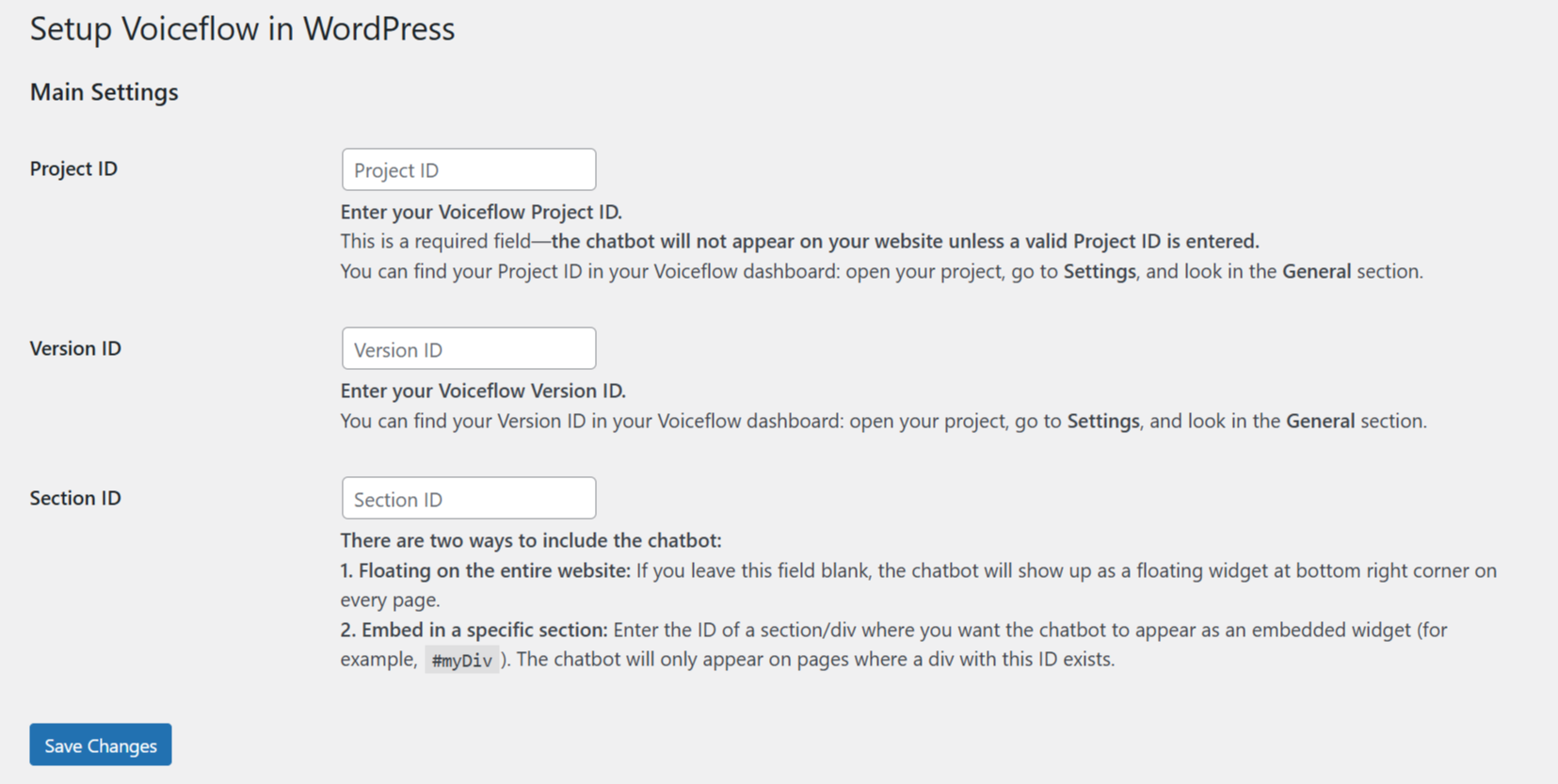
Plugin Settings Page — Configure the integration settings easily.

Chatbot (Floating) — Sitewide floating Voiceflow chatbot.

Chatbot (Embedded) — Embedded inside a page section via Section ID.
Changelog
1.0.0
- Initial release.
- Floating widget and embedded modes (via Section ID).
- No-code configuration for Project ID, Version ID, and optional Section ID.