

Views Output Formats
Export your WordPress data in XML and JSON formats easily!
Plugin info
Maintenance & Compatibility
Maintenance score
Possibly abandoned • Last updated 3536 days ago
Is Views Output Formats abandoned?
Possibly abandoned (last update 3536 days ago).
Compatibility
Similar & Alternatives
Explore plugins with similar tags, and compare key metrics like downloads, ratings, updates, support, and WP/PHP compatibility.
Description
This plugin provides JSON and XML output formats for Toolset Views.
The plugin will also fetch all available custom fields for each post, making it truly simple to integrate WordPress
with other systems that speak JSON and XML.
New in version 2.0
This plugin now supports Taxonomy and User queries!
Usage
Basic usage
Create your View, go to Settings -> Views Output Formats and pick your format. You will get a link to the XML or JSON version of the query.
Requirements
- PHP 5.3 or higher
Translations
- None
Upcoming features
Support for attaching taxonomy data to posts is planned
Feel free to contribute over at GitHub:
https://github.com/khromov/wp-views-output-formats
Installation
- Upload the
views-output-formatsfolder to/wp-content/plugins/ - Activate the plugin through the ‘Plugins’ menu in WordPress
- Create your View using Toolset Views, go to Settings -> Views Output Formats and pick your format to get a link!
Frequently Asked Questions
What are the prerequisites for using this plugin?
You need to have the Toolset Views plugin installed.
More information can be found here:
http://wp-types.com/home/views-create-elegant-displays-for-your-content/
Review feed
Screenshots
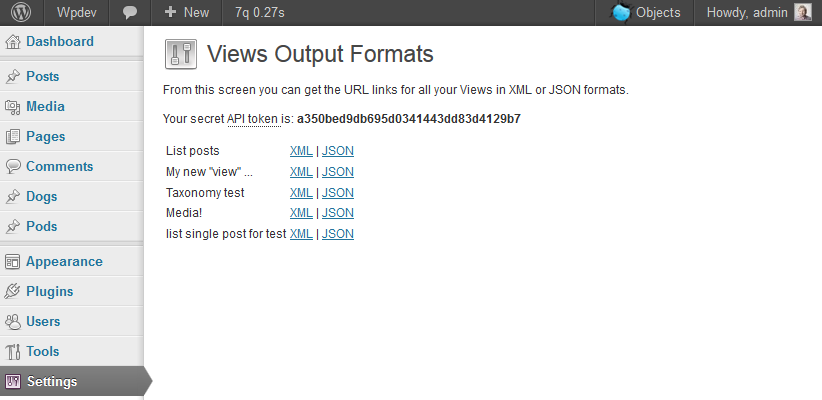
Administration menu

Exported XML example
Changelog
2.1
- New field: _thumbnail_url – This field returns the URL of the featured image for the post
2.0
- Support for Taxonomy queries
- Support for User queries (Views 1.4 and up)
- Improved XML validation
- Improved security with per-view API tokens and global token
1.0
- Initial release