

Sovrn
Maximize your affiliate revenue with Sovrn Commerce - link optimization, price comparisons, and unified reporting.
Plugin info
Maintenance & Compatibility
Maintenance score
Maintained • Last updated 155 days ago • 8 reviews
Is Sovrn abandoned?
Likely maintained (last update 155 days ago).
Compatibility
Similar & Alternatives
Explore plugins with similar tags, and compare key metrics like downloads, ratings, updates, support, and WP/PHP compatibility.
Description
Sovrn Commerce helps you maximize your affiliate revenue. Turn every link into a revenue stream with link optimization, price comparisons, AI shopping galleries, and unified reporting.
By signing up for Sovrn and installing this plugin, you can automatically monetize links to over 50,000 merchants. Sovrn Commerce works on existing links across all of your pages through link optimization. It even works for links distributed in your RSS feeds.
After you’ve signed up, sign in to sovrn.com to view real-time analytics and full-funnel reporting, understand buyer expectations, and optimize earnings across your content.
When clicks leave your site, you are creating value. Sovrn Commerce is the easiest way to measure and capture that value.
Installation
- Upload the
viglinkfolder to/wp-content/plugins/ - Activate the plugin through the ‘Plugins’ menu in WordPress
- If you don’t already have a Sovrn account, sign up
- Sign in to Sovrn Platform and copy your API key from your account
- Insert the key from above in the Sovrn plugin settings on your site
- Configure the plugin in the WordPress Settings > Sovrn menu
Frequently Asked Questions
Sovrn Commerce is affiliate workflow software for publishers and creators. It helps you optimize, operate, and scale your affiliate business with tools like link optimization, price comparisons, AI shopping galleries, and unified reporting. Our technology works across sites, apps, and social networks so you can focus on your business and earn more.
Create a free account at Sovrn and then follow the simple instructions on the installation tab. It only takes a few minutes.
See our Sovrn Commerce overview, and visit our Knowledge Base for detailed guides. You can also learn more about Sovrn Ad Exchange and Sovrn Signal.
Review feed
Screenshots
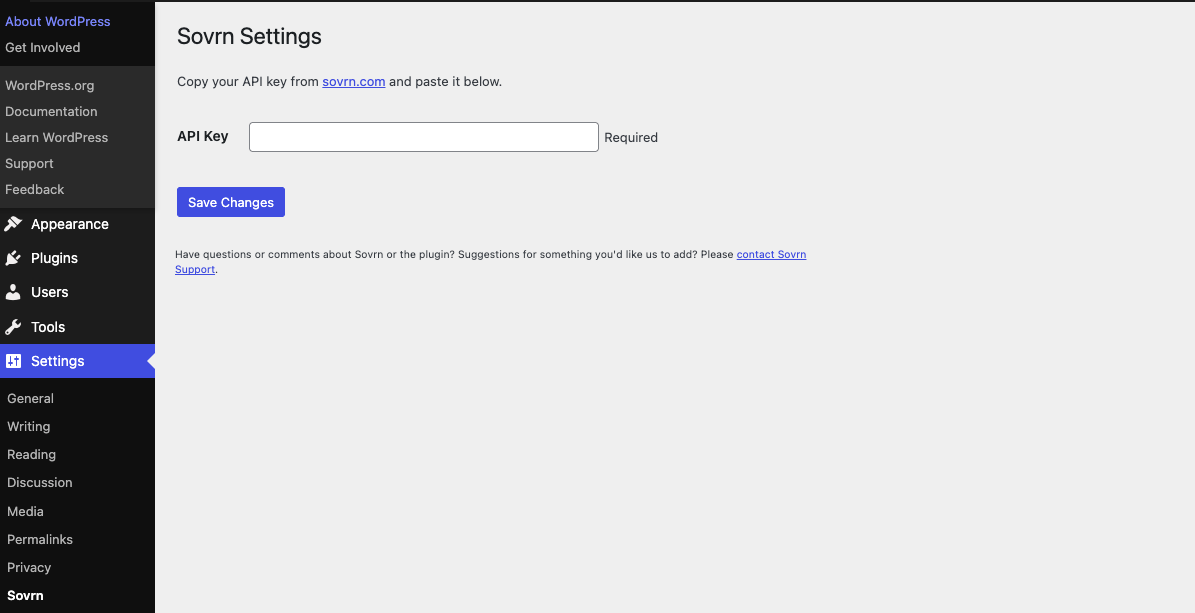
The Settings Page - Once you're signed up at sovrn.com, copy and paste your Sovrn key from your account, and click the key icon next to the site you are using.