

VigLink SpotLight By ShortCode
Adding VigLink Spotlight to your site enhances your content by showcasing the products discussed on each page, making it easier for readers to buy.
Plugin info
Maintenance & Compatibility
Maintenance score
Possibly abandoned • Last updated 4222 days ago • 1 reviews
Is VigLink SpotLight By ShortCode abandoned?
Possibly abandoned (last update 4222 days ago).
Compatibility
Similar & Alternatives
Explore plugins with similar tags, and compare key metrics like downloads, ratings, updates, support, and WP/PHP compatibility.
Description
What is VIGLINK SPOTLIGHT
Viglink Spotlight is a tool from Viglink, which creates shoppable content on your blog page/post.
It makes your content more shoppable while boosting revenue. Adding Viglink Spotlight to your site enhances your content by showcasing the products discussed on each page, making it easier for readers to buy and you to earn revenue.
Relevant Products
Spotlight always finds shoppable content. VigLink uses state-of-the-art natural language processing (NLP) technology to analyze each page on your site and identify product-related references. These are matched to our catalog over 150 million product offers available for display.
Yield Optimized
Through the VigLink Exchange, showcased products are linked to the highest bidding advertiser. As merchants compete to list their products in your pages, earnings are maximized.
Flexible
Unlike traditional banner ads that interrupt, distract, and clutter, Spotlight is content that makes it easier for visitors to buy what they’re reading about. It’s native advertising that adapts to your site’s look and feel. Place it anywhere on the page.
Do not have a Viglink Account yet? Get it here. (https://www.viglink.com/?vgref=1593661)
Installation
- Upload plugin’s
.zipfile to the/wp-content/plugins/directory - Unzip
.zipfile - Activate the plugin through the ‘Plugins’ menu in WordPress
- Place
[spotlight]in your page/post where you want to display viglink spotlight
Frequently Asked Questions
What is VigLink?
VigLink automatically monetizes existing links across all pages, past and future by ensuring eligible links always go to the highest bidding advertiser.
How to use it?
Simply you can use [spotlight] to place aa VigLink SpotLight on your page with all default values
Susanta’s Lab VigLink SpotLight plugin supports following arguments (default value)
- width = 300
- height = 250
- float = left
- border = 0
Is there any example
[spotlight width=”400″ height=”350″ float=”right” border=”3″]
It will create a right aligned and 400px wide spotlight area with 350px height and 3px border.
[spotlight width="300" height="250"]
It will create a borderless left aligned and 300px wide spotlight area with 250px height.
Review feed
Screenshots
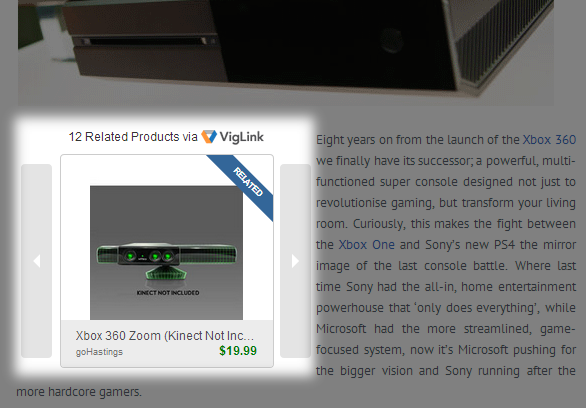
VigLink SpotLight on a Xbox One review page. Showing advertisement from goHastings

VigLink SpotLight on a Sony Walkman review page. Showing sony headphone advertisement from eBay

VigLink SpotLight on a Xbox One review page with two VigLink Convert links.
Changelog
1.0
Initial release