

Virtual Fit & Style Assistant for WooCommerce
WooCommerce extension for Virtual Try-On (AR), AI size recommendations, and AI-powered style suggestions. Reduce returns & boost sales.
Plugin info
Maintenance & Compatibility
Maintenance score
Maintained • Last updated 137 days ago
Is Virtual Fit & Style Assistant for WooCommerce abandoned?
Likely maintained (last update 137 days ago).
Compatibility
Similar & Alternatives
Explore plugins with similar tags, and compare key metrics like downloads, ratings, updates, support, and WP/PHP compatibility.
Description
Virtual Fit & Style Assistant for WooCommerce revolutionizes the online shopping experience by bringing the dressing room to your customers.
Using cutting-edge Augmented Reality and powerful AI models from Google, this plugin helps reduce returns, increase conversions, and boost customer confidence.
Whether you sell apparel, accessories, or even furniture, AI Try n Buy provides an immersive and interactive way for shoppers to connect with your products.
✨ Key Features
- Immersive Virtual Try-On (AR):
- Face Tracking Mode: Perfect for glasses, hats, jewelry, and other accessories.
- Uses live camera feed to overlay 2D (PNG) or 3D (GLB) models onto the user’s face.
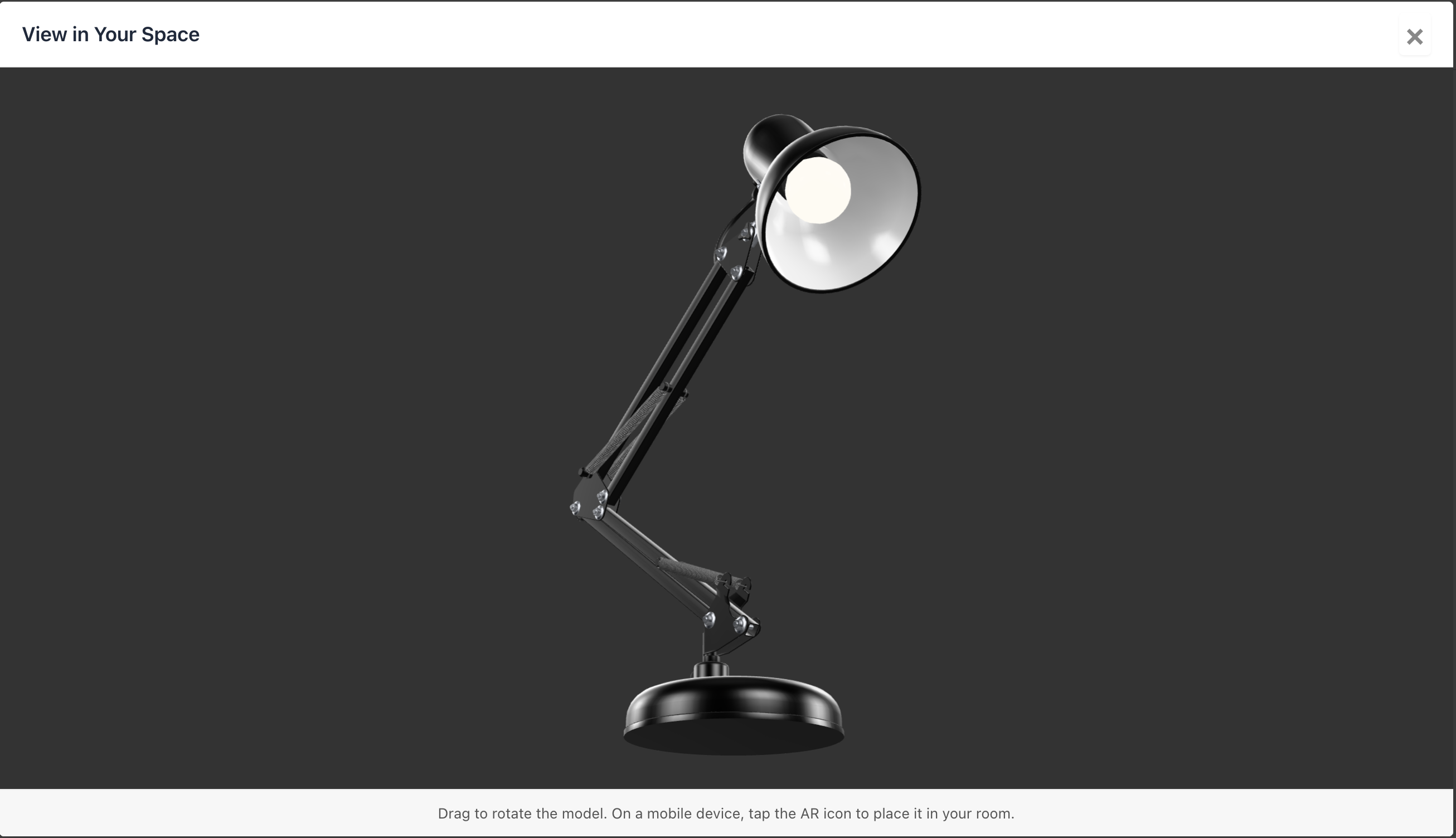
- World Tracking Mode: Allows customers to place 3D models of furniture, art, and other objects in their own space using their device’s back camera.
- AI Fit Recommender:
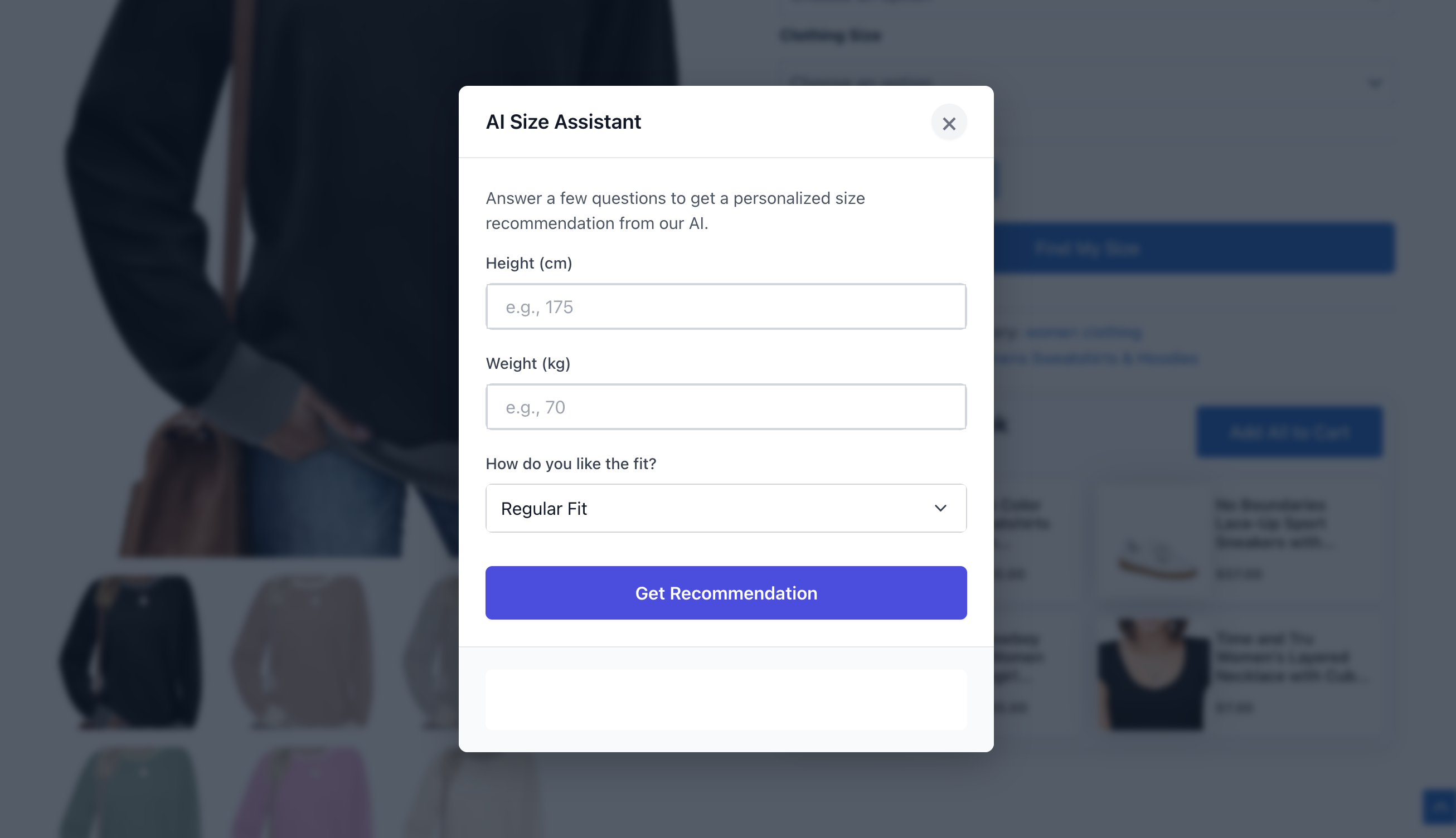
- Powered by Google’s Gemini API, this feature acts as a personal sizing assistant.
- Customers enter basic measurements (e.g., height, weight) to receive an intelligent size recommendation based on your product’s specific size chart.
- AI Style Assistant (“Complete The Look”):
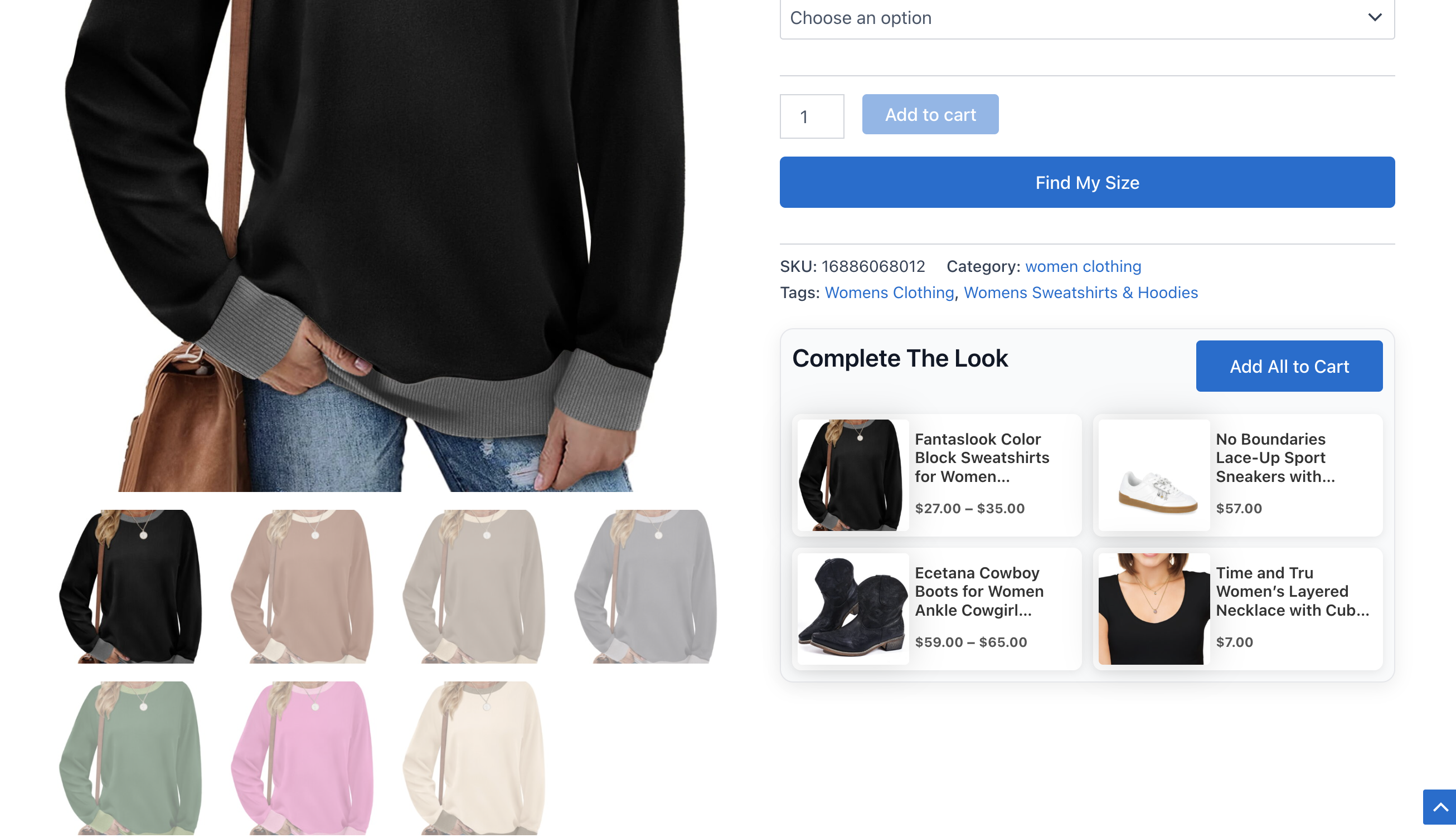
- Leverages the Gemini API to analyze the current product and suggest complementary items from your catalog.
- Recommendations are generated and cached periodically via WP-Cron to ensure fast performance and reduce API costs.
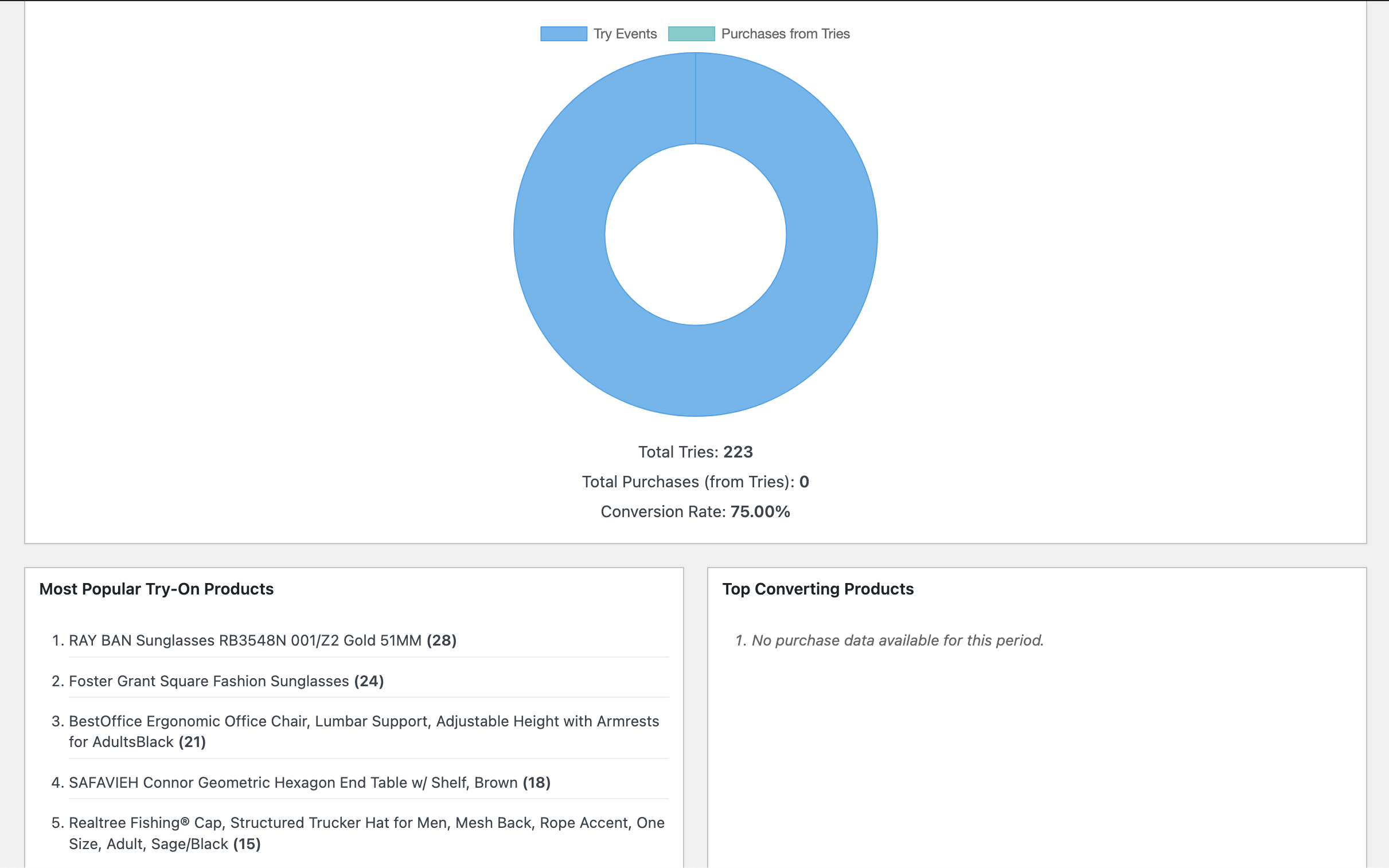
- Actionable Analytics Dashboard:
- Track key events like “try-ons” and subsequent “purchases from tries.”
- Visualize your conversion funnel, identify your most popular try-on products, and see which items convert best after a virtual try-on.
-
Seamless WooCommerce Integration:
- Adds a dedicated “AI Try n Buy” settings panel to the WooCommerce product edit screen.
- Easily enable/disable features on a per-product basis.
-
Modern API Integration Note:
- This plugin utilizes modern, third-party APIs including Google Gemini for generative AI features and Google Cloud Vision for image analysis.
- It also integrates client-side AR libraries like MindAR and Google’s
- All API calls are aggressively cached to optimize performance and prevent rate-limiting.
Dependencies and Credits
This plugin utilizes the following open-source libraries (all run client-side in the user’s browser and do not transmit data to external servers):
- A-Frame: A web framework for building virtual reality experiences. MIT License.
- MindAR: An open-source library for web-based Augmented Reality. MIT License.
- Google
- Chart.js: A flexible JavaScript charting library. MIT License.
Full license details for these libraries are included in the LICENSE-3RD-PARTY.txt file. These libraries process data locally in the browser and do not send any information to third-party servers.
External Services
This plugin relies on third-party external services provided by Google to enable its AI-powered features. By using this plugin, you acknowledge and consent to data being transmitted to these services.
1. Google Gemini API (Generative Language API)
- What it’s used for: This service powers the “AI Fit Recommender” feature (which provides personalized size recommendations) and the “AI Style Assistant” feature (which suggests complementary products to complete the look).
- When data is sent: Data is sent to Google’s Gemini API when:
- A customer uses the “Find My Size” feature and submits their measurements (height, weight, fit preference)
- The plugin automatically generates style recommendations for products via WP-Cron (based on your configured update frequency)
- What data is sent:
- For size recommendations: Customer measurements (height, weight, fit preference), product size chart data, and product name
- For style recommendations: Product details (name, description, categories, price) and a list of other products in your catalog for comparison
- Service provided by: Google LLC
- Terms of Service: https://policies.google.com/terms
- Privacy Policy: https://policies.google.com/privacy
- API Documentation: https://ai.google.dev/gemini-api/terms
2. Google Cloud Vision API
- What it’s used for: This service is used for advanced image analysis features.
- When data is sent: Data is sent when testing the API connection in the plugin settings page.
- What data is sent: Test image data is sent only when you manually test the API connection from the settings page. No customer data or product images are automatically sent to this API during normal plugin operation.
- Service provided by: Google LLC
- Terms of Service: https://cloud.google.com/terms
- Privacy Policy: https://policies.google.com/privacy
- API Documentation: https://cloud.google.com/vision/docs
Important Notes:
* All API calls are cached to minimize data transmission and improve performance
* You must obtain and configure your own API keys from Google to use these features
* You are responsible for ensuring your use of these services complies with applicable privacy laws and regulations
* By enabling these features, you consent to the transmission of data as described above
Installation
- Upload the
ai-try-n-buyfolder to the/wp-content/plugins/directory. - Activate the plugin through the ‘Plugins’ menu in WordPress.
- Navigate to the “AI Try n Buy” admin menu to configure the required API keys.
Configuration
- API Keys: Go to
AI Try n Buy -> Settings.
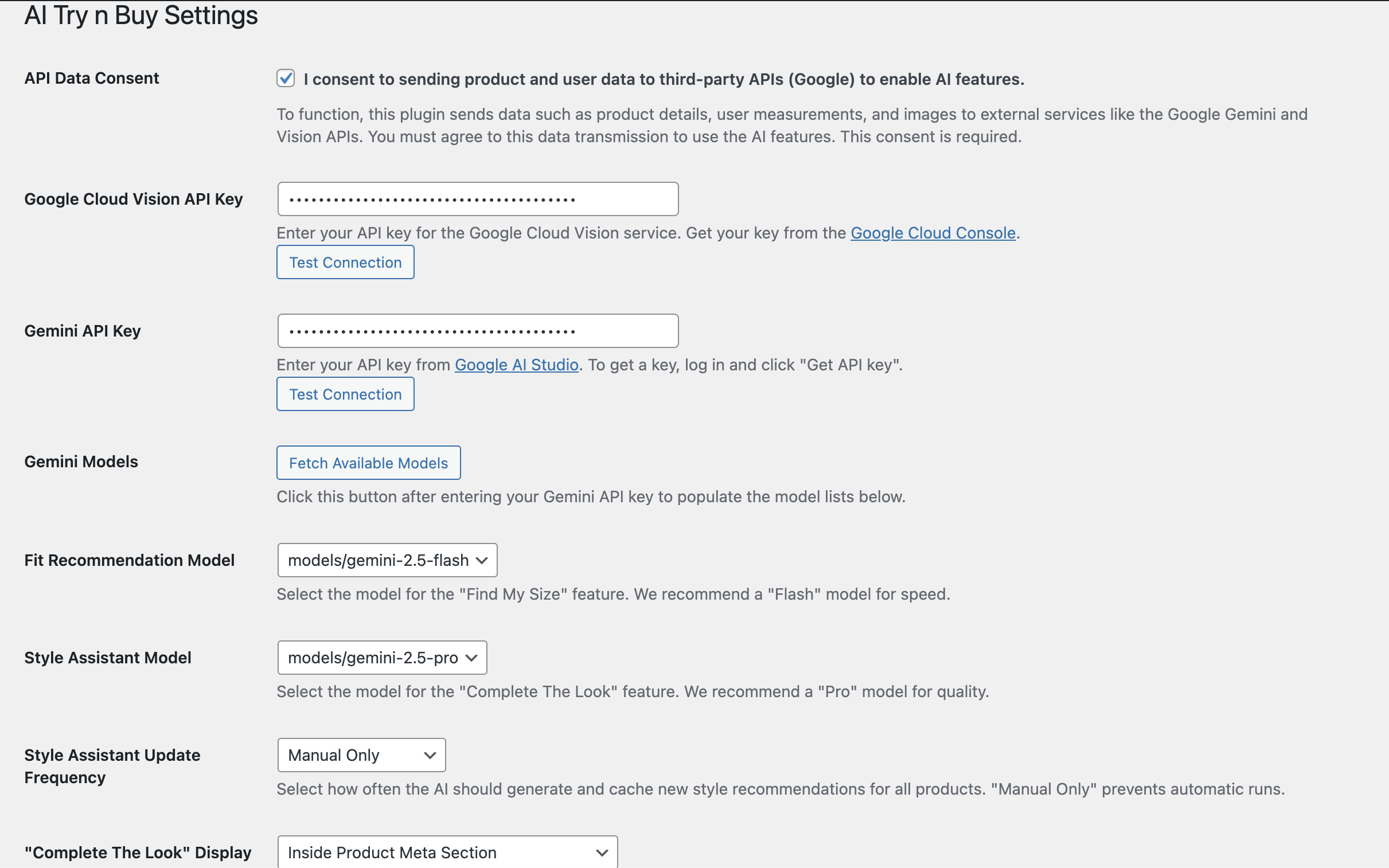
Enter your API keys for Google Cloud Vision and Google Gemini. - Product Settings: Edit a WooCommerce product and find the “AI Try n Buy Settings” meta box.
- Enable Features: Check the boxes to enable “Virtual Try-On,” “AI Fit Recommendation,” or “AI Style Assistant” for that specific product.
- Configure Assets:
- For Virtual Try-On, upload a
.pngor.glbfile. - Set the AR mode (Face/World) and adjust the position and scale as needed.
- For Fit Recommendation, fill in the product’s size chart.
- For Style Assistant, select the product categories from which the AI should pull recommendations.
- For Virtual Try-On, upload a
Frequently Asked Questions
This can be for a few reasons:
1. Make sure you have enabled “AI Style Assistant” in the product’s settings.
2. You must select at least one “Recommendation Category” for the AI to search in.
3. The feature relies on WP-Cron to generate recommendations.
It may take a few minutes after you save the product for the recommendations to appear for the first time.
Review feed
Screenshots
The "AI Try n Buy" settings panel on the WooCommerce product edit page.
The main settings page (AI Try n Buy -> Settings) showing API configuration.
The "Virtual Try-On" modal in action (Face Tracking mode).
The "Virtual Try-On" modal in action (World Tracking mode).
The "AI Fit Recommender" modal.
Changelog
1.0.2
- Security improvements and code quality enhancements
- Improved compatibility with WordPress.org standards
1.0.1
- Security: Added direct file access protection to all PHP files
- Security: Enhanced input validation and sanitization for all POST and FILES data
- Security: Added proper nonce verification with unslashing before sanitization
- Security: Added isset() checks for all array indices to prevent undefined index warnings
1.0.0
- Initial Release.