

Visual Term Description Editor
Replaces the plain-text category and tag description editor with a visual editor.
Plugin info
Maintenance & Compatibility
Maintenance score
Possibly abandoned • Last updated 593 days ago • 21 reviews
Is Visual Term Description Editor abandoned?
Possibly abandoned (last update 593 days ago).
Compatibility
Developers
Languages
Similar & Alternatives
Explore plugins with similar tags, and compare key metrics like downloads, ratings, updates, support, and WP/PHP compatibility.
Description
-Replaces the term description editor with the WordPress TinyMCE visual editor, allowing you to use HTML in term descriptions and write them in rich text. Works on all taxonomies, including tags, categories and link categories, as well as custom taxonomies.
This plugin is multisite-compatible; if you would like to use it on every blog, network activate the plugin from the network dashboard. Otherwise, activate the plugin for individual sites.
This plugin’s code is available on GitHub. Please feel free to fork the repository and send a pull request. If you find a bug in the plugin, open an issue.
Installation
Simple Installation
- Search for ‘Visual Term Description Editor’ in the ‘Plugins > Add New’ menu and click ‘Install’
- Activate the plugin through the ‘Plugins’ menu in WordPress
Manual Installation
- Download the latest version of the plugin
- Upload the
visual-term-description-editordirectory to the/wp-content/plugins/directory - Activate the plugin through the ‘Plugins’ menu in WordPress
Frequently Asked Questions
Review feed
This is very helpful
Love the simplicity
Great plugin - works with WP 6.3
Screenshots

Adding a new tag using the visual editor
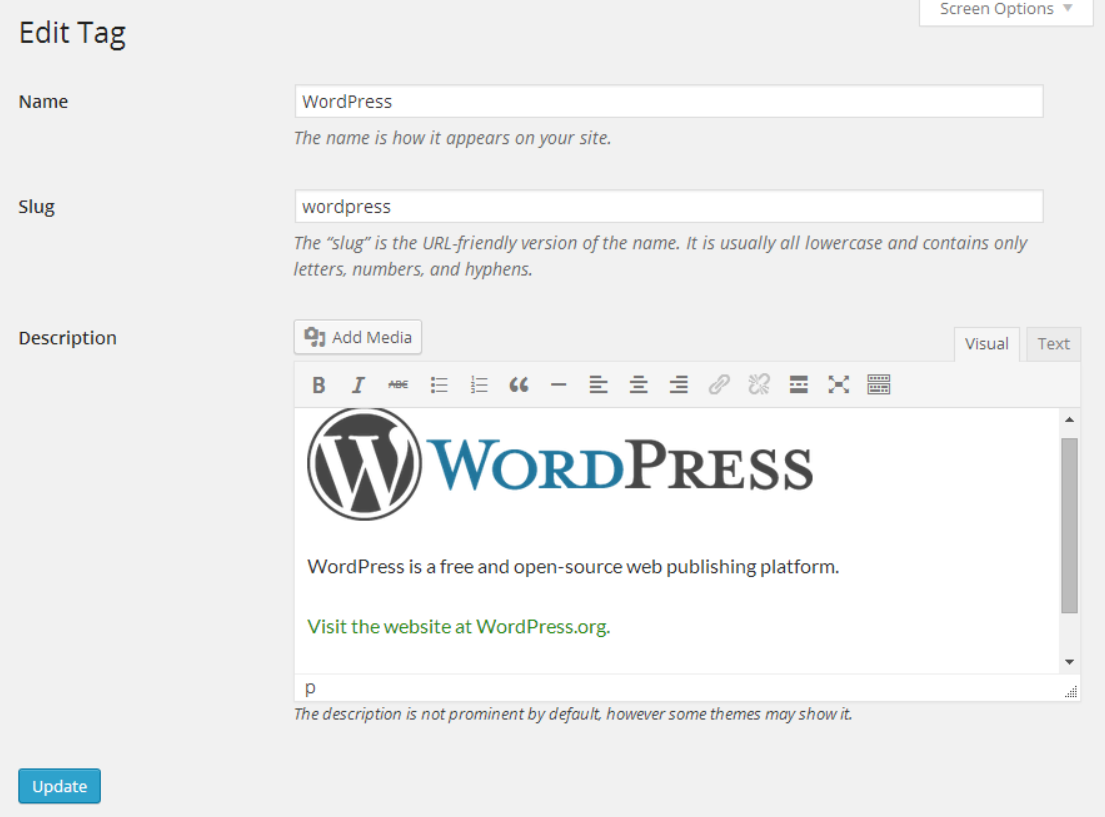
Editing a tag using the visual editor

Viewing a tag archive page with the formatted tag description (using the Twenty Fourteen theme)
Changelog
1.8.1
- Prevented console error when trying to clear editor content.
1.8.0
- Fixed: prevent description from persisting in editor field after adding a new term [#]
- Fixed: always load underscore as a dependency of the word count script
1.7.0
- Added compatibility with qTranslate-X
1.6.0
- Disabled evaluation of shortcodes in the administration area
- Constrained image widths in description administration column
1.5.0
- Fixed action hooked to wrong method
- Added word count feature to visual editor
- Added a warning and graceful recovery if plugin is used on PHP < 5.4
1.4.2
- Update field HTML to match what is used in WordPress 4.5
1.4.1
- Update HTML elements and class names to match latest version of WordPress (props to @ThatStevensGuy)
1.4.0
- Add
visual_term_description_taxonomiesfilter - Add support for oEmbed in term description
1.3
- Add visual editor for administrators without the
unfiltered_htmlcap [#]
1.2
- Evaluate shortcodes in term description
- Convert smilies in term descriptions
- Unsimplify add term editor #
1.1.1
- Load plugin as late as possible to ensure all custom taxonomies are registered
1.1
- Fix text (HTML) editor buttons from displaying full width
- Stripped down add term editor
- Updated screenshots for WordPress 3.9
1.0
- Initial release