

Voila Contact Form
Do you need to add a "Contact Us" Form to your WordPress site without breaking a sweat? Voila Contact Form is the answer.
Plugin info
Maintenance & Compatibility
Maintenance score
Possibly abandoned • Last updated 2277 days ago
Is Voila Contact Form abandoned?
Possibly abandoned (last update 2277 days ago).
Compatibility
Similar & Alternatives
Explore plugins with similar tags, and compare key metrics like downloads, ratings, updates, support, and WP/PHP compatibility.
Description
Do you need to add a “Contact Us” Form to your WordPress site without breaking a sweat? Voila Contact Form is the answer.
- No coding
- No short-code to stick anywhere
- No long customization form to fill
- No confusing settings
- No gimmick
Just a simple form that delivers your message with visitors’ info and contacts — Period!
Simply download/upload and activate, and VOILA!
Voila Contact Form creates a “Contact Us” page and inserts a working form. The form collects basic information about the site’s visitors along with their messages and sends them to the site admin via email and/or save them in the WordPress database. The site admin can set how the message is handled – save only, send only or save & send via the Voila Contact Form settings page. The saved messages could be viewed under the “Voila Contact From Messages” tab under the admin menu.
Installation
From within WordPress
- Visit ‘Plugins > Add New’
- Search for ‘Voila Contact Form’
- Activate ‘Voila Contact Form’ from your Plugins page.
Manually
- Upload
voila-contact-formfolder to the/wp-content/plugins/directory - Activate the plugin through the ‘Plugins’ menu in WordPress
Frequently Asked Questions
Is there any settings to configure after activating the plugin?
Voila Contact Form has a basic setting page where site admin can select how messages should be handled –
save only, send only or save & send.
Where would I view the saved messages?
Voila Contact Form has a menu under the WordPress admin menu called “Voila Contact Form Messages”; this is
where all saved messages are displayed.
I don’t want messages mailed to admin, can I specify another email address(es)?
Yes, please contact [email protected].
Where do I change how my messages are handled?
Voila Contact Form has a menu under the WordPress admin menu called “Voila Contact Form Settings”; this is
where meessage handling could be modified.
The Contact Form’s look and feel do not blend well with my favorite theme, can it be modified?
Yes, please contact [email protected].
I have my wordpress in my local language, but the plugin is in English; could the plugin be translated to my language?
Voila Contact Form has been internationalized, that is, it is translation ready. The file (.pot) required for translation is in the languages folder in the root of the plugin folder. You can have a developer help with the translation process or contact us at [email protected].
Review feed
Screenshots

Screenshot shows the Voila Contact Form messages page where saved messages are viewable.

Screenshot shows the Voila Contact Form settings page.
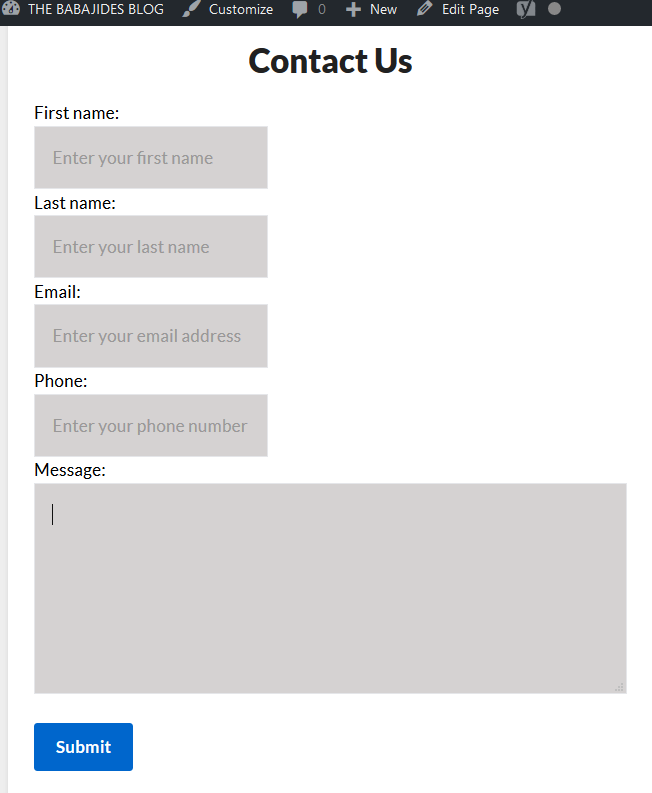
Screenshot shows the contact form & page created by Voila Contact Form.
Changelog
1.0
- None yet
0.5
- 1.0.0