

WordPress Wall Paint Calculator by Ostheimer
This Plugin gives you the possibility to insert a wall paint calculator via widget or shortcode into your site.
Maintenance 20/1002466d since update
Active installs
10
Downloads
2,186
Reviews
0
Age
12.4y
Plugin info
Total downloads: 2,186
Active installs: 10
Total reviews: 0
Average rating: 0
Support threads opened: 0
Support threads resolved: 0 (0%)
Available in: 1 language(s)
Contributors: 1
Last updated: 5/19/2019 (2466 days ago)
Added to WordPress: 9/20/2013 (12 years old)
Minimum WordPress version: 3.0
Tested up to WordPress version: 5.1.21
Minimum PHP version: f
Maintenance & Compatibility
Maintenance score
Possibly abandoned • Last updated 2466 days ago
20/100
Is WordPress Wall Paint Calculator by Ostheimer abandoned?
Possibly abandoned (last update 2466 days ago).
Compatibility
Requires WordPress: 3.0
Tested up to: 5.1.21
Requires PHP: f
Similar & Alternatives
Explore plugins with similar tags, and compare key metrics like downloads, ratings, updates, support, and WP/PHP compatibility.
No similar plugins found yet.
Description
The user has to write the roomsize in square meters, the number of doors and the number of windows and the widget calculates the needed paint in kilograms.
Shortcode
- You can add the Wall Paint Calculator via shortcode [wall_paint_calculator]
- If you want to show our backlink use the shortcode [wall_paint_calculator link=”true”]
- To change the title of the widget use the shortcode [wall_paint_calculator link=”true” title=”YOUR TITLE”]
Widget
- Just insert the widget in the chosen sidebar, type a title and activate the wanted options
Translate jQuery Messages
- Open the file wall-paint-calculator.php and search for wp_localize_script
- In this function you will find an array with 1 defined string
- Translate the strings after the => into your language and save the file
- To change the result string open the file wall-paint-calculator.js and change the strings on line 59
Try the demo
- See the Wall Paint Calculator site on the official plugin site.
Installation
- Upload “wall-paint-calculator” folder to the
/wp-content/plugins/directory - Activate the plugin through the ‘Plugins’ menu in WordPress
- Add the Wall Paint Calculator to your widget enabled space
- If you need insert in article please use short tag [wall_paint_calculator]
Frequently Asked Questions
How can I display the Windspeed Converter on the Frontend?
You can add the shortcode [wall_paint_calculator] in a post or page so that the Wall Paint Calculator will be diplayed in that page.
How can I translate the jQuery Error Messages?
- Upload “wall-paint-calculator” folder to the
/wp-content/plugins/directory - Activate the plugin through the ‘Plugins’ menu in WordPress
- Add the Wall Paint Calculator to your widget enabled space
- If you need insert in article please use short tag [wall_paint_calculator]
Review feed
No reviews available
Screenshots
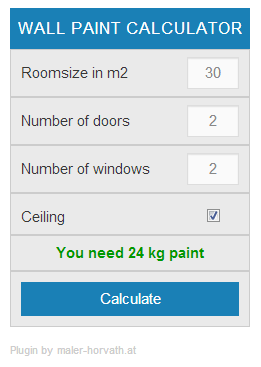
Wall Paint Calculator Frontend Widget

Wall Paint Calculator Backend Widget Control
Changelog
1.2
- Design change
1.1
- Testet Up 5.1
1.0.0
- Initial Release