

Wallet Up Checkout for WPForms
This plugin helps you load Wallet Up P2P payments methods directly into WPForms Templates. Wallet Up and WPForms plugins are REQUIRED to be activated.
Plugin info
Maintenance & Compatibility
Maintenance score
Possibly abandoned • Last updated 776 days ago
Is Wallet Up Checkout for WPForms abandoned?
Possibly abandoned (last update 776 days ago).
Compatibility
Similar & Alternatives
Explore plugins with similar tags, and compare key metrics like downloads, ratings, updates, support, and WP/PHP compatibility.
Description
This plugin helps you load Wallet Up P2P payments methods directly into WPForms Templates. Wallet Up and WPForms plugins are REQUIRED to be activated.
WPForms premium version may be required for some functionalities.
What is Wallet Up Checkout for WPForms?
Wallet Up Checkout for WPForms helps you integrate directly the Wallet Up P2P payments methods into WPForms. It is a Trademark of Wallet UP LLC.
Features
- Accepts one-off donations or funds via Cash App
- Accepts one-off donations or funds via Paypal.me
- Accepts one-off donations or funds via Zelle
- Accepts one-off donations or funds via Venmo
- Accepts one-off donations or funds via Facebook Pay
Installation
Minimum Requirements
- WordPress 4.8 or greater
- Wallet Up 3.0.0 or greater
- WPForms 1.7.0 or greater
- PHP version 5.6 or greater
- MySQL version 5.0.15 or greater
- cURL version 5.40 or higher
- An SSL certificate
Automatic installation
Automatic installation is the easiest option as WordPress handles the file transfers itself and you don’t need to leave your web browser. To do an automatic install of “WalUp” or “Wallet Up”, log in to your WordPress dashboard, navigate to the Plugins menu and click “Add New”.
In the search field type “WalUp” or “Wallet Up” and click Search Plugins. Once you have found the plugin you can view details about it such as the point release, rating and description. Most importantly of course, you can install it by simply clicking “Install Now”.
Manual installation
The manual installation method involves downloading our wallet plugin and uploading it to your server via your favorite FTP application. The WordPress codex contains instructions on how to do this here.
Frequently Asked Questions
After activation go to WPForms >> Templates >> Customs Templates >> and Select Wallet Up Payment. Visit https://bit.ly/3hCfYli for a demo.
Find more on www.walletup.app
Now Wallet Up Checkout for WPForms plugin supports Cash App, Venmo, PayPal, Zelle and Facebook Pay integration into WPForms Template.
More are coming soon.
Review feed
Screenshots

WPForm Steps

WPForms Shortcode integration
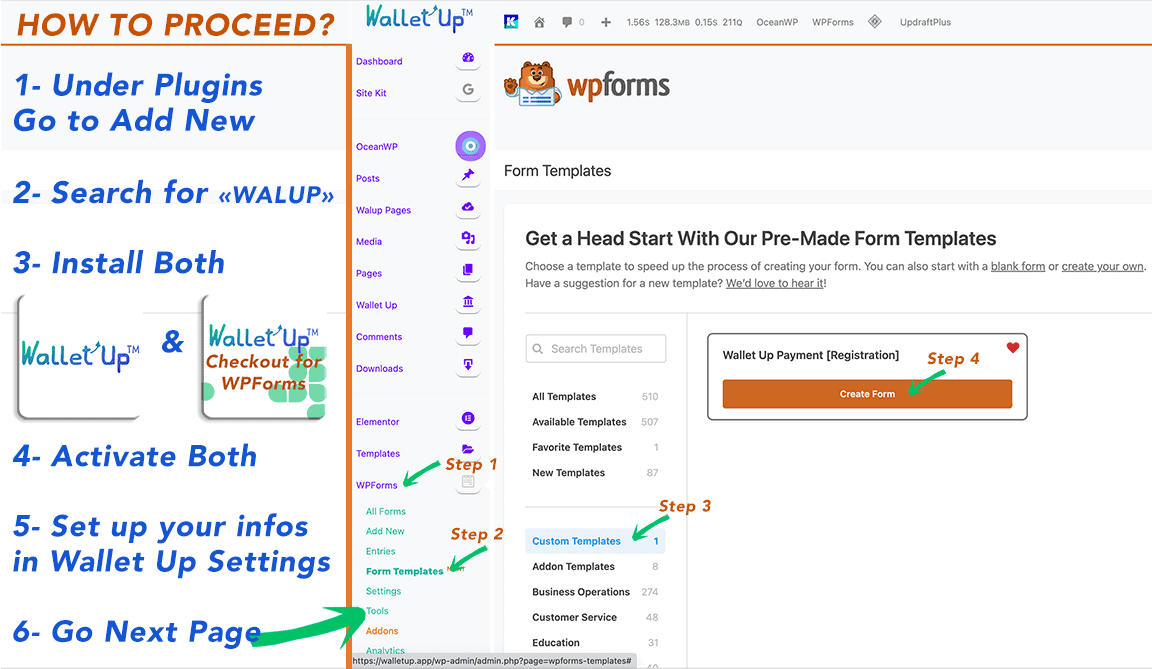
How To Proceed

ShortCodes combinations

General Info Home

General Desc

Who can use it
Changelog
1.0.5 February 16, 2024
- Compatibility: Compatible to WP 6.6 and Latest WP Forms
1.0.4 March 3, 2023
- Compatibility: Compatible to WP 6.2 and Latest WP Forms
1.0.3 March 3, 2023
- Fixed: Update plugin in Admin Dashboard failure
1.0.2 March 3, 2023
- minor fixes
1.0.1 March 3, 2023
- Bug: Fixed conditional trigger on template payment processing
- Tweak: Template improvement
1.0.0 November 9, 2022
-
Initial Public Release
-
Supports:
WPForms Templates
Cash App
Venmo
Paypal
Facebook Pay