

Was This Helpful?
Simple article feedback plugin. find out if the information you provided is helpful to visitors and improve the user experience.
Maintenance 30/100500d since update
Active installs
1,000
Downloads
12,617
Reviews
14
Age
7.0y
Plugin info
Total downloads: 12,617
Active installs: 1,000
Total reviews: 14
Average rating: 4.7
Support threads opened: 0
Support threads resolved: 0 (0%)
Available in: 1 language(s)
Contributors: 1
Last updated: 11/18/2024 (500 days ago)
Added to WordPress: 3/26/2019 (7 years old)
Minimum WordPress version: 4.0
Tested up to WordPress version: 6.8.3
Minimum PHP version: f
Maintenance & Compatibility
Maintenance score
Possibly abandoned • Last updated 500 days ago • 14 reviews
30/100
Is Was This Helpful? abandoned?
Possibly abandoned (last update 500 days ago).
Compatibility
Requires WordPress: 4.0
Tested up to: 6.8.3
Requires PHP: f
Similar & Alternatives
Explore plugins with similar tags, and compare key metrics like downloads, ratings, updates, support, and WP/PHP compatibility.
Helpful – Article Feedback Plugin
Rating 4.4/5 (8 reviews) • Active installs 600
Was This Helpful? – Article Feedback
Rating 5.0/5 (1 reviews) • Active installs 10
That Was Helpful
Rating 0.0/5 (0 reviews) • Active installs 0
Description
Simple article feedback plugin. find out if the information you provided is helpful to visitors and improve the user experience.
Key Features
- Lightweight and simple workflow.
- Ajax Rating
- Simple UI.
Installation
Install “Was this helpful?” just as you would any other WP Plugin:
- Download “Was this helpful?” from WordPress.org.
- Unzip the .zip file.
- Upload the Plugin folder (was-this-article-helpful/) to the wp-content/plugins folder.
- Go to Plugins Admin Panel and find the newly uploaded Plugin, “Was this helpful?” in the list.
- Click Activate Plugin to activate it.
Frequently Asked Questions
No FAQ available
Review feed
Sarankumar
Simple and lightweight
lightweight and excellent plugin for collecting some feedback from visitors.
Arun Basil Lal
Easy to configure and straight forward plugin
The plugin is simple and does the job very well. Install, select which post types to display in WordPress Dashboard > Settings > Helpful and you are good to go.
The plugin has scope for growth by adding few features as others have suggested. However, it is a useful plugin as it is.
Thank you for sharing it with the community.
Screenshots
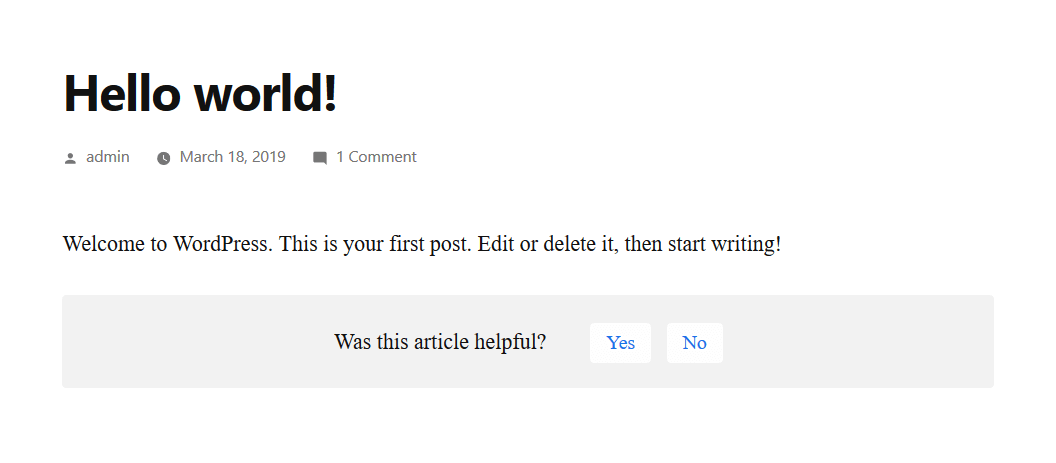
"Was this helpful" question is at below of the page.
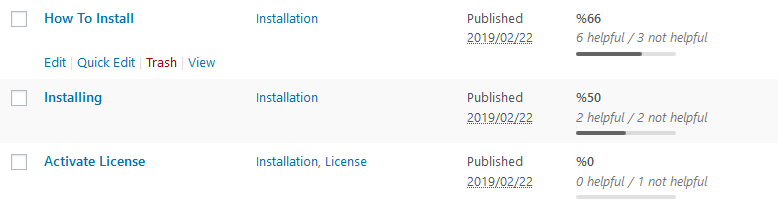
The results in WordPress dashboard > Posts.
Changelog
1.0.2
- Added a shortcode to be able to show the widget at anywhere.
1.0.1
- Added margin between the content and the helpful widget
1.0.0
- Initial Release