

PDF Ink Lite – Stamp PDFs with Customer Data
PDF Ink Lite applies custom watermarks & passwords to simple PDFs upon WooCommerce, Download Monitor & Easy Digital Downloads file downloads.
Plugin info
Maintenance & Compatibility
Maintenance score
Maintained • Last updated 123 days ago • Support resolved 100% • 49 reviews
Is PDF Ink Lite – Stamp PDFs with Customer Data abandoned?
Likely maintained (last update 123 days ago).
Compatibility
Similar & Alternatives
Explore plugins with similar tags, and compare key metrics like downloads, ratings, updates, support, and WP/PHP compatibility.
Description
PDF Ink Lite can add a watermark to every page of your sold PDF file(s). It can also password and permissions protect your PDF file(s). The watermark is customizable with font face, font color, font size, vertical placement, and text.
PDF Ink Lite watermarks PDF products when downloaded using WooCommerce download links, and works similarly for Download Monitor and Easy Digital Downloads.
Since the watermark is added when the download button is clicked (either on the customer’s order confirmation page or email, or account page), the watermark can include customer-specific data such as the customer’s first name, last name, and email.
Upon purchase download link, this plugin uses the open source TCPDI and TCPDF libraries to parse and customize your PDF. This process isn’t fool-proof, but works well in many cases. You may encounter problems if your PDF is malformed (bad PDF syntax), encrypted, web-optimized, linearized, or if your server cannot handle the memory load of PDF processing/encryption.
(FYI – This plugin used to be called WaterWoo. Little Package chose to rename it after maintaining it for over ten years.)
Features:
- Choice of font face, color, size and placement (a horizontal line of text, centered anywhere on the page)
- Included font types cover most languages, and the plugin is internationalized
- Dynamic customer data inputs (customer first name, last name, email, order paid date, and phone) to customize PDFs on-the-fly
- Add a password to your PDF, and/or anti-copy, anti-print protections
- Watermark only designated PDF downloads (as specified by you), or all PDF downloads from your site
- Watermark is applied to all pages of the PDF (upgrade to choose pages)
- Accommodates different page/paper sizes, and PDFs with various page sizes (letter, A4, legal, etc)
- Secure & encapsulated: PDF Ink hooks into e-commerce download link clicks and checks for PDFs and maybe marks them – that’s it!
PDF Ink Lite is the only watermarker for WordPress which includes necessary libraries (so you don’t have to ask your host to load them), is compatible with PHP 8+, and watermarks newer versions of PDFs (not just older versions).
For better PDF coverage and many more options, check out PDF Ink, the full version of PDF Ink Lite.
Upgraded (paid) version features:
- Clean, robust settings panels and a separate watermarking testing suite
- Watermark all PDF files with same settings OR set individual watermarks/passwords per product or even per product variation
- Begin watermark on selected page of PDF document (to avoid watermarking a cover page, for example), and/or select end page
- Watermark every page, odd pages, even pages, or selected pages
- Unlimited rotatable watermark locations on one page, anywhere on the page
- Additional dynamic customer data input (business name, address, order number, product name, quantity of product purchased), and filter hooks for adding your own
- Semi-opaque (transparent) watermarks – hide your watermarks completely if desired
- RTL (right to left) watermarking
- Use of some HTML tags to style your output, including text-align CSS styling (right, center, left is default), links (), bold (), italic ()…
- Additional text formatting options, such as font color and style (bold, italics) using HTML
- Line-wrapping, forced breaks with
and
tags - Upload and use your own font for stamping. Also, hooks to further customize font use
- Higher level PDF protections with AES encryption and extended file protection settings
- Keep original file metadata
- Open ZIP files and mark PDF files inside the archive
- Stamp EPUB files with customized text
- Shortcode for creating PDF download links for any page (no need for e-commerce plugin)
- Embed marked/encrypted files on the page, using ADOBE SDK embed or PDF Object JavaScript embed.
- Test watermark and/or manually watermark a file on the fly, from the admin panel
- Preserves external embedded PDF links despite watermarking; internal links are not preserved (add SetaPDF-Stamper to PDF Ink for this feature)
- Filter hooks to add 1D and 2D barcodes (including QR codes)
- Remove stamped files from your server after stamping, or on a schedule
PDF Ink is priced below competitor plugins that offer maybe half the function. Why? Because we want you to succeed! 🥰
Installation
Minimum Requirements
- WordPress 5.6 or greater
- WooCommerce 5.0 and newer
- PHP version 7.4 or greater
- PDFs version under 2.0
Please use the most recent version of all WordPress software – it’s what we support!
We recommend your host supports:
- WordPress Memory limit of 64 MB or greater (usually <=512MB works fine)
- PHP max_execution_time up to 60 seconds (30 should be fine)
- If you have large PDF files and/or heavy download traffic, you may need to pay for beefier hosting with more CPUs. A shared hosting plan might not cut it.
- OpenSSL
To install plugin
- Upload the entire “waterwoo-pdf” folder to the “/wp-content/plugins/” directory.
- Activate the “PDF Ink Lite” plugin through the Plugins menu in WordPress.
- Visit WooCommerce->Settings->PDF Ink Lite tab to set your plugin preferences (OR Easy Digital Downloads -> Settings -> Extensions -> PDF Ink Lite OR Download Monitor Downloads -> Settings -> PDF Ink Lite).
- Test your watermarking by making mock purchases before going live to make sure it works and looks great!
To remove plugin:
- Deactivate plugin through the ‘Plugins’ menu in WordPress
- Delete plugin through the ‘Plugins’ menu in WordPress
Frequently Asked Questions
Oh, thanks for thinking of the countless volunteers who develop plugins for you to enjoy!
In the PDF Ink Lite “Housekeeping” settings, you can check the “Attribution” box. This will add a super tiny, invisible watermark to page 2 of your PDF files, linking back to PDF Ink. The attribution mark is almost impossible to spot — try it!
You can find the PDF Ink settings page by clicking on the “Settings for XXX” link under the PDF Ink Lite plugin title on your WordPress plugins panel.
Troubleshooting Steps
In order of simplest/obvious to more difficult/less obvious…
- Is WooCommerce or Download Monitor or Easy Digital Downloads installed, and do you have a purchasable PDF product in your shop to watermark?
- Have you checked the PDF Ink Lite settings checkbox to enable watermarking?
- Have you entered your PDF file names correctly in the second field if you’ve entered any at all? This field is case-sensitive.
- Make sure your PDF product downloads work without PDF Ink Lite activated, to narrow the problem.
- Try watermarking a different PDF (one you didn’t create) to see if that PDF works. If your PDF has goofy syntax (and many do because good PDF syntax is “optional”), this plugin will not be able to read it. Use PDF Ink with SetaPDF-Stamper instead.
- Is your PDF version 2.0? You’ll want to downgrade your PDF or use PDF Ink with SetaPDF-Stamper instead.
- Choose a different font in the settings.
- Update WordPress, and all plugins including this plugin to the most recent versions.
- If your PHP version is the newest, try downgrading.
- Is your Y fine-tuning adjustment moving the mark off the page? Read more below under “Why does the watermark go off the page, create blank pages?”.
- Increase your PHP time limit and memory limits if they are set low (but don’t set too high, either). Server limitations can stop this plugin from functioning well.
- If using WooCommerce, go to WooCommerce -> Settings -> PDF Ink Lite -> Logging and turn logging on. If using Easy Digital Downloads, go to Settings -> Misc -> Debug Mode and turn on logs. Run the program again, then look at the logs (EDD logs are under the Tools tab).
- Check your WP debug logs. If logs suggest your PDF is “malformed” or “template does not exist,” try using Apple Preview application to resave your PDF by clicking “Export as PDF” in the menu. Preview might fix bad PDF syntax and allow your PDF to be processed for watermarking.
Please – definitely – get in touch with your issues via the WordPress.org support forum before leaving negative feedback about this free plugin.
To request help using the WordPress.org support forum, start here.
Do not use the WordPress.org support forum for help with the full (paid) version of PDF Ink – that is against WordPress.org rules. Conversely, use the WordPress.org support channel — not email — for PDF Ink Lite (free).
Try selecting the “Deja Vu,” “Furat,” or “M Sung” font in the plugin settings panel.
One reason watermarks might not show up is because the watermark contains special characters but you’re using a font which doesn’t support those characters. If none of the included fonts are subsetted for your language characters, you will need to programmatically add fonts yourself or look into purchasing the full version of this plugin, which has many more built-in fonts and supports font uploads.
Maybe set your PDF to $0 (free) and “Privately Published” (for WooCommerce). Or maybe create a coupon in your shop to allow 100% free purchases. Don’t share this coupon code with anyone! Test your watermark by purchasing PDFs from your shop using the coupon. It’s a bit more tedious. If you want easier on-the-fly testing, purchase the full version of this plugin.
Your watermark text string is too big or long for the page, and goes off it! Try decreasing font size or using the Y fine tuners to move the watermark back onto the page. Try lowering your “y-axis” value. This number corresponds to how many millimeters you want the watermark moved down the page. For example, if your PDF page is 11 inches tall, your Y-axis setting should be a deal less than 279.4mm in order for a watermark to show. The built-in adjustments on the settings page ultimately allow for watermarking on all document sizes. You may need to edit your watermark if it is too verbose.
You can use a negative integer value for your Y-tuner and measure up from the bottom of the page. This is especially helpful if your PDF has variable sized pages.
They are generated with a unique name and stored in the same folder as your original WordPress/Woo product media upload (usually wp-content/uploads/year/month/file). The unique name includes the order number and a time stamp. If your end user complains of not being able to access their custom PDF for some reason (most often after their max number of downloads is exceeded), you can find it in that folder, right alongside your original.
If you are using Woo FORCED downloads, the plugin attempts to delete the watermarked files after being delivered. This isn’t 100% reliable since it works on PHP shutdown. If you don’t like attempted deletion, you can change it with the ‘wwpdf_do_cleanup’ filter hook (set it to FALSE). The paid version of this plugin has improved file handling/removal.
PDF Ink is intended to watermark PDF (.pdf) files. If you are specifically looking to watermark image files (.jpg, .jpeg, .gif, .png, .etc), you may want to look into a plugin such as Image Watermark.
This plugin is just for PDF files, but the upgrade also works with EPUB files, and MOBI coverage is roadmapped.
PDF Ink Lite bridges your e-commerce PDFs and the open-source PDF reading library TCPDI and PDF writing TCPDF library. PDF Ink Lite functions by parsing/reading your PDF into memory the best it can, then adding a watermark to the PDF syntax and outputting a revised file. Between the reading and output, certain features may be lost and other features (interactive PDF elements like internal links and fillable forms) will be lost. This is a limitation of the open-source third-party libraries used (TCPDI/TCPDF) AND the wild-west nature of PDF syntax. It is not the fault of PDF Ink Lite, which simply connects your e-commerce to PDF manipulation libraries.
Ultimately, PDF Ink Lite is best for simple, smaller-sized and well-formed PDFs. If you are serious about watermarking and/or encrypting complex PDF files, purchase PDF Ink. It includes other libraries you can try free, and also allows you to link purchased 3rd party (non-GPL) libraries (such as SetaPDF Stamper) which work on any PDF. You might even find that the free libraries (TCPDI/TCPDF) included with PDF Ink (paid) work better than here in the free version! 😉
Yes, you can serve the file untouched if watermarking fails, and avoid any error messages, by using the following filter code in your (child) theme functions.php file:
add_filter( 'wwpdf_serve_unwatermarked_file', '__return_true' );
If you do not know how to edit your functions.php file, you can use the Code Snippets plugin to easily add this code to your WP site frontend.
Review feed
Screenshots
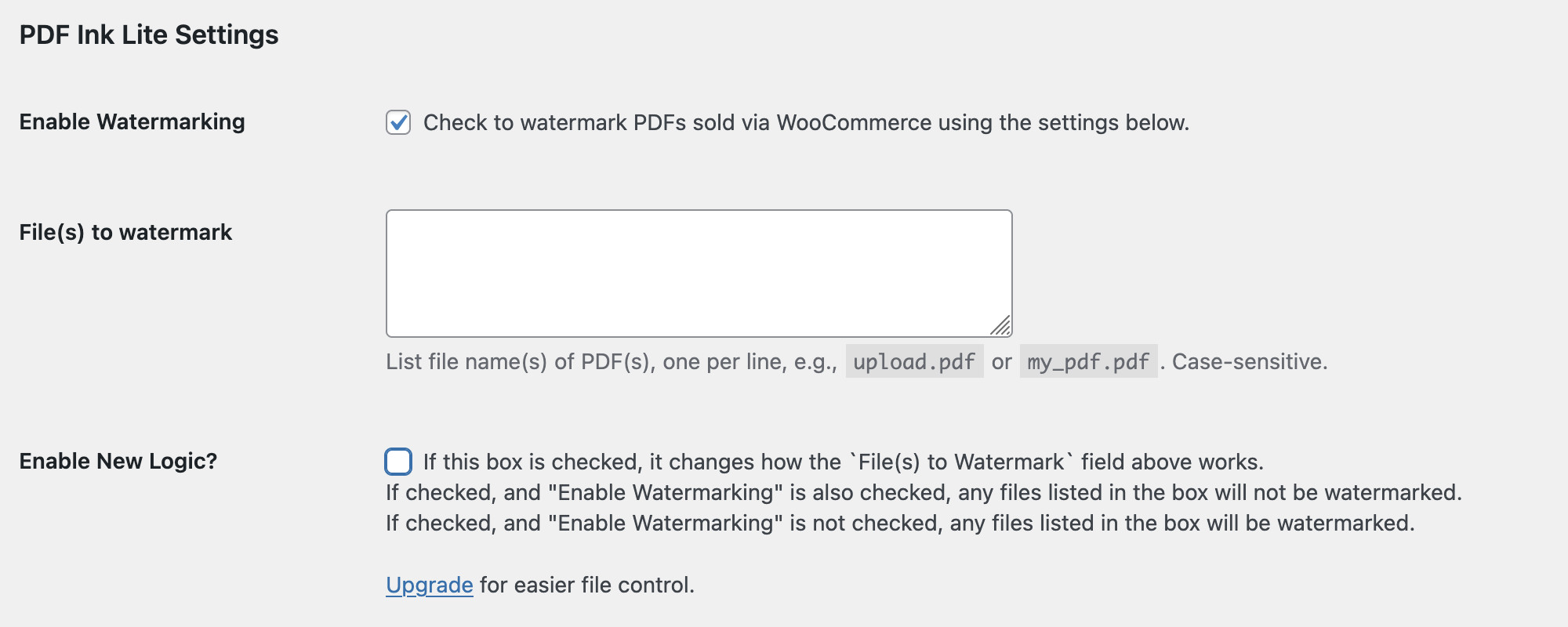
Settings page screenshot, showing where to turn on the plugin and choose files.
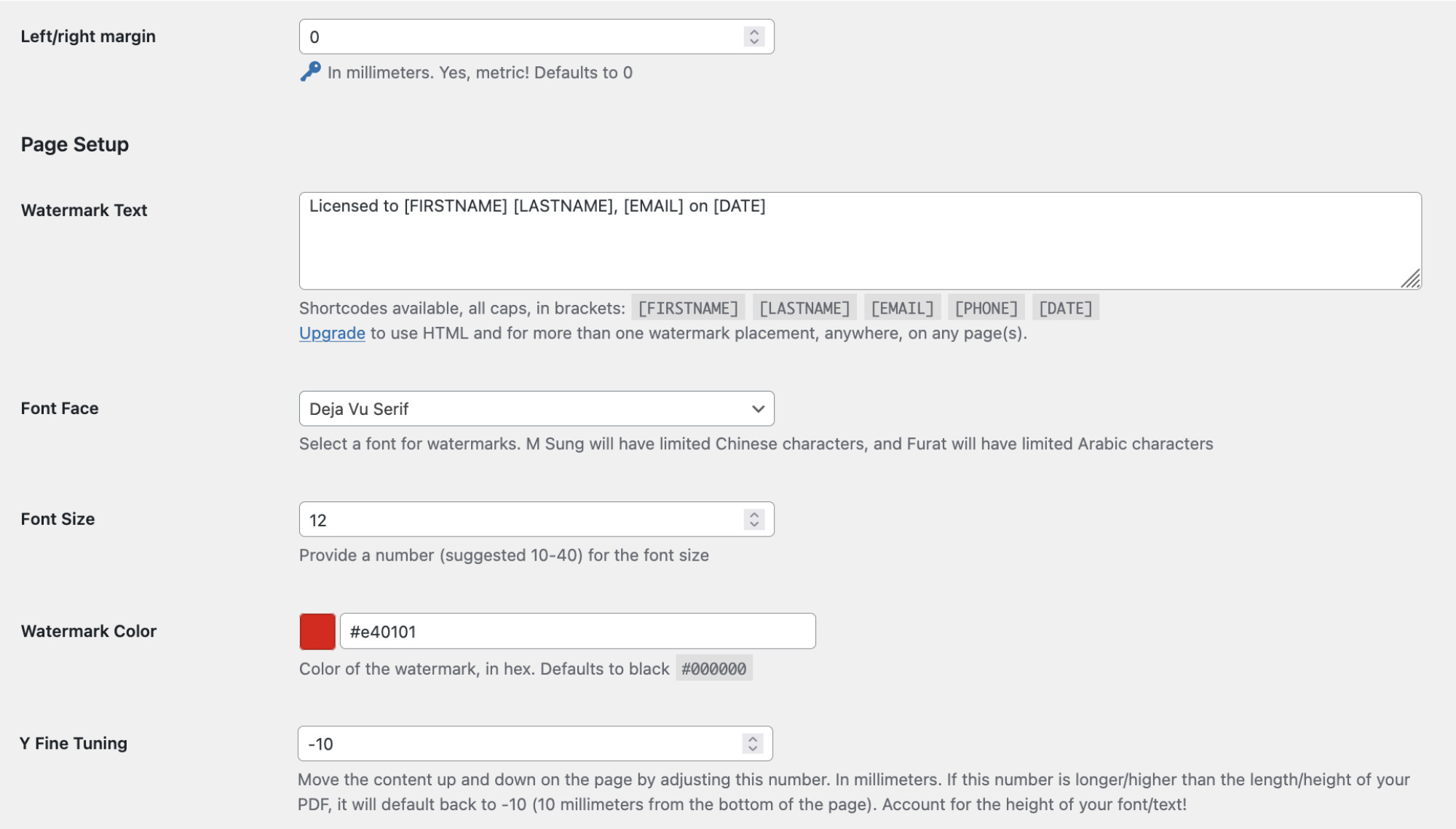
Settings page screenshot, having to do with font choices and watermark content. Shortcodes are in use and will be converted dynamically to actual customer information.
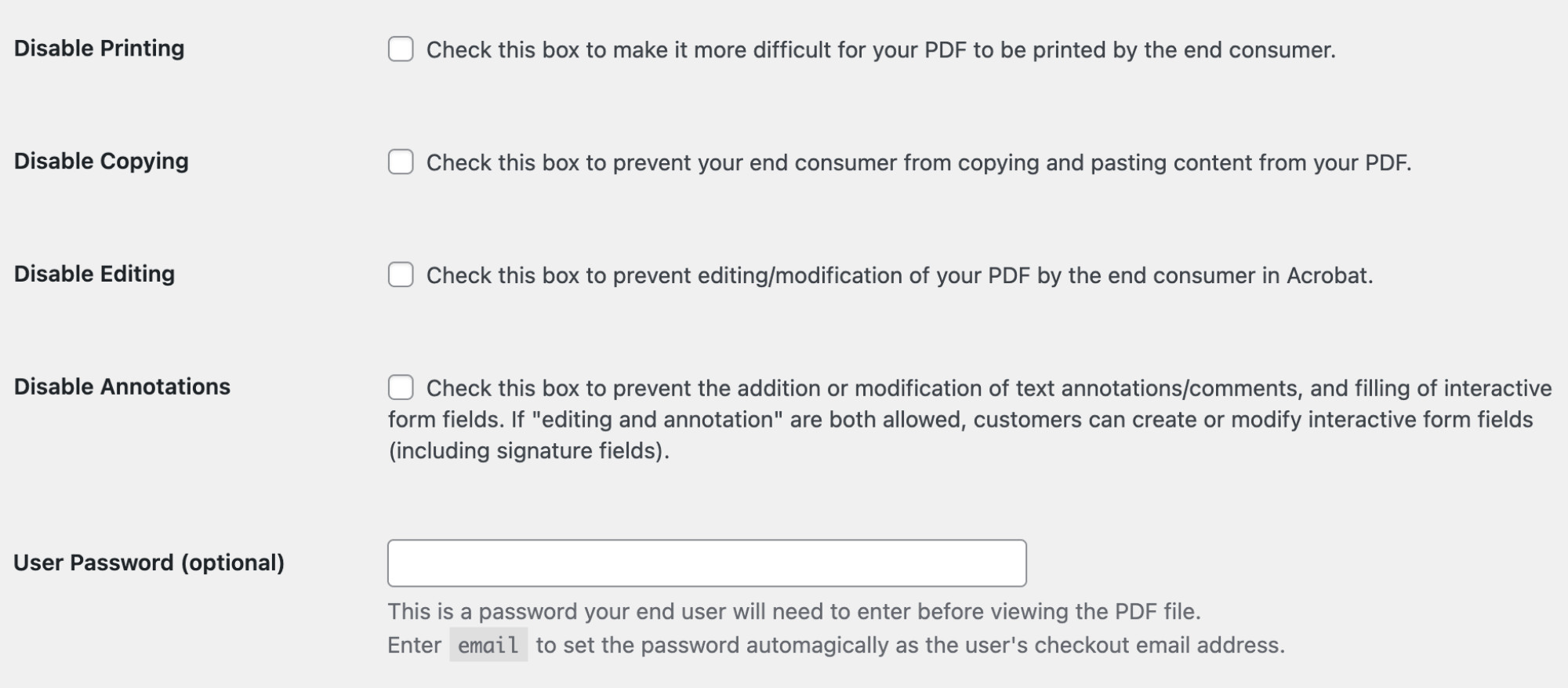
Settings page screenshot, showing password and protections settings. RC4 40-bit encryption is set automatically in PDF Ink Lite. For higher encryption, upgrade.

Changelog
4.0.7 – 2 December 2025
- Fix – check for existence of function ‘edd_get_file_download_method’ during auto temp file deletion
4.0.6 – 1 December 2025
- Fix – automatic temp file deletion (when used with WooCommerce forced and EDD forced file delivery)
4.0.5 – 21 November 2025
- Fix – move load_plugin_textdomain() to ‘init’ hook
- Tweak – provide debug log feedback for people getting unexpected white bars on PDF (answer: upgrade)
- Tweak – update/add translations
- Upgrade TCPDF library to version 6.10.0
- Testing with WC 10.3
4.0.4 – 4 September 2025
- Fix for new email as password feature
- Bump minimum WC version to 6.5 (to match plugin PHP 7.2 requirement)
4.0.3 – 26 July 2025
- Tweak for TCPDI parser to reach more PDFs
- Tweak – move set font color and size outside page loop
- Remove
wwpdf_skip_watermarking, wwpdf_dont_watermark_this_page, andwwpdf_public_key` filter hooks. Sorry, it’s free! - Testing with WC 10.0
4.0.2 – 21 June 2025
- Fix for some PDFs with line breaks between objects
4.0.1 – 27 May 2025
- Fix WooCommerce [EMAIL] shortcode gone missing
4.0.0 – 27 May 2025
- Integration with Download Monitor & Easy Digital Downloads
- Move created files out to an independent folder in wp-content/uploads/ for easier file management; no more file name changes!
- Give user ability to set left/right margins in plugin settings
- Update TCPDF library to version 6.9.4; fixed some parsing bugs in tcpdi_parser class
- The
wwpdf_filter_file_path,wwpdf_font_decode, andwwpdf_out_charsetfilter hooks removed from the free version; upgrade at pdfink.com to continue using them - Fonts added: Dejavu Sans, Dejavu Serif, Symbol, and Zapf Dingbats 👾
- PDF Ink Lite now sets attribution in PDF files it generates. Remove this by upgrading!
3.6.0 – 19 January 2025
- Upgrades to TCPDI parser for better handling of external (URL) links
- Remove unused fonts from package to save dolphins
Older changes are found in the changelog.txt file in the plugin directory.