

Plugin info
Maintenance & Compatibility
Maintenance score
Possibly abandoned • Last updated 1349 days ago
Is Payment Gateway for Adyen and WooCommerce abandoned?
Possibly abandoned (last update 1349 days ago).
Compatibility
Languages
Similar & Alternatives
Explore plugins with similar tags, and compare key metrics like downloads, ratings, updates, support, and WP/PHP compatibility.
Description
Start accepting card payments on your WooCommerce by using Adyen integration.
Key Benefits
- Accepting debit and credit card payments.
- Automatically updating Order statuses using Adyen webhooks notifications.
- Automatically refunds payments on Adyen when you refund them in WooCommerce.
- Capture payments immediately.
Setup instructions
Disclaimer: This plugin is created and maintained by WPRuby.com using the publicly available API of Adyen and WooCommerce. All product names, trademarks and registered trademarks are property of their respective owners.
Installation
Using The WordPress Dashboard
- Navigate to the ‘Add New’ in the plugins dashboard
- Search for ‘Adyen Payment Gateway for WooCommerce’
- Click ‘Install Now’
- Activate the plugin on the Plugin dashboard
Uploading in WordPress Dashboard
- Navigate to the ‘Add New’ in the plugins dashboard
- Navigate to the ‘Upload’ area
- Select
wc-adyen-payment-gateway.zipfrom your computer - Click ‘Install Now’
- Activate the plugin in the Plugin dashboard
Using FTP
- Download
wc-adyen-payment-gateway.zip - Extract the
wc-adyen-payment-gatewaydirectory to your computer - Upload the
wc-adyen-payment-gatewaydirectory to the/wp-content/plugins/directory - Activate the plugin in the Plugin dashboard
Frequently Asked Questions
To generate an API Key:
1. Log in to your Customer Area.
2. Navigate to Account > Users, and click the user ws@Company.[YourCompanyAccount].
3. Under Authentication, click Generate New API Key.
Don't forget to copy and securely store the API Key in your system. If you lose this API Key you won't be able to restore it later.
- Click Save at the bottom of the page.
In order to get an origin key, please follow this guide from Adyen.
Review feed
Screenshots
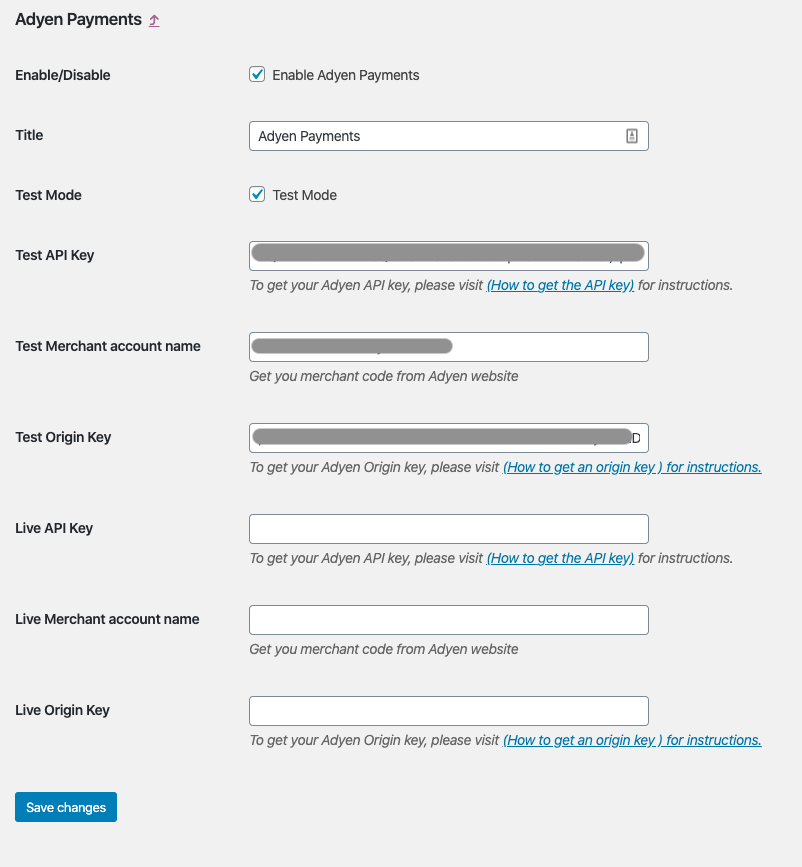
The plugin provides test mode where you can test the Adyen payment gateway before going live.

At the moment, the plugin support Adyen Card payments.
Changelog
2.0.0
- Added: Implementation of SCA (Strong Customer Authentication).
1.1.1
- Fixed: Include shopperInteraction with API calls.
1.1.0
- Added: Live API prefix option.
1.0.2
- Fixed: API Key was not decoded properly.
- Added: Integrator information to API request.
1.0.1
- Fix autoload for linux operating systems.
1.0
- Initial release.