

WC Easypay pk
WC Easypay PK is developed to provide checkout experience with Easypay(Pakistan). This plugin is compatiable with woocommerce.
Plugin info
Maintenance & Compatibility
Maintenance score
Possibly abandoned • Last updated 1145 days ago
Is WC Easypay pk abandoned?
Possibly abandoned (last update 1145 days ago).
Compatibility
Similar & Alternatives
Explore plugins with similar tags, and compare key metrics like downloads, ratings, updates, support, and WP/PHP compatibility.
Description
WC Easypay PK allow users to checkout through Easypay. This plugin redirects user to easypay site where user can pay through different payment methods. Instant payment notification feature is available to record customer activity for order on easypay checkout page.
Features:
- Sandbox Mode
- Production Mode
- Debug mode
- Instant Payment Notification
Installation
Automatic installation:
Automatic installation is the easiest option as WordPress handles the file transfers itself and you don’t need to leave your web browser. To do an automatic install, log in to your WordPress dashboard, navigate to the Plugins menu and click Add New.
In the search field type “WC Easypay pk” and click Search Plugins. Once you’ve found our plugin you can view details about it such as the the rating and description. Most importantly, of course, you can install it by simply clicking Install Now.
Manual Installation:
Unzip the files and upload the folder into your plugins folder (/wp-content/plugins/) overwriting previous versions if they exist
Activate the plugin in your WordPress admin area.
configuration
Easy steps to install the plugin:
Upload “woocommerce-easypay-pk” folder/directory to the /wp-content/plugins/ directory
Activate the plugin through the ‘Plugins’ menu in WordPress.
Go to WooCommerce=> Settings=> Checkout=> Easypay PK.
Configuration IPN
IPN URL will be generated like this url (http://mysite.com/__easypay=ipn). You can find exact URL under Easypay setting page.
Frequently Asked Questions
Review feed
Screenshots

Setting Page.
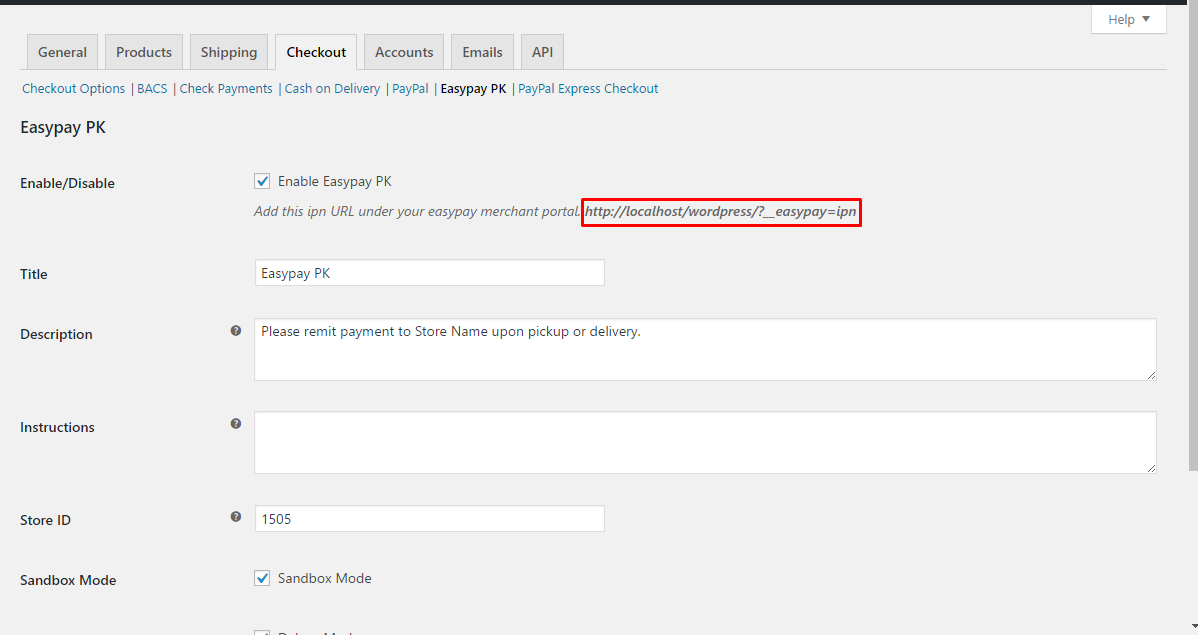
Copy IPN url and add in you merchant portal to work instant payment notification with your store.

IPN reflect status and add an order note.