

WC Filter By Multiple Tax
WC Filter By Multiple Tax is an e-commerce toolkit that helps you filter products by multiple taxonomy (Product category, Product Feature, Product Bra …
Plugin info
Maintenance & Compatibility
Maintenance score
Possibly abandoned • Last updated 3035 days ago • 2 reviews
Is WC Filter By Multiple Tax abandoned?
Possibly abandoned (last update 3035 days ago).
Compatibility
Similar & Alternatives
Explore plugins with similar tags, and compare key metrics like downloads, ratings, updates, support, and WP/PHP compatibility.
Description
WC Filter By Multiple Tax is an e-commerce toolkit that helps you filter products by multiple taxonomy (Product category, Product Feature, Product Brand, Product Tags, Product Attributes). Supports latest version of the WooCommerce plugin. Plugin WC Filter By Multiple Tax is compatible with any themes, this plugin has advance features for your WooCommerce powered online store to help your customers find products easily.
Feature
- Taxonomy: Brands, Features for woocommerce product. Drag to change order term in Brand & Feature taxonomy.
- Filter products on multiple taxonomies with multiple terms (Taxonomies support: Woocommerce product category, product tags, brand, feature, attributes)
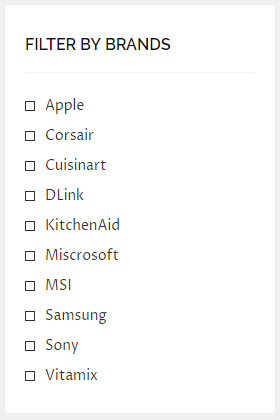
- Widget: List Taxonomies Multiple Level display taxonomy on list or dropdown and filter check box.
Demo
http://preview.peepress.com/peefilter/
Video guide you to install and use plugin
Installation
- Upload
wc-filter-by-multiple-taxfolder to the/wp-content/plugins/directory or install the plugin through the WordPress plugins screen directly. - Activate the plugin through the ‘Plugins’ screen in WordPress
- Go to Products => Brand & Feature to add your term and set it into products
- Use Widget List Taxonomies Multiple Level in Appearance => Widgets to configure to show filter in your shop
Action/Hook
- Hook Filter accept to add class to ul of widget “List Taxonomies Multiple Level”: wc_filter_add_class_to_ul
Frequently Asked Questions
Installation Instructions
- Upload
wc-filter-by-multiple-taxfolder to the/wp-content/plugins/directory or install the plugin through the WordPress plugins screen directly. - Activate the plugin through the ‘Plugins’ screen in WordPress
- Go to Products => Brand & Feature to add your term and set it into products
- Use Widget List Taxonomies Multiple Level in Appearance => Widgets to configure to show filter in your shop
Action/Hook
- Hook Filter accept to add class to ul of widget “List Taxonomies Multiple Level”: wc_filter_add_class_to_ul
Review feed
This plugin is useful
Advance filter product
Screenshots




Changelog
1.1.0 | 26th October 2017
- [Update] Filter by WC Product Attributes.
- [Update] Box show your selection.
- [Update] Options show thumbnail of taxonomy on widget “List Taxonomies Multiple Level”.
- [Update] Show box search taxonomy on widget.
1.0.9 | 6th September 2017
- [Update] Convert from the filter to the menu normal when the filter is in each page archive of taxonomy.
1.0.8 | 5th September 2017
- [Fix] Update logic to show term of taxonomies related with term was choosed.
1.0.7 | 28th August 2017
- [Fix] Change logic to show term of taxonomies related with term was choosed.
- [Fix] Some bug js.
1.0.6 | 27th August 2017
- [Fix] Small bug for filter.
1.0.5 | 25th August 2017
- [Update] Filter run on any page.
1.0.4 | 24th August 2017
- [Update] Add filter “wc_filter_add_class_to_ul” accept to add class to ul of widget “List Taxonomies Multiple Level”.
- [Update] Add style support Flatsome.
- [Fix] Some style.
- [Fix] some js.
1.0.3 | 17th August 2017
- [Update] Drag to change order term in Brand & Feature taxonomy.
- [Fix] Some style admin.
1.0.2 | 12th August 2017
- [Update] Feature: When use filter for Product category, the term of taxonomy Brands/Feature will show relate with term of product category.
- [Update] Optimize some code.
- [Fix] Some style issue.
1.0.1 | 10th August 2017
- [Update] Feature filter Product category related with other term of taxonomies (Product Tags, Brand, Feature).
1.0.0 | 24th July 2017
- First release version.