

Invoice Payment Gateway for WooCommerce
The Invoice Payment Gateway for WooCommerce plugin adds an Invoice Payment Gateway feature to the WooCommerce plugin for B2B transactions when instant …
Plugin info
Maintenance & Compatibility
Maintenance score
Possibly abandoned • Last updated 387 days ago • 11 reviews
Is Invoice Payment Gateway for WooCommerce abandoned?
Possibly abandoned (last update 387 days ago).
Compatibility
Developers
Similar & Alternatives
Explore plugins with similar tags, and compare key metrics like downloads, ratings, updates, support, and WP/PHP compatibility.
Description
Adds an Invoice Payment Gateway to the WooCommerce plugin. This type of payment method is usually used in B2B transactions with account / invoice customers where taking instant digital payment is not an option.
Default and custom WooCommerce order statuses of like On Hold, Pending Payment, Processing or Completed etc can be chosen from the gateway settings panel. The selected order status will be applied to all orders processed via the WooCommerce invoice payment gateway and the corresponding status order emails will be sent after checkout.
You can also choose to restrict the gateway to only be enabled for specific WordPress users roles.
The plugin itself does not create customer invoices for you only orders. For invoices this is something you would still have to use an accounting program like Quickbooks or similar to bill your customers with.
Supports the WooCommerce block based checkout and HPOS.
Minimum Requirements
For this extension to function WooCommerce must be installed and activated on your WordPress site.
Installation
- Download the Invoice Payment Gateway for WooCommerce plugin from the WordPress plugin directory.
- Goto WordPress > Appearance > Plugins > Add New.
- Click Upload Plugin and Choose File, then select the plugin’s .zip file. Click Install Now.
- Click Activate to use your new plugin right away.
Frequently Asked Questions
Review feed
Perfect!!!
Happy for support
Perfect Offline Gateway for Invoices.
Screenshots
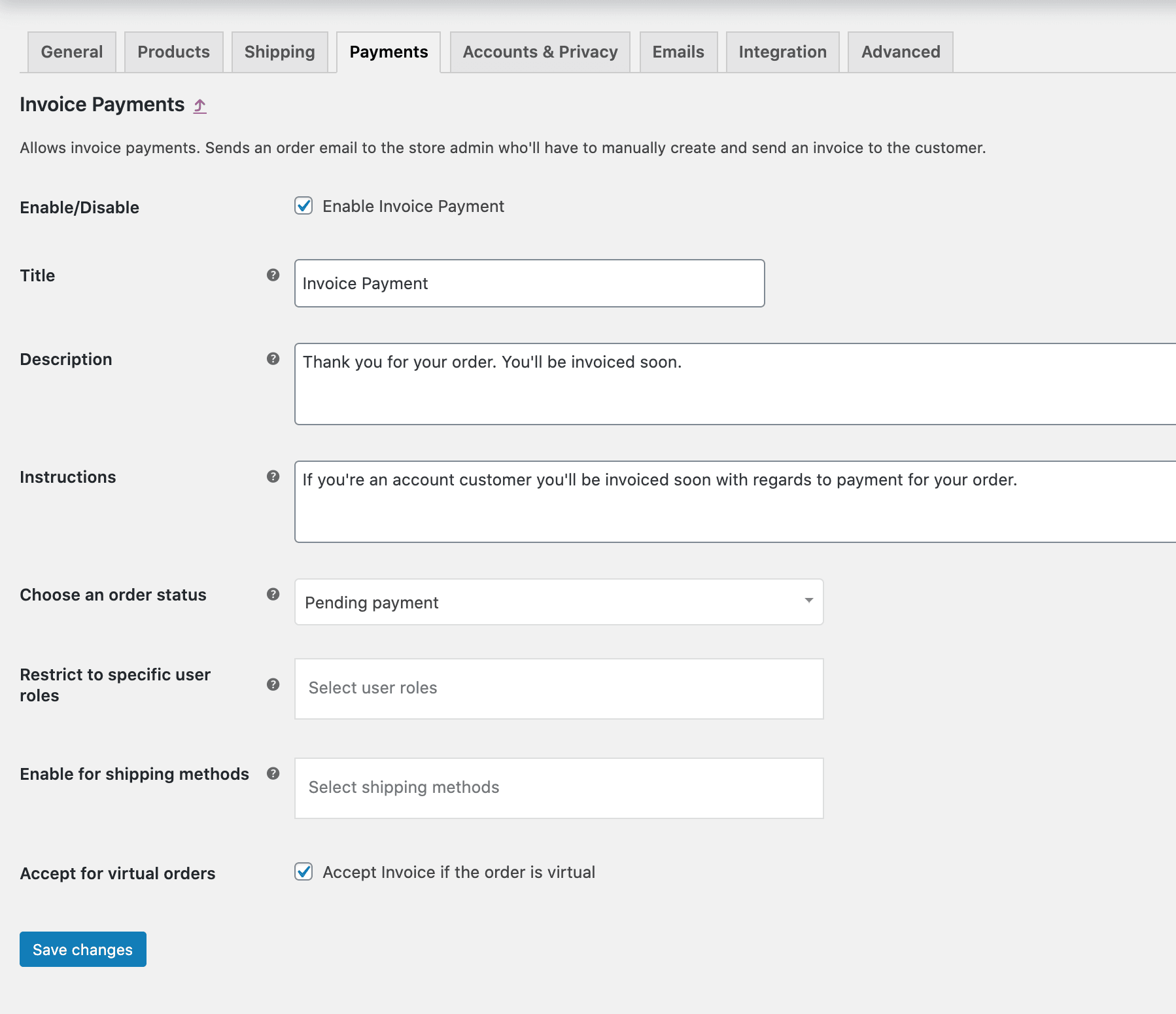
The Invoice Payment Gateway for WooCommerce settings panel.
Changelog
2.0.2 – 10/03/25
- Fix – For deprecated PHP notices
- Added – Name chage from WooCommerce Invoice Gateway to Invoice Payment Gateway for WooCommerce
2.0.1 – 30/08/23
- Added – HPOS Compatibility.
2.0.0 – 18/02/23
- Added – Compatibility for the WooCommerce block checkout.
1.0.6 – 16/05/20
- Added – The functionality to restrict gateway access to specific users roles.
- Fix – Typo of “Choose and order status” to “Choose an order status”.
1.0.5 – 08/05/20
- Added – The functionality to enable the order actions buttons using the
remove_wc_invoice_gateway_order_actions_buttonsfilter.
1.0.4 – 03/04/20
- Fix – Remove Pay, Cancel order action buttons on My Account > Orders if order status is Pending Payment.
1.0.3 – 25/02/20
- Added – Functionality to return custom WooCommerce order statuses.
1.0.2 – 04/11/17
- Fix – Enable for shipping methods dropdown.
- Added – WooCommerce v3.2+ compatibility.
1.0.1 – 27/10/17
- Added – WooCommerce plugin version check compatibility.
1.0.0 – 20/07/16
- Initial Release – first version of the plugin released.