

Who Stole the Text Justify Button ?!
OMG! WordPress 4.7 stole my text justify button! Please bring it back :)
Plugin info
Maintenance & Compatibility
Maintenance score
Possibly abandoned • Last updated 2353 days ago • 3 reviews
Is Who Stole the Text Justify Button ?! abandoned?
Possibly abandoned (last update 2353 days ago).
Compatibility
Similar & Alternatives
Explore plugins with similar tags, and compare key metrics like downloads, ratings, updates, support, and WP/PHP compatibility.
Description
WordPress 4.7 removed the text justify button from TinyMCE buttons. This plugin will bring it back \o/
Disclaimer: justifying is not a very good idea on websites, because justified text can be unreadable on small screens. According to typographic rules, you shouldn’t justify text without good hyphenation and under 70 characters per line in average. So be careful and do not use justified text in all case. I strongly recommend you to provide left alignment for small devices, using CSS media queries.
To be honest, I do not really think removing this button was a bad idea, but some clients wanted it again, so I made a little plugin for them 🙂
Underline button was also removed by WordPress 4.7, and we are not going to bring it back here because this button clearly sucks. On the web, underlining normal text is always a bad idea because it should be reserved for links. If you want it back too, check this plugin: Re-Add Underline and Justify.
Credits : Jean-Baptiste Audras, project manager at Whodunit and WordPress developer. @audrasjb on Twitter or Github.
Installation
- Install WSTJB plugin and activate. That’s all: text justify alignment button is back (second row of buttons).
Frequently Asked Questions
Review feed
Screenshots
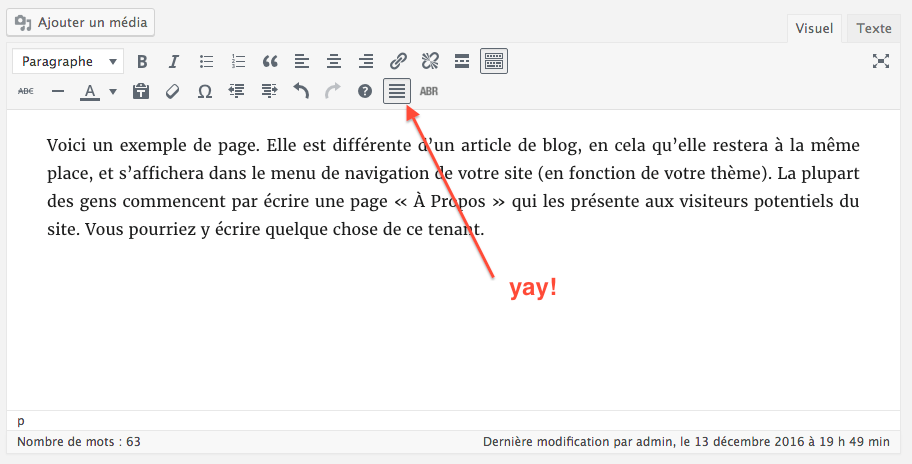
Hurray! (oh, do you notice the ABR button? It's an abbreviation button provided by my Abbreviation button for tinymce plugin)
Changelog
1.0
- Plugin initial commit. Works fine 🙂