

Widget for My Mitsu Estimation Form
This plugin allows users to put a My Mitsu form in your website's widget area.
Plugin info
Maintenance & Compatibility
Maintenance score
Possibly abandoned • Last updated 3298 days ago
Is Widget for My Mitsu Estimation Form abandoned?
Possibly abandoned (last update 3298 days ago).
Compatibility
Similar & Alternatives
Explore plugins with similar tags, and compare key metrics like downloads, ratings, updates, support, and WP/PHP compatibility.
Description
My Mitsu, is a webservice in Japan, allows users to create an estimation(calculation) form. A powerful form allows you to create a conditional form with calculation, and outputs a PDF file. It is suited for business persons.
https://my-mitsu.com/ (written in Japanese.)
This plugin allows you to output an iframe html tag which displays a my mitsu form in your website’s widge area.
- Note * In order to create an estimation form, you need to register My Mitsu https://my-mitsu.jp/register .
Filter Sample
This plugin allows you to set your default values for URL, ID, width, and height. You can alter them by hooking the “mymitsu_widget_default_***” filter. Here is a sample code.
add_filter( 'mymitsu_widget_default_width', 'my_widget_default_width' );
 function my_widget_default_width() {
     return 400;
 }
Installation
- Install a plugin and activate it
- Upload
shortcode_for_my_mitsu_estimation_form' to the/wp-content/plugins/` directory
Frequently Asked Questions
Review feed
Screenshots
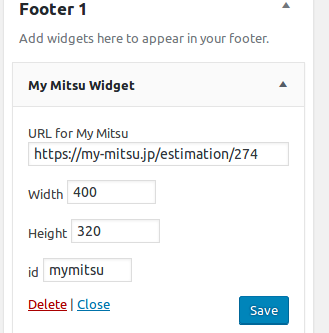
A widget for My Mitsu.
Changelog
1.0
- initial release