

WooCommerce Backorder Manager
View WooCommerce reports with products and orders in backorder, CSV export for backorders, manage backorder email notifications.
Plugin info
Maintenance & Compatibility
Maintenance score
Stale • Last updated 319 days ago • 5 reviews
Is WooCommerce Backorder Manager abandoned?
Likely maintained (last update 319 days ago).
Compatibility
Similar & Alternatives
Explore plugins with similar tags, and compare key metrics like downloads, ratings, updates, support, and WP/PHP compatibility.
Description
The best management plugin for backorders in WooCommerce. View reports with products and orders in backorder, manage backorder email notifications. You can also export all backorders to a CSV file.
Features
- View report ‘Products On Backorder’ in WooCommerce (with export option)
- View report ‘Orders with Backorders’ in WooCommerce (with export option)
- Show number of backorders in order on order overview page
- Manage backorder email notifications
- Select which (WooCommerce or custom) order statuses appear on ‘Orders with Backorders’ report
- Export backorders to CSV
- Multilanguage ready
Extra Pro Features
- Set the maximum allowed number of backorders for a product and product variation
- When the maximum allowed number of backorders is reached the stock status will switch to ‘Out of stock’
- Show products available for backorder on product overview page
- Show maximum backorders in sortable column on product overview page
- Option to show available backorder items in shop when backorder notification is enabled
- Option to show custom backorder description on product page and cart
- Try WooCommerce Backorder Manager Pro – 100% money back guarantee
Installation
For an automatic installation through WordPress:
- Go to the ‘Add New’ plugins screen in your WordPress admin area
- Search for ‘WooCommerce Backorder Manager’
- Click ‘Install Now’ and activate the plugin
For a manual installation via FTP:
- Upload the ‘WooCommerce Backorder Manager’ directory to the ‘/wp-content/plugins/’ directory
- Activate the plugin through the ‘Plugins’ screen in your WordPress admin area
To upload the plugin through WordPress, instead of FTP:
- Upload the downloaded zip file on the ‘Add New’ plugins screen (see the ‘Upload’ tab) in your WordPress admin area and activate.
- Activate the plugin through the ‘Plugins’ screen in your WordPress admin area
Frequently Asked Questions
Review feed
Great plugin
Screenshots
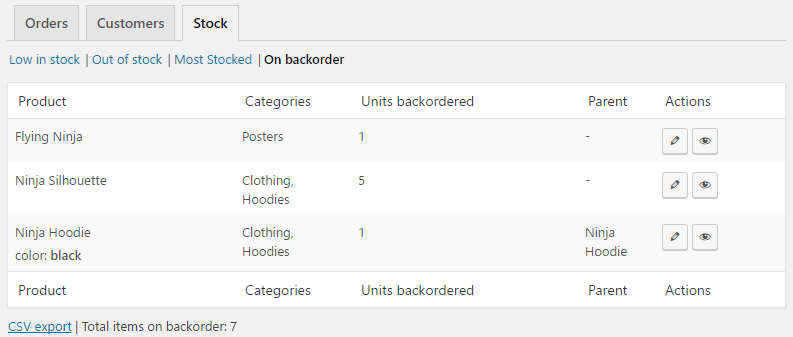
WooCommerce report to view all units on backorders. One overview to see which products and product variations are on backorder. With action links to view and edit the product. CSV export link is at the bottom of the overview.
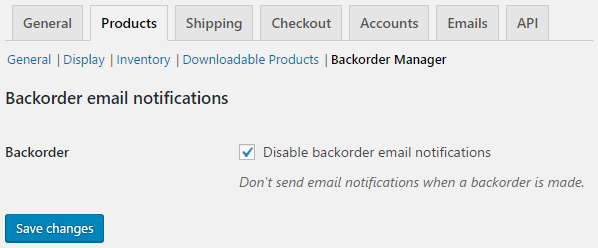
Option to disable backorder email notifications.
Changelog
2.5
- Add HPOS (High-Performance Order Storage) support
2.4
- WooCommerce 8+ compatibility
- Small optimizations