
Bulk Order WooCommerce
"Bulk Order Woocommerce" allows your customers to order multiple products on single page.
Plugin info
Maintenance & Compatibility
Maintenance score
Stale • Last updated 227 days ago • 7 reviews
Is Bulk Order WooCommerce abandoned?
Likely maintained (last update 227 days ago).
Compatibility
Languages
Similar & Alternatives
Explore plugins with similar tags, and compare key metrics like downloads, ratings, updates, support, and WP/PHP compatibility.
Description
Bulk Order Woocommerce allows your customers to order multiple products on single page so that they can add more products to their cart from single place with a continuous experience resulting in a high sales revenue.
Key features:
- List all products you want to users to purchase on single page
- AJAX based functionality improves user experience
- Filter products by Category
- Supports Variable products
- Instant update of cart widget as soon as product is added to cart
- Purchasing all products at one place boosts your sales
Don’t believe it? Try it out here, its free..!!
Demo of Bulk Order WooCommerce
PRO version features:
- Coming Soon
Thank you for LOVING our creations…!!
More plugins by WooExtend:
Installation
- Please make sure that you installed WooCommerce
- Go to plugins in your dashboard and select “Add New”
- Search for “Bulk Order WooCommerce”, Install & Activate it
- There is a page automatically create named “Order Now”. You can use that for your customers.
Frequently Asked Questions
Make sure your theme is using jquery. If not, you can add one.
Yes. You can specify product ids in shortcode like this!
[wbo_woo_bulk_order id=”20,2446,10,9″]
Yes. You can specify orderby in shortcode like this!
[wbo_woo_bulk_order id=”20,2446,10,9″ orderby=”title” order=”ASC”]
You can sort products by:
title, id, menu_order, date
The orders are: ASC & DESC
Review feed
Screenshots
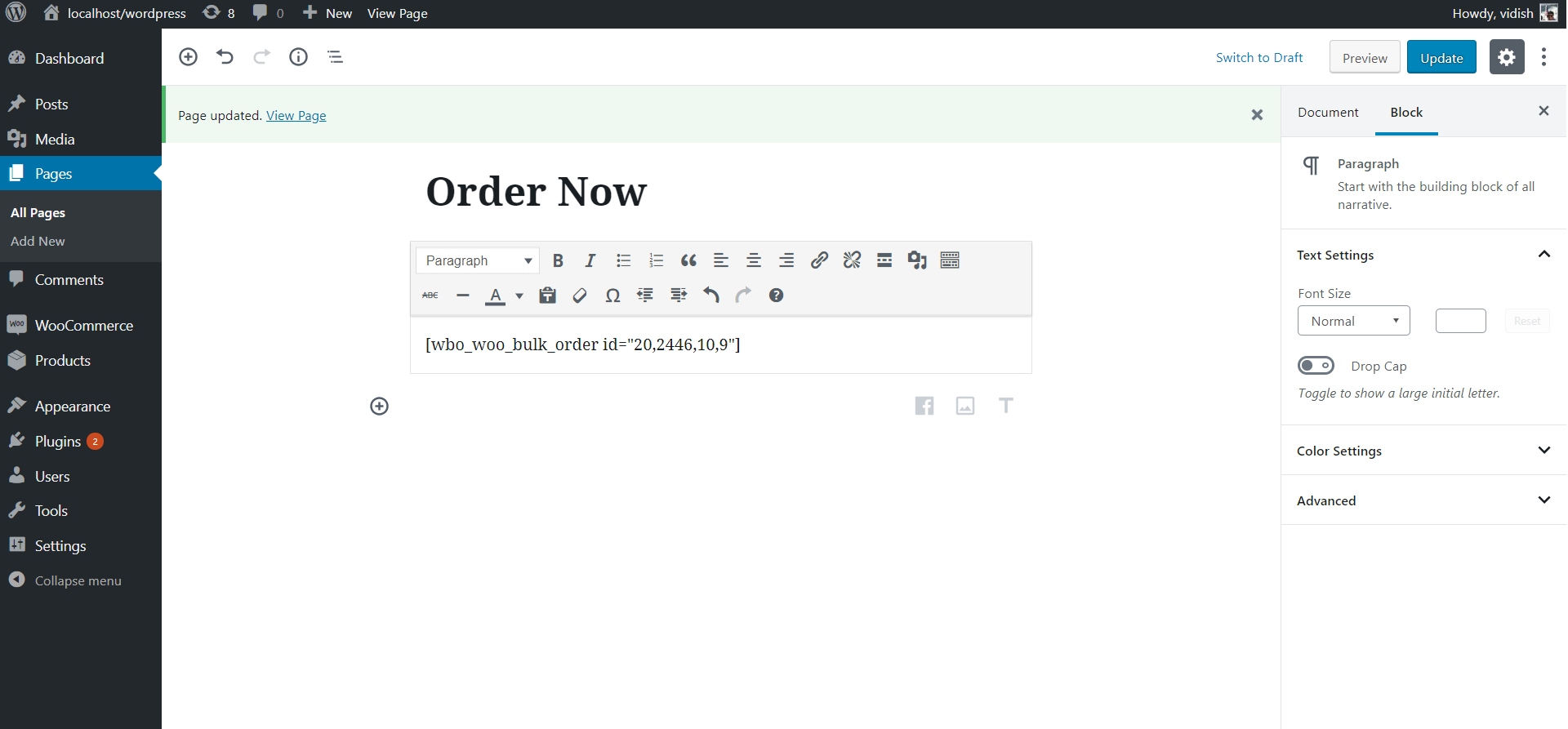
Admin page which is created when installing plugin.

Front-end customers see all products listed and add it to cart.
Changelog
3.2
- Made miscellaneous improvements
- Made thumbnail open large picture in grid
3.1
- Made grid responsive
3.0.6
- Changed file name
3.0.5
- Added a link to review form for admin
3.0.4
- Updates to meet wp guidelines
3.0.3
- Updates to meet wp guidelines
3.0.2
- Updates to meet wp guidelines
3.0
- Major release with security fixes and enhanced code
2.10
- Fix : Updated guidelines
2.9
- Fix : Show proper notification if add to cart failed
2.8
- Fix : jQuery migrate update broke prettyphoto
2.7
- Feature : Default category filter added
2.6
- Feature : Added Category Filter
2.5
- Fix : Sort by date
2.4
- Fix miscellaneous error
2.3
- Added filter for filtering image thumbnail html
2.2
- Fixed column titles
2.1
- Fix : Sorting not working
2.0
- Feature : If product has thumbnail, then user can view it enlarged by clicking on it
- Feature : Made bulk order page responsive for mobile devices
- Feature : Settings screen in admin to setup shortcode
1.5
- Show simple product sale price if its on sale
1.4
- Make product list sortable by shortcode
1.3
- Fix for simple product
- Made plugin translation compatible
1.2
- Fix for add to cart
1.1
- Fix for script
1.0
- Initial