

Enhanced Ecommerce Google Analytics for WooCommerce
Track sales analytics, conversions and understand consumer behavior using google analytics (with ecommerce tracking).
Plugin info
Maintenance & Compatibility
Maintenance score
Stale • Last updated 238 days ago • 6 reviews
Is Enhanced Ecommerce Google Analytics for WooCommerce abandoned?
Likely maintained (last update 238 days ago).
Compatibility
Languages
Similar & Alternatives
Explore plugins with similar tags, and compare key metrics like downloads, ratings, updates, support, and WP/PHP compatibility.
Description
Struggling to make a data-driven action plan for your WooCommerce store? Say no more, because the solution is here: Enhanced Ecommerce Google Analytics for WooCommerce.
Our plugin allows you to track every step of your customer’s journey, from product impressions to purchases, providing you with reliable insights that help to optimize your online store’s performance and make effective business decisions.
Plugin Demo : View Demo
📒 KEY FEATURES
- Detailed eCommerce Tracking: Track all steps of your customer’s journey, including product impressions, clicks, add-to-cart, checkout, and product purchases.
- Custom Dimensions and Metrics: Set up custom dimensions and metrics to track additional information about your products, customers, and transactions.
- Dynamic Remarketing: Enables dynamic remarketing to show personalized ads to people who have interacted with your products but haven’t made a purchase.
- Real-time tracking: Get updates on all essential performance metrics in real-time.
- Advanced eCommerce Analytics Tracking: Set-up and track the performance of custom events for unstoppable growth.
🚀 PLUGIN USE CASES
- Customer Behavior Analysis: Utilize detailed tracking to understand how customers interact with your products and optimize their experiences.
- Personalize Marketing Strategy: Use dynamic remarketing to target customers who have shown interest in your products but have yet to make a purchase.
- Data-driven Decision Making: Use advanced analytics to make effective business decisions.
- Monitor Performance: Keep track of all relevant performance metrics in real-time for incessant performance monitoring and improvement.
⭐ REVIEWS (5-star by 100+ users)
- “Best plugin to track enhanced eCommerce on Google Analytics.” – Arthur Rightus
- “Really easy way to insert Google Analytics tracking code.” – Verified Buyer
- “Very happy with plugin function & also, the support team is quite helpful.” – Oliver Coleman, Operational Head
- “Very useful plugin. Amazing support. 5 stars!!!” – Daniel Phoenix, Technical Manager
- “Perfect support! Perfect plugin!” – Verified Buyer
👀 WHAT MAKES US STAND OUT
At Dotstore, our exclusive focus is on developing WooCommerce plugins that are reliable, efficient, and easy to use.
- Top-of-the-Line Customer Support: Our customer support, known for its quick and helpful solutions, can assist you effectively with any issues.
- Trusted Solutions: Precision-coded and optimized for top performance, our plugins are designed to help you make the most of your WooCommerce store.
- Flexibility for Customization: Our Enhanced Ecommerce Google Analytics for WooCommerce plugin is highly customizable, enabling it to cater to your specific needs.
- Easy Setup: All our plugins are user-friendly, with straightforward interfaces and accessible features, ensuring a smooth setup process for all.
Invest in our Enhanced Ecommerce Google Analytics for WooCommerce plugin and upgrade your WooCommerce store to the next level.
📣 PREMIUM: Enhanced E-Tracking — Try the Pro Version Today!
✅ NEED EVEN MORE FEATURES?
Upgrade to Enhanced Ecommerce Google Analytics PRO to get all the advanced features.
💁 How to’s Plugin Guide
🔖 Cross-selling vs Upselling: Boost Your Ecommerce Growth
🔖 Influencer Marketing: Key to Ecommerce Sales and Growth
🔖 Product Photography: Its Impact on Ecommerce Growth
🔖 How to Protect Your Ecommerce Store from Fraud Risks & Spam
🔖 Ecommerce Growth Hacks to Increase Average Order Value
📣 PREMIUM: Enhanced E-Tracking — Try the Pro Version Today!
☎️ CONTACT US
- Free plugin: Need Technical Help? – Click here
- Pro Plugin: PRE-SALE Questions – Click here or Review Help Document
🎯 Supercharge Your Store Performance
Gain access to 50 expert tips covering everything from site speed and user experience to advanced sales strategies, each with impact scores to help you prioritize what truly drives results.
💎 EXPLORE OUR OTHER PLUGINS TO SUPERCHARGE YOUR WEBSITE
👉 Premium WooCommerce Plugins list
- Flat-rate shipping plugins for WooCommerce
- WooCommerce Extra Fees
- Hide Shipping Method For WooCommerce
- Product Attachment For WooCommerce
- Advanced Product Size Charts Plugin
- Product Sample for WooCommerce
- Blocker – Prevent Fake Orders And Blacklist Fraud Customers
- Enhanced Ecommerce Google Analytics for WooCommerce
- Conditional Payments For WooCommerce
- Advanced USPS Shipping Plugin
- WooCommerce Multi-Vendor Shipping Addon
- Category Banner Management for Woocommerce
- Product Finder For WooCommerce
- Conditional Discount Rules For WooCommerce Checkout
- WooCommerce Checkout For Digital Goods
- WooCommerce Attribute Stock
Installation
Automatic installation
Automatic installation is the easiest option as WordPress handles the file transfers itself and you don’t even need to leave your web browser. To do an automatic install of Enhanced Ecommerce Google Analytics for WooCommerce, log in to your WordPress admin panel, navigate to the Plugins menu and click Add New.
In the search field type “Enhanced Ecommerce Google Analytics for WooCommerce” and click Search Plugins. Once you have found our plugin you can install it by simply clicking Install Now. After clicking that link you will be asked if you are sure you want to install the plugin. Click yes and WordPress will automatically complete the installation.
Installation Instructions
-
For Ecommerce Tracking
- Sign into your Google Analytics Account
- Enable Enhanced E-commerce for your profile/view. This is a profile / view level setting and can be accessed under Admin > View > E-commerce Settings
- Add meaningful labels for your checkout steps. We recommend you to label as,
Step 1 : Checkout View; Step 2 : Billing Info; Step 3 : Proceed to payment - Activate our plugin from the Settings page. You can access the setting page from wordpress left tab DotStore Plugins >>Enhanced Ecommerce Google Analytics for WooCommerce plugin
- Find “Add Enhanced Ecommerce Tracking Code” in the settings page and check the box to add the tracking code
- Click on Google Ecommerce Tracking Settings tab in the plugin.
- Enable Google Ecommerce Tracking features in the plugin.
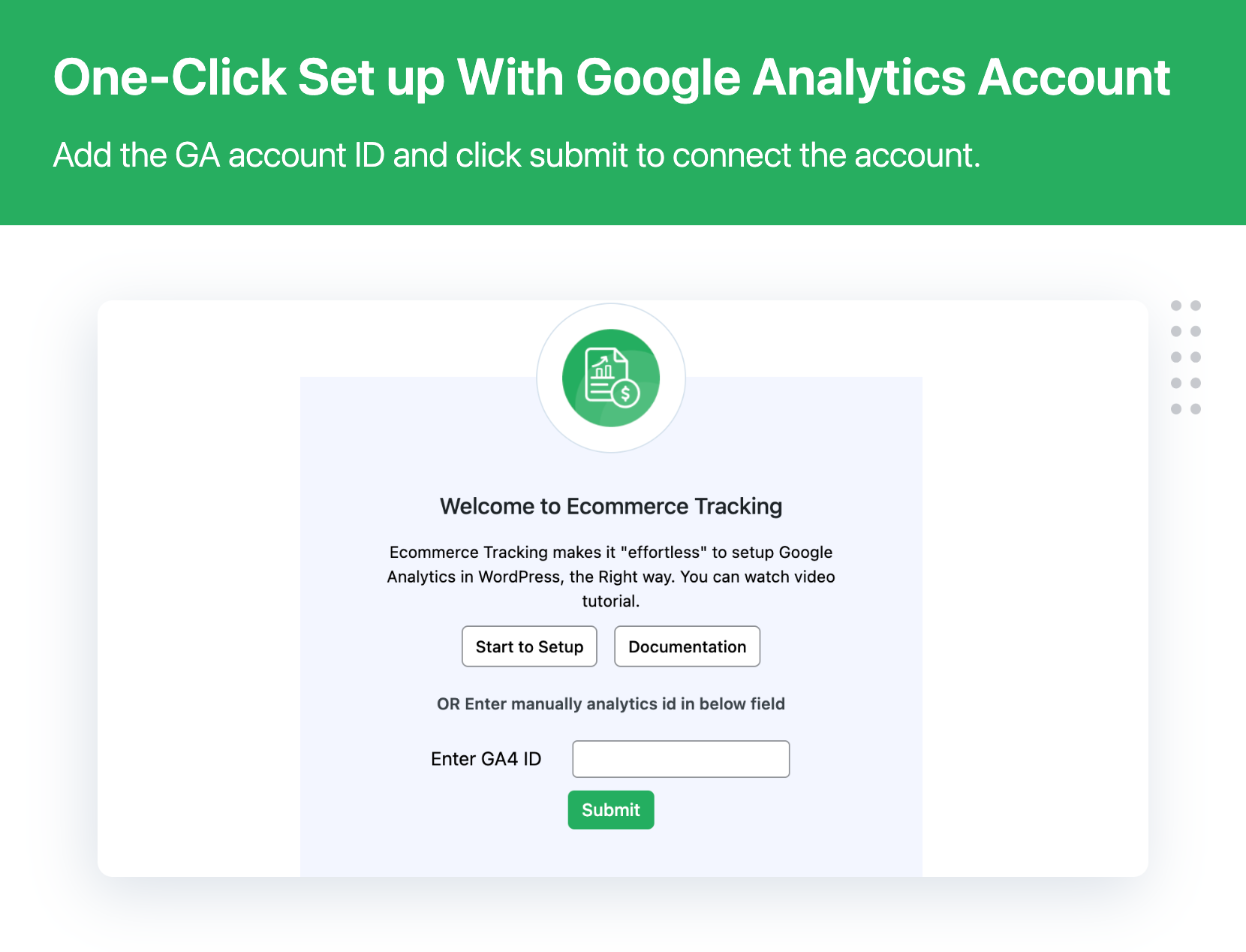
- Add Google Analytics UID in the plugin.
-
For Facebook conversion
- Before Enable Facebook Conversion from our plugin Please follow steps and create “Facebook Track Id” from this link https://www.facebook.com/business/help/435189689870514?locale=en_GB and enter “Facebook Track id” to our Plugin settings and boost your store marketing 🙂
- For Google conversion
- Before Enable Google Conversion from our plugin Please follow steps and create Google conversion from this link https://support.bigcommerce.com/articles/Public/How-do-I-add-Google-Adwords-Conversion-Tracking and enter “Google conversion id” and “Google conversion lable” to our plugin settings section then you are ready to boost your AdWords in your WooCommerce store.
Getting started
The plugin allows you to easy Integration with Multiple Analytic tools with your WooCommerce store. It will provide all the features to track your sales and product performance through different analytics tools.
Plugin Support below List of Analytic tools:
- Google Conversion Tracking
- Facebook Conversion Tracking
Step 1 : Google Ecommerce Tracking Settings.
Sign into your Google Analytics Account
If already have Google Analytics Account then enable below option, You can able to track WooCommerce order in your store.
You can Tracking below Event:
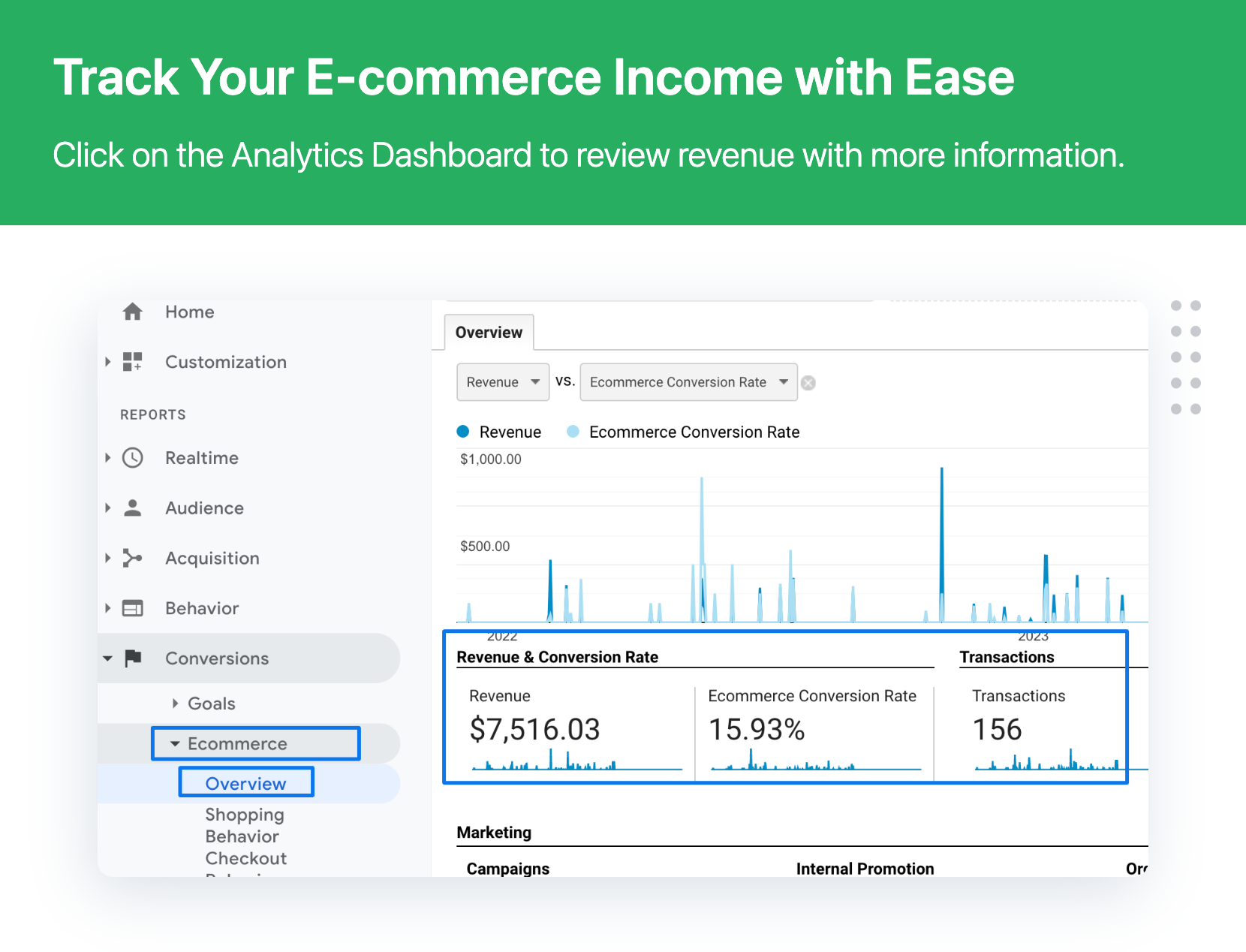
- Tracking Orders
- Tracking Total Order Revenue
- No of Transaction
Step 2 : you can view google ecommerce tracking reports
Questions?
If you have any questions please feel free to post them to the support forum.
Frequently Asked Questions
- Log into your Google Analytics Account.
- Navigate to Admin View E-commerce Settings and enable Enhanced E-commerce for your view.
- Label your checkout steps for clarity, such as:
- Step 1: Checkout View
- Step 2: Billing Info
- Step 3: Proceed to Payment
- Go to the WordPress Dashboard, find DotStore Plugins, and select Enhanced Ecommerce Google Analytics for WooCommerce plugin. Activate it.
- In the settings, check “Add Enhanced Ecommerce Tracking Code”.
- Click the “Google Ecommerce Tracking Settings” tab within the plugin and enable the feature.
- Enter your Google Analytics UID.
Open any page of your site, right-click, select Inspect Network tab, and then reload the page. Search for “google analytics” to see if your tracking code is active.
Google Analytics requires some time to begin reflecting data. It is advised to wait at least 24 hours. If issues persist, consult the Google Analytics Help Center.
For comprehensive guides, tutorials, and FAQ, visit our Enhanced Ecommerce Google Analytics for WooCommerce plugin page. For direct support or to provide feedback, please create a support ticket here.
This plugin provides in-depth tracking of customer behavior, product impressions, and purchase activities. It allows for personalized marketing strategies, dynamic remarketing, and detailed insights into the customer journey, ultimately helping optimize store performance.
Yes, our plugin is designed to seamlessly integrate with both Universal Analytics and Google Analytics 4, ensuring you can keep tracking your WooCommerce website effectively.
Absolutely. The plugin enables you to set up and track custom events, giving you further insights into how users interact with your store, which is crucial for optimizing and enhancing the shopping experience.
Review feed
Excellent !
This is what I am looking for..!!
Screenshots

Changelog
3.8.1
- [Enhancement] Minor security update.
- [Enhancement] Compatible with WooCommerce 9.8.x
- [Enhancement] Compatible with WordPress 6.8
3.8.0
- [Enhancement] Plugin UI enhancement
- [Enhancement] Compatible with WooCommerce 9.1.x
- [Enhancement] Compatible with WordPress 6.5.x
3.7.3
- [Enhancement] Plugin UI enhancement
- [Enhancement] Compatible with WooCommerce 8.8.x
- [Enhancement] Compatible with WordPress 6.5.x
3.7.2
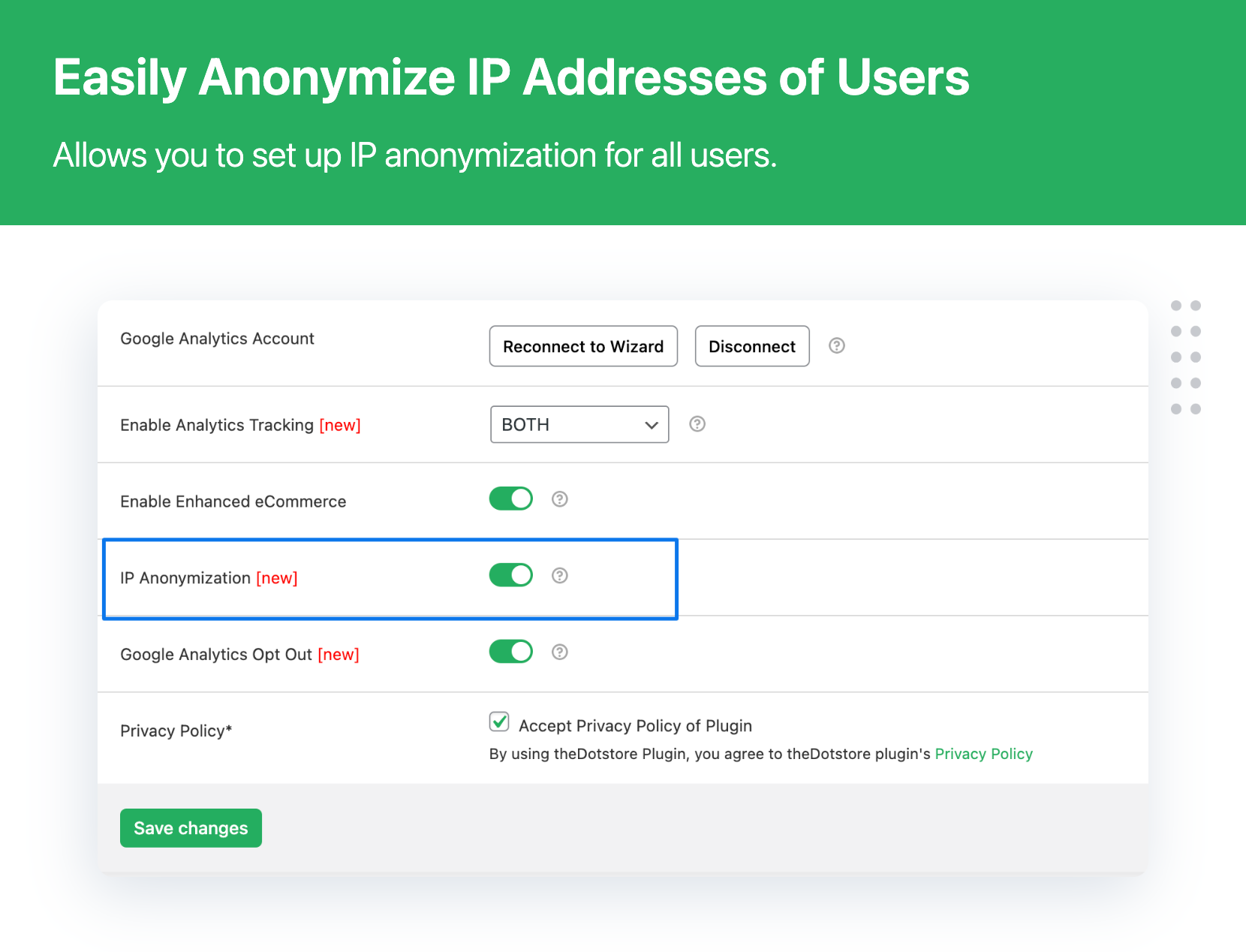
- [New] Added GA4 IP Anonymization
- [New] Added GA4 Opt Out
- [New] Added GA4 Purchase event
- [Bug Fix] Minor fixes related to the Cross Site Request Forgery (CSRF) vulnerability
- [Enhancement] Compatible with WooCommerce HPOS
- [Enhancement] New design implementation
- [Enhancement] Enabled GA4 compatibility
- [Enhancement] Compatible with WooCommerce 8.2.x
- [Enhancement] Compatible with WordPress 6.3.x
3.7.1
- [Fixed] Minor bug fixed related to PHP 8.1 compatibility
- [Enhancement] Quick fix related to the Cross Site Scripting (XSS) vulnerability
- [Enhancement] Compatible with WooCommerce 7.9.x
- [Enhancement] Compatible with WordPress 6.2.x
3.7.0
- [New] Google Analytics 4 Opt-Out
- [Fixed] Single quotes product name jQuery issue
- [Fixed] Compatible with PHP 8
- [Update] Compatible with WooCommerce 7.5.x
- [Update] Compatible with WordPress 6.2.x
3.6.4
- Fixed – Deprecated jQuery calls
- Update – freemius SDK version
- Compatible with WooCommerce 6.7.x
- Compatible with WordPress 6.0.x
3.6.3
- Compatible with WooCommerce 6.2.x
- Compatible with WordPress 5.9.x
3.6.2
- Fixes – Fixes minor php notice issue
- Compatible with WooCommerce 6.1.x
- Compatible with WordPress 5.8.x
3.6.1
- New – Option to login via Gmail for GA and GA4
- New – Added option to accept privacy policy terms
- Update – Compatible with WooCommerce 6.0.x
- Update – Compatible with WordPress 5.8.x
3.6.0
- New – I.P. Anonymization
- New – Google Analytics Opt-Out
- Fixed – Minor bug fixed related to version compatible
- Update – Compatible with WooCommerce 5.9.x
- Update – Compatible with WordPress 5.8.x
3.5.1
- Compatible with WooCommerce 5.3.x
- Compatible with WordPress 5.7.x
3.5
- Compatible with WooCommerce 5.1.x
- Compatible with WordPress 5.7.x
3.4
- Compatible with WooCommerce 4.7.1
- Compatible with WordPress 5.5.3
3.3 – 20-11-2020
- Maintenance Release
3.2 – 29-09-2020
- Compatible with WordPress 5.5.x
- Compatible with WooCommerce 4.5.x
3.1 – 26-05-2020
- Update – Compatible with WordPress 5.4.x
- Update – Compatible with WooCommerce 4.2.x
3.0 – 05-02-2020
- Enhanced new code.
- Update – Compatible with WooCommerce 3.9.x
2.4.2 – 18-11-2019
- Check WordPress and WooCommerce compatibility
2.4.1 – 23-09-2019
- Upgrade Fancybox v2.0 to v3.0
2.4 – 20-09-2019
- Maintenance Release
2.3 – 26-03-2019
- Normal Bug Fix.
2.2 – 12-08-2018
- Check WordPress and WooCommerce compatibility
2.1 – 19-06-2018
- Normal Bug Fix.
2.0 – 05-06-2018
- Normal Bug Fix.
1.9 – 04-06-2018
- Normal Bug Fix.
- Check WordPress compatibility
1.8 – 25-04-2018
- Normal Bug Fix.
- Check WordPress and WooCommerce compatibility
1.7 – 23-02-2018
- Subscription form added
1.6 – 12-06-2017
- WordPress compatibility 4.8
1.5 – 18-04-2017
- Normal Bug Fix.
- WooCommerce compatibility 3.0.x
1.4 – 08-03-2017
- Normal Bug Fix.
1.3 – 30-12-2016
- Check WordPress and WooCommerce compatibility
1.2 – 26-08-2016
- Check WordPress and WooCommerce compatibility
1.0.2 – 06.7.2016
- Fix – Php error notice
1.1.1 – 01.12.2015
- Tweak – Remote request handles on activate.