

Friendly User Agent for WooCommerce
Displays the user agent (device/platform, browser and browser version) that was used by a customer to make an order in your WooCommerce store.
Plugin info
Maintenance & Compatibility
Maintenance score
Possibly abandoned • Last updated 1379 days ago • 10 reviews
Is Friendly User Agent for WooCommerce abandoned?
Possibly abandoned (last update 1379 days ago).
Compatibility
Similar & Alternatives
Explore plugins with similar tags, and compare key metrics like downloads, ratings, updates, support, and WP/PHP compatibility.
Description
Unknown to many, WooCommerce captures the device/platform, browser and browser version used by a customer when an order is placed, this is known as the user agent string. This useful information is currently not shown anywhere in the WooCommerce plugin.
**Friendly User Agent for WooCommerce* simply displays this information as a new column on the Orders page and within the Edit Order page. You can then see what customers are using what devices and browsers.
Currently Detected Platforms
Desktop
- Windows
- Linux
- Macintosh
- Chrome OS
- FreeBSD
- NetBSD
- OpenBSD
Mobile
- Android
- iPhone
- iPad
- iPod
- Windows Phone
- Kindle
- Kindle Fire
- BlackBerry
- Playbook
- Tizen
- Sailfish
- Symbian
Console
- Nintendo 3DS
- New Nintendo 3DS
- Nintendo DS
- Nintendo Switch
- Nintendo Wii
- Nintendo WiiU
- PlayStation 3
- PlayStation 4
- PlayStation 5
- PlayStation Vita
- Xbox
- Xbox One
Currently Detected Browsers
- AdsBot-Google
- Android Browser
- Applebot
- Baiduspider
- bingbot
- BlackBerry Browser
- Bunjalloo
- Camino
- Chrome
- curl
- Edge
- facebookexternalhit
- FeedValidator
- Firefox
- Googlebot
- Googlebot-Image
- Googlebot-Video
- HeadlessChrome
- IEMobile
- iMessageBot
- Kindle
- Lynx
- Midori
- MiuiBrowser
- MSIE
- msnbot-media
- NetFront
- NintendoBrowser
- OculusBrowser
- Opera
- Puffin
- Safari
- SailfishBrowser
- SamsungBrowser
- Silk
- TelegramBot
- TizenBrowser
- Twitterbot
- UC Browser
- Valve Steam Tenfoot
- Vivaldi
- Wget
- WordPress
- Yandex
- YandexBot
If you find a missing platform or browser, please let us know in the support forum and we’ll add it in our next version.
Using the simple, streamlined PHP user-agent parser. Credit: https://github.com/donatj/PhpUserAgent
PhpUserAgent license: https://github.com/donatj/PhpUserAgent/blob/master/LICENSE.md
Installation
Friendly User Agent for WooCommerce requires the WooCommerce plugin (at least version 2.5.5) to be installed. Tested from WooCommerce 2.5.5 to 3.5.5.
Via WordPress
- From the WordPress Dashboard, go to Plugins > Add New
- Search for ‘Friendly User Agent for WooCommerce’ and click Install. Then click Activate.
- Click ‘Orders’ in the Admin sidebar to see the new ‘User Agent’ column.
- Click on a single order view/edit page link and the ‘Customer User Agent’ information will be displayed below the billing address.
Manual
- Upload the folder /woo-friendly-user-agent/ to the /wp-content/plugins/ directory.
- Activate the plugin through the ‘Plugins’ menu in WordPress.
- Click ‘Orders’ in the Admin sidebar to see the new ‘User Agent’ column.
- Click on a single order view/edit page link and the ‘Customer User Agent’ information will be displayed below the billing address.
Frequently Asked Questions
- When viewing the ‘Orders’ screen click the ‘Screen Options’ tab at the right top of the screen.
- Uncheck the ‘User Agent’ checkbox.
- Click ‘Apply’.
Review feed
simple and great
Screenshots

Orders page
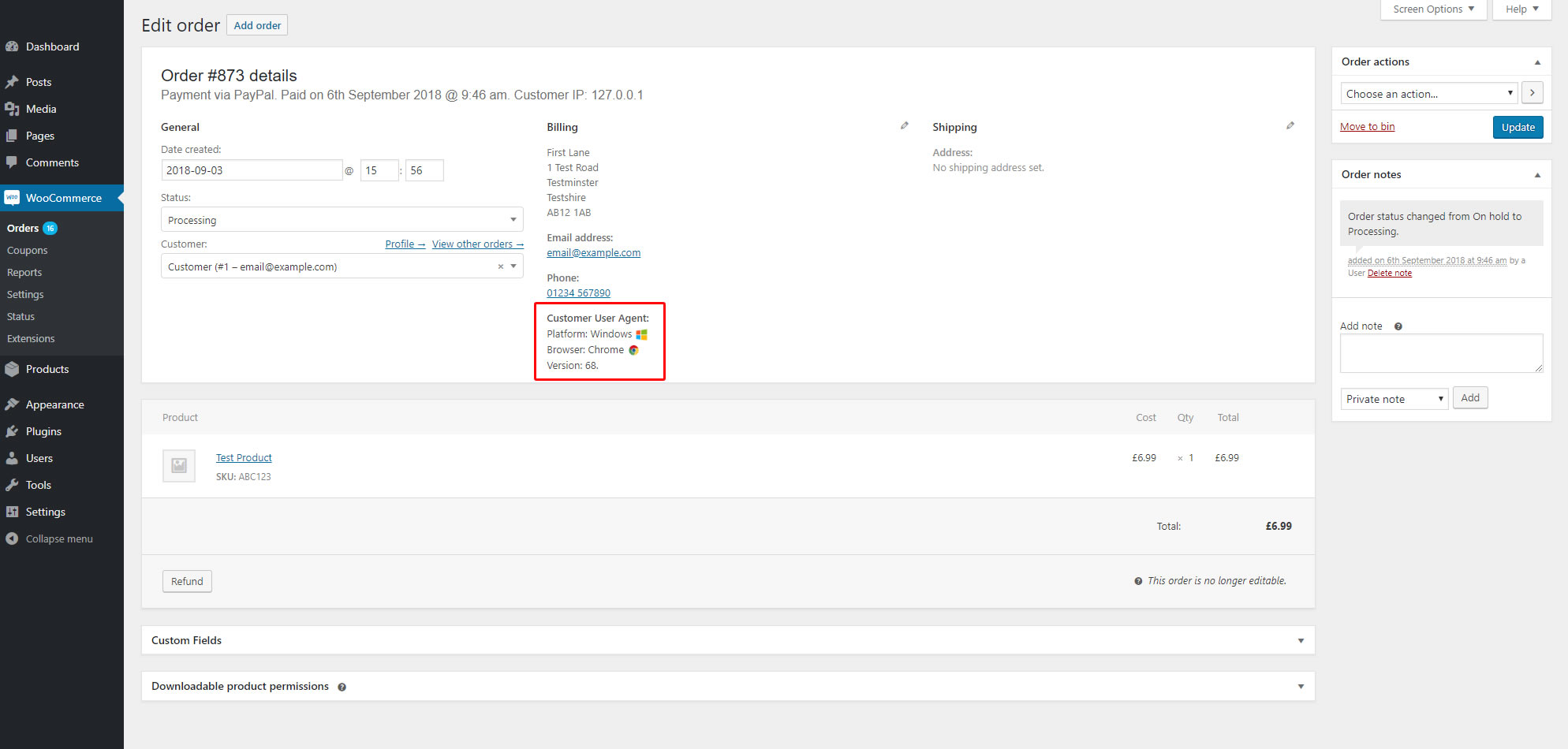
Single order view/edit page
Changelog
1.0
- Initial release
1.1.0
- Version updates
1.2.0
- New supported browsers/OS’s
- Version updates
- Name change
1.3.0
- New supported browsers/OS’s
- Version updates
- Better commenting