

Konto Checkout for WooCommerce
Have Konto create an electronic invoice and deliver a PDF or XML to your customer's inbox and a payment claim to their eBank in Iceland.
Plugin info
Maintenance & Compatibility
Maintenance score
Maintained • Last updated 128 days ago
Is Konto Checkout for WooCommerce abandoned?
Likely maintained (last update 128 days ago).
Compatibility
Similar & Alternatives
Explore plugins with similar tags, and compare key metrics like downloads, ratings, updates, support, and WP/PHP compatibility.
Description
In the checkout process, the customer can choose to get an electronic invoice (PDF) sent to their inbox and for the invoice to appear in their eBank – where they make their payment.
Konto users will have Konto automatically generate an invoice and bill their customers in their respective eBank. Konto provides connections to bookkeeping applications like Navision and makes it easy to generate a legit invoice, bill customers, monitor payment and book the transaction in your choice of accounting solutions.
Note: The plugin requires that Konto users have an API key.
IS: Áskrifendur á konto.is geta virkjað vefþjónustutengingu og fengið úthlutað API lykil sem þarf til að tengja þína vefverslun við reikningakerfi Konto.
Installation
Once you have installed WooCommerce on your WordPress instance, add this plugin –> view video and images on http://wcplugin.konto.is or follow these steps:
1a. Upload the plugin files to the /wp-content/plugins/konto directory OR
1b. Install the plugin through the WordPress plugins screen directly (add plugin and upload the zip file).
2. Activate the plugin through the ‘Plugins’ screen in WordPress.
3. Configure plugin. Insert the username and API key in the Checkout settings for the Konto payment plugin and save changes. See details on http://wcplugin.konto.is
Frequently Asked Questions
Yes, the plugin supports test mode.
Please follow the setup instructions on http://wcplugin.konto.is
Review feed
Screenshots
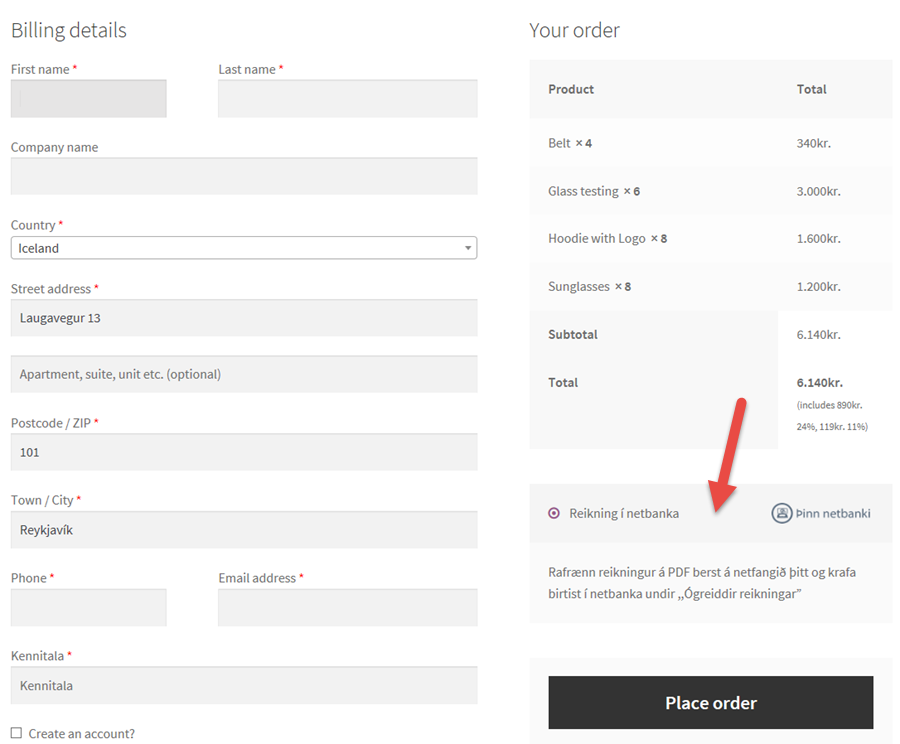
The Checkout screen where customer can select to get an eInvoice and pay via eBank

The settings screen for the plugin, under Checkout tab

The message seen by customer when they select Konto's payment method

The way to create, send and book invoices when the customer selects other payment method