
WooWIB – Payment Gateways Bank Indonesia
WooWIB - Payment Gateways Bank Indonesia plugin with 3 digits code payment
Plugin info
Maintenance & Compatibility
Maintenance score
Possibly abandoned • Last updated 1141 days ago • 2 reviews
Is WooWIB – Payment Gateways Bank Indonesia abandoned?
Possibly abandoned (last update 1141 days ago).
Compatibility
Similar & Alternatives
Explore plugins with similar tags, and compare key metrics like downloads, ratings, updates, support, and WP/PHP compatibility.
Description
** WooWIB – Payment Gateways Bank Indonesia **
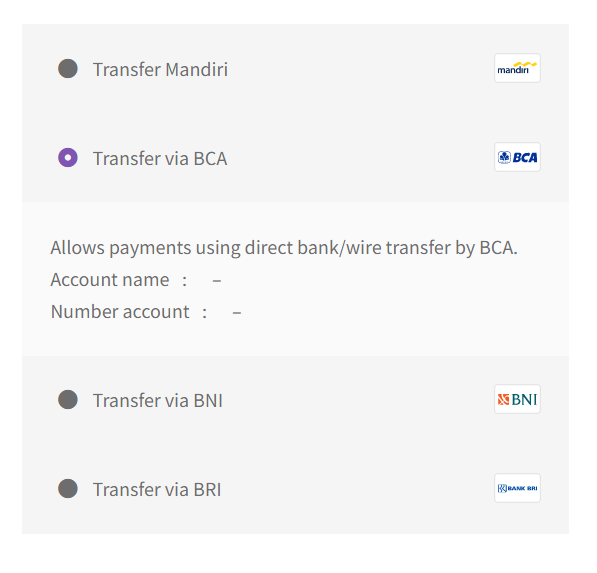
WooCommerce default provides 1 bank transfer payment gateway for all your bank accounts. And this WooCommerce extension which provides Indonesian banks (BCA, BNI, Mandiri and BRI) as payment method for checkout on WooCommerce. And give code payment to make it easier to check the transfer of consumer funds in the seller’s account. Code payment is 3 digits (random) added to total shopping automatically. This plugin does nothing except:
- Providing list of Indonesian Banks checkout
- Providing Bank information on order notes on the dashboard, customer email, etc
- Providing Payment code for checkout
Hopefully barokah & useful 🙂
Installation
- Go to
Pluginsin the Admin menu - Click on the button
Add new - Search for
WooWIB - Payment Gateways Bank Indonesiaand click ‘Install Now’ or click on theuploadlink to uploadwoo-payment-gateways-bank-indo-kode-payment.zip - Click on
Activate plugin - For manual install , upload
woo-payment-gateways-bank-indo-kode-paymentfolder to the/wp-content/plugins/directory - You can also download from Github
- Unzip the file
- Activate the plugin through the ‘Plugins’ menu in WordPress
Frequently Asked Questions
An answer to that question.
Review feed
Screenshots


Changelog
2.3.3
- Enhancement – some bux fix code payment
2.3.2
- Enhancement – account, number and some bux fix checkout page
2.3.1
- Enhancement – logo bank & some bux fix checkout page
2.3.0
- Enhancement – bux fix
- Dev – Add setting for minimal (default 1 ) – maximal (default 200 ) payment code
- Dev – Add for choose payment gateway active to payment code
2.2.5.2
- Enhancement – bux fix
2.2.5.1
- Enhancement – bux fix
2.2.5
- Change – Change plugin name from ‘Woo Payment Gateways Bank Indo & Kode Payment’ to ‘WooWIB – Payment Gateways Bank Indonesia’
- Dev – renamed index plugin file
- Dev – Add setting admin page for disable code payment
- Dev – Add setting menu and link to setting page
- Dev – Add donate link to in plugin list detail
- Dev – add style for payment method list / detail account.
- Update – update icon with smaller size to svg icon
2.2.4
- Enhancement – bux fix
2.2.3
- Enhancement – clean & improve style icon
2.2.2
- Enhancement – clean & improve the struktur code oop
- Update – improve payment method icon in checkout.
- Update – remove payment method title in checkout.
2.2.1
- Enhancement – clean & improve the struktur code oop
- Dev – add style for payment method list .
- Update – update installation instructions.
- Update – update License GPLv3.
- Fix – custom icons layout.
2.1.5
- Clean up.
- Fix – test and fix for newest version wordpress and woocommerce.
2.1.4
- Add BRI Bank .
- Update installation instructions.
- Add “settings” .
0.2.1.1
- Clean up.
0.2
- Clean up.
1.0.0
Thanks.