

Woocommerce Product Shipping Table Rates
While shopping on any ecommerce store, we often buy items which are delivered from different cities or states to us. Sometimes, this causes us to pay …
Plugin info
Maintenance & Compatibility
Maintenance score
Possibly abandoned • Last updated 2260 days ago
Is Woocommerce Product Shipping Table Rates abandoned?
Possibly abandoned (last update 2260 days ago).
Compatibility
Similar & Alternatives
Explore plugins with similar tags, and compare key metrics like downloads, ratings, updates, support, and WP/PHP compatibility.
Description
FREE VERSION DOCUMENTATION LINK
Overview
While shopping on any ecommerce store, we often buy items which are delivered from different cities or states to us. Sometimes, this causes us to pay some extra price for them in the form of shipping charges.
As for a seller, shipping charges can convert a profitable sales conversion into a loss, if not calculated properly.
To avoid this, we created the TABLE RATE SHIPPING PLUGIN. With this plugin, you can set custom shipping charges that will be applied every time an order is placed.
This plugin allows the admin to add or remove shipping charges on each product. These charges can be customized depending on the zones where the delivery will take place, the number of items or orders, the total weight of the items or the cart total.
FREE VERSION DOCUMENTATION LINK
Free features
- Option to add unlimited shipping methods and rules per shipping zones.
- Option to add Cart total based shipping.
- Option to add weight based shipping.
- Option to add cost per order.
- Only logged in users will see the shipping methods.
Take a look at how to set up Table Rate Shipping for Woocomerce
Premium WordPress Themes
Here is our premium wordpress theme
Our Website
Support Email
NOTE
- Our plugin support the Multisite Network.
Installation
- Install WordPress
- Go to your WordPress admin panel, and then to Plugins. Click on “Add New” and then upload the zip file of the plugin using the “Upload Plugin” button you can find on top of the screen.
- For the plugin to work as it should, WooCommerce plugin has to be installed and enabled.
Frequently Asked Questions
Review feed
Screenshots

Displays plugin settings.

Displays Shipping Rate table.
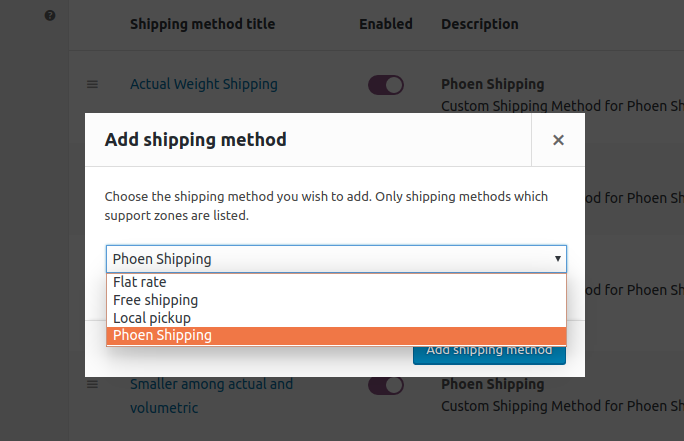
Add shipping method.

Lists of all the shipping methods added

Displays frontend view.