
Manually Approved Reviews for WooCommerce
Force WooCommerce product reviews to be manually approved.
Plugin info
Maintenance & Compatibility
Maintenance score
Possibly abandoned • Last updated 1132 days ago • 11 reviews
Is Manually Approved Reviews for WooCommerce abandoned?
Possibly abandoned (last update 1132 days ago).
Compatibility
Similar & Alternatives
Explore plugins with similar tags, and compare key metrics like downloads, ratings, updates, support, and WP/PHP compatibility.
Description
With this plugin, newly written WooCommerce product reviews will be in a pending (hold) status until manually approved.
Product reviews in WooCommerce are immediately available for everyone to see (this can’t be changed without this plugin). WooCommerce ignores the WordPress “comment must be manually approved” discussion setting. With this plugin, new product reviews must be manually reviewed and approved before being visible on the front-end.
Installation
For an automatic installation through WordPress:
- Select Add New from the WordPress Plugins menu in the admin area.
- Search for Manually Approved Reviews for WooCommerce.
- Click Install Now, then Activate Plugin.
For manual installation via FTP:
- Upload the woo-reviews-manually-approved folder to the /wp-content/plugins/ directory.
- Activate the plugin from the Plugins screen in your WordPress admin area.
To upload the plugin through WordPress, instead of FTP:
- From the Add New plugins page in your WordPress admin area, select the Upload Plugin button.
- Select the woo-reviews-manually-approved.zip file, click Install Now and Activate Plugin.
Frequently Asked Questions
No. All you need to do is install and activate the plugin and new product reviews will require approval. To turn it off, simply deactivate the plugin.
The plugin creates a hook that is triggered whenever someone writes a product review. It then changes the review to a pending (hold) status which requires the review to be manually reviewed and approved (or deleted).
Nope. New product reviews are immediately available for anyone to read, which is why this plugin exists.
In the WordPress admin area under Comments.
Review feed
Screenshots

Activate the Manually Approved Reviews for WooCommerce plugin.

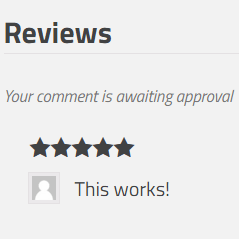
New reviews will be in pending status until manually approved.
Changelog
v1.3.0 – 2/24/2023
- Verified working with WordPress v6.2
v1.2 – 2/1/2021
- Updated contact email address, verified working with WordPress v5.6
v1.1 – 3/23/2016
- Added check to verify WooCommerce was installed and activated
v1.0 – 3/22/2016
- Initial release