

WPC Smart Compare for WooCommerce
It helps customers compare products with mighty AJAX, doesn't require opening a new page or iframe, and allows drag-and-drop functionality.
Plugin info
Maintenance & Compatibility
Maintenance score
Maintained • Last updated 122 days ago • Support resolved 0% • 44 reviews
Is WPC Smart Compare for WooCommerce abandoned?
Likely maintained (last update 122 days ago).
Compatibility
Similar & Alternatives
Explore plugins with similar tags, and compare key metrics like downloads, ratings, updates, support, and WP/PHP compatibility.
Description
WPC Smart Compare is an optimal solution that brings about beyond-expectation features for improving user experience and enhance the sales strategy on your online WooCommerce shop. Advanced comparing features, detailed settings with extensive options for further customizing the Compare button, comparison table & comparison bar, powerful responsiveness and mobile friendly interface are things that you should not overlook from this plugin. A truly sharp comparing tool for powering your WooCommerce shop and obtaining customers’ trust. Let’s put this Smart Compare in a comparison now.
Live demo
Curious about how WPC Smart Compare works? Visit our live demo 01 or live demo 02 to have a play around. Try out each and every feature listed here to give your business a real boost.
Features
- Powerful AJAX functions (there’s no need to open a new tab or iframe)
- Drag and drop to rearrange product order in the comparison line
- Switch between horizontal and vertical view of comparison table (coming soon)
- Adjust the visibility of Compare button for products in selected categories
- Save login data for registered/subscribed users (same function as the Wishlist plugin)
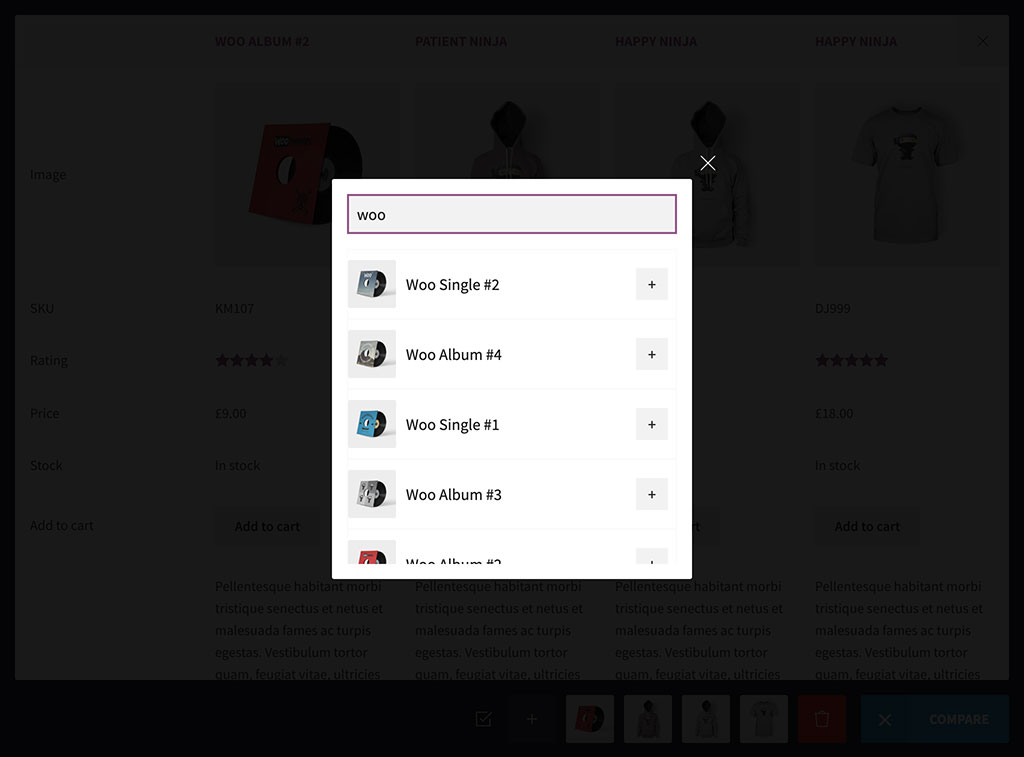
- Automatically prompt related products when searching for items in the comparison table
- Prompt new products instantly when the table is empty or no related products found
- Enable/disable Quick Comparison Table for related products
- Customize the position of Quick Comparison Table on single product pages
- Add new products to the comparison list instantly by pressing the search button
- Fully responsive & mobile friendly view on any touch devices
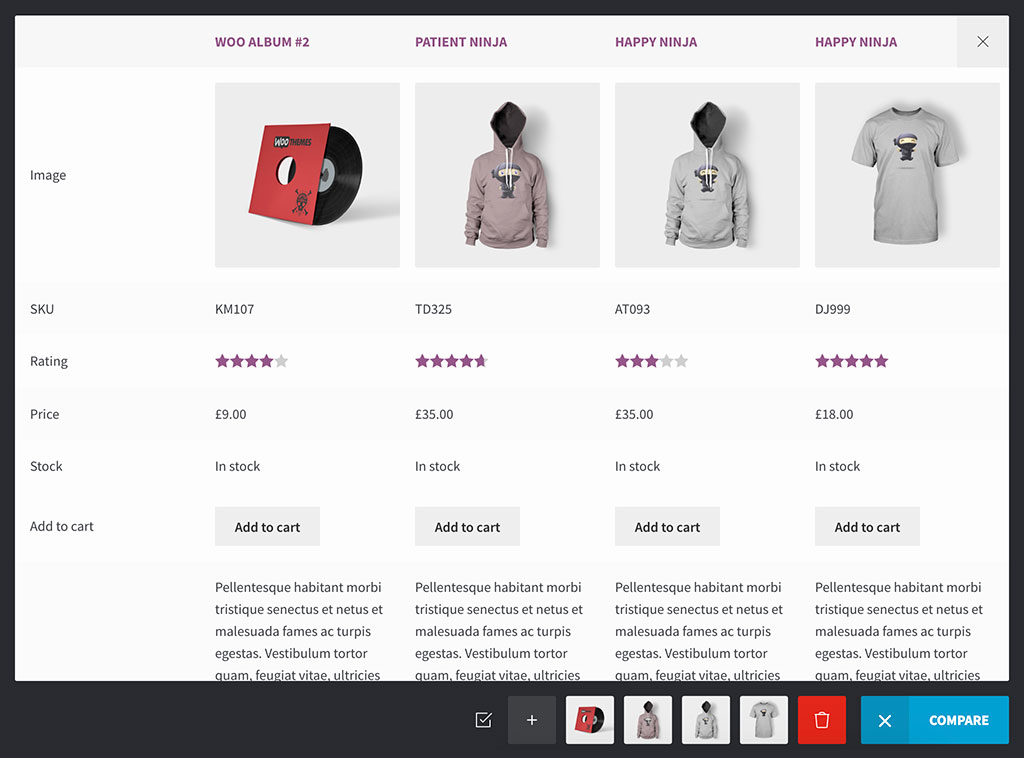
- Dynamic comparison table: sticky first column & row
- Using custom shortcodes to add buttons to specific pages
- Unlimited choice of bar background color and button color
- Hide/show fields for a clearer view in comparison table
- Smart filter by a selected taxonomy (category, color, size, etc.)
- WPML compatible for building multilingual sites
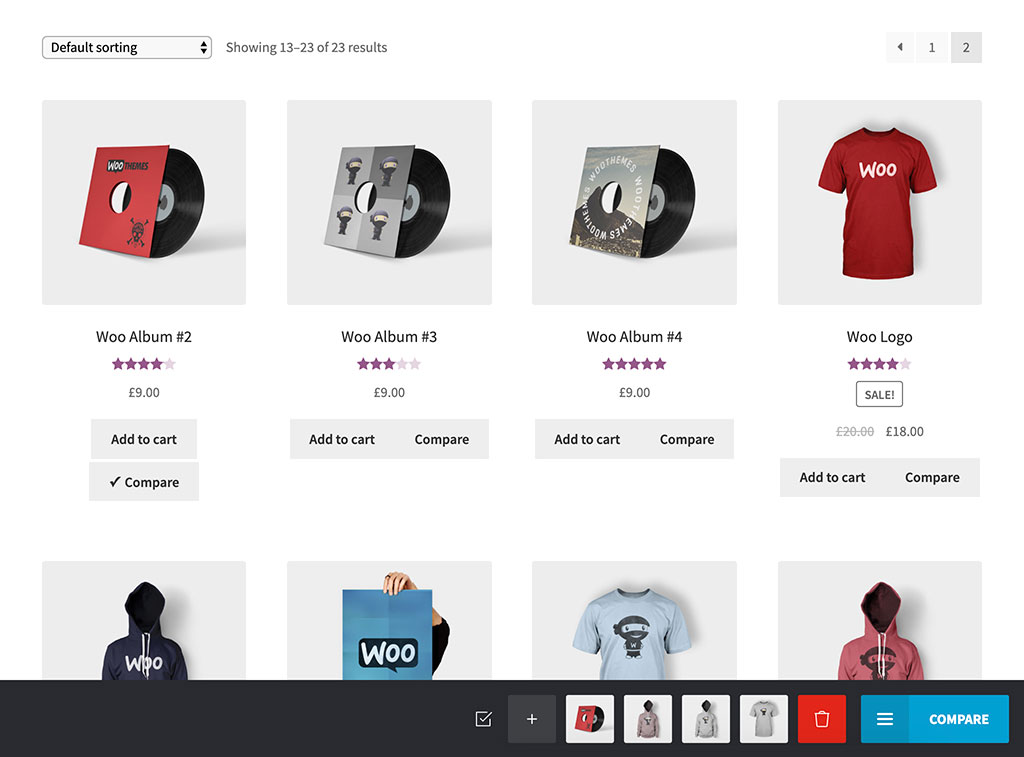
- Compare button advanced settings: type, text, visibility, categories, product removal
- Comparison table advanced settings: fields, attributes, sticky column & row
- Comparison bar settings: Add More button, Remove All button, bar appearance, …
- HOT: Comparison methods – hide similarities and highlight differences
- HOT: Share button – social media sharing via links
Premium Version
- Support customization of all attributes, custom attributes
- Support customization of all product fields, custom fields
- HOT: Free support of compare button’s adjustment to customers’ theme design
Need more features?
Please try other plugins from us:
Installation
- Please make sure that you installed WooCommerce
- Go to Plugins in your dashboard and select “Add New”
- Search for “WPC Smart Compare”, Install & Activate it
- Now you can see the Compare button on each product
- Go to settings page to configure the compare button/bar/table as you want
Frequently Asked Questions
To integrate with a theme, please use bellow filter to hide the default buttons.
add_filter( 'woosc_button_position_archive', '__return_false' );
add_filter( 'woosc_button_position_single', '__return_false' );
After that, use the shortcode to display the button where you want.
echo do_shortcode('[woosc id="{product_id}"]');
Example:
echo do_shortcode('[woosc id="99"]');
Review feed
Screenshots

Changelog
6.5.3
- Updated: Optimized the code
6.5.2
- Added: Import/export settings
- Updated: Compatible with WP 6.8 & Woo 10.3
6.5.1
- Fixed: Doesn’t work with variations
- Updated: Compatible with WP 6.8 & Woo 10.2
6.5.0
- Fixed: Minor CSS/JS issue
- Added: Hide comparison bar when closed
6.4.9
- Added: Filter hook ‘woosc_quick_table_limit’
6.4.8
- Fixed: Security issue on the button
- Updated: Compatible with WP 6.8 & Woo 10.0
6.4.7
- Fixed: Security issue on the button shortcode
6.4.6
- Fixed: Minor CSS/JS issue in the backend
- Updated: Compatible with WP 6.8 & Woo 9.9
6.4.5
- Updated: Optimized the code
- Updated: Compatible with WP 6.8 & Woo 9.8
6.4.4
- Fixed: Compatible with ACF fields
6.4.3
- Updated: Optimized the code
- Updated: Compatible with WP 6.7 & Woo 9.5
6.4.2
- Updated: Compatible with WP 6.7 & Woo 9.4
6.4.1
- Fixed: Minor CSS/JS issues
6.4.0
- Added: Smart filter by a selected taxonomy (category, color, size, etc.)
6.3.0
- Fixed: Show private products for logged-in users
- Added: Filter hook ‘woosc_product_visible’
6.2.9
- Updated: Optimized the code
- Updated: Compatible with WP 6.6 & Woo 9.3
6.2.8
- Updated: Use WC_AJAX for frontend
6.2.7
- Added: Option to reload the count
6.2.6
- Fixed: Minor CSS/JS issue in the backend
6.2.5
- Updated: Optimized the code
- Updated: Compatible with WP 6.5 & Woo 8.8
6.2.4
- Added: “Remove all” button on the comparison page
6.2.3
- Updated: Search for a custom field
6.2.2
- Updated: Optimized the code
- Updated: Compatible with WP 6.4 & Woo 8.7
6.2.1
- Fixed: Minor CSS/JS issue for the backend
6.2.0
- Updated: Compatible with WP 6.4 & Woo 8.5
6.1.9
- Added: Enable/disable variations compare
6.1.8
- Updated: Optimized the code
6.1.7
- Added: New option “Disable for unauthenticated users”
6.1.6
- Added: Filter hook ‘woosc_hide_empty_row’
- Updated: Optimized the code
6.1.5
- Fixed: Minor CSS/JS issue for the backend
- Added: Filter hook ‘woosc_button_rel’
6.1.4
- Added: Function ‘get_user_key’ & ‘get_products’
- Updated: Optimized the code
6.1.3
- Updated: Compatible with WP 6.3 & Woo 8.0
6.1.2
- Updated: Optimized the code
6.1.1
- Fixed: CSRF vulnerability
6.1.0
- Updated: Optimized the code
6.0.1
- Added: Custom text/shortcode field
6.0.0
- Updated: New interface for fields manager
5.5.0
- Fixed: Configure fields for quick comparison table
5.4.8
- Fixed: Minor CSS/JS issue for the backend
5.4.7
- Fixed: Minor CSS issue
5.4.6
- Added: Parameter ‘products’ for shortcode [woosc_list] to show the comparison table of selected products
5.4.5
- Added: “Above title” position
5.4.4
- Updated: Optimized the code
5.4.3
- Added: Comparison menu on My Account page
5.4.2
- Updated: Optimized the code
5.4.1
- Fixed: Minor CSS/JS issue for the backend
5.4.0
- Updated: Optimized the code
5.3.9
- Fixed: Images don’t show when printing on Safari
5.3.8
- Added: Print button to print the comparison table
5.3.7
- Fixed: Minor issue for variations
5.3.6
- Added: Option to enable “Hide similarities” and “Highlight differences” by default
5.3.5
- Updated: Optimized the code
5.3.4
- Fixed: JQMIGRATE: jQuery.fn.resize() event shorthand is deprecated
5.3.3
- Fixed: 404 error when the comparison page is a child page
5.3.2
- Fixed: Minor JS issue in the backend
5.3.1
- Added: Function ‘get_settings’ & ‘get_setting’
- Updated: Optimized the code
5.3.0
- Added: Quick comparison table on single product page
5.2.1
- Added: Show related products as default when opening the search popup
5.2.0
- Added: Icon picker for the button
5.1.7
- Fixed: Filter hook ‘woosc_field_value’
5.1.6
- Fixed: Compatible with WPML
5.1.5
- Added: Product adding option, prepend or append
5.1.4
- Fixed: Notice on settings page
5.1.3
- Fixed: Can’t change button position
5.1.2
- Updated: Optimized the code
5.1.1
- Fixed: Minor CSS/JS issues
5.1.0
- Added: Compare sidebar
5.0.0
- Added: Enable show the message only when adding to the compare
- Updated: Optimized the code
…
1.0.0
- Released