

Woo Tracking for The Courier Guy
This is a simple plugin to display tracking information for The Courier Guy on your WooCommerce orders page.
Plugin info
Maintenance & Compatibility
Maintenance score
Possibly abandoned • Last updated 3041 days ago • 4 reviews
Is Woo Tracking for The Courier Guy abandoned?
Possibly abandoned (last update 3041 days ago).
Compatibility
Similar & Alternatives
Explore plugins with similar tags, and compare key metrics like downloads, ratings, updates, support, and WP/PHP compatibility.
Description
This plugin adds a meta box on WooCommerce admin order pages where you can add waybill numbers on orders.
It then display a tracking action button on the admin order listing page and a customer can then view their orders on the orders page with tracking which will list the waybill number, recipient name and tracking events.
Installation
- Upload
woo-tracking-the-courier-guyto the/wp-content/plugins/directory - You can also upload the zip file in the admin area in your WordPress installation
- Activate the plugin through the ‘Plugins’ menu in WordPress
- Enter the waybill number from The Courier Guy on your relevant order page
Frequently Asked Questions
Installation Instructions
- Upload
woo-tracking-the-courier-guyto the/wp-content/plugins/directory - You can also upload the zip file in the admin area in your WordPress installation
- Activate the plugin through the ‘Plugins’ menu in WordPress
- Enter the waybill number from The Courier Guy on your relevant order page
A question that someone might have
An answer to that question.
Review feed
Screenshots

Enter tracking number on relevant order and save it. There is also a link which will open The Courier Guy website tracking page using the waybill number.

We have also added a tracking button on the orders listing page if a tracking number has been saved for an order. It will open The Courier Guy's tracking page with that waybill number.
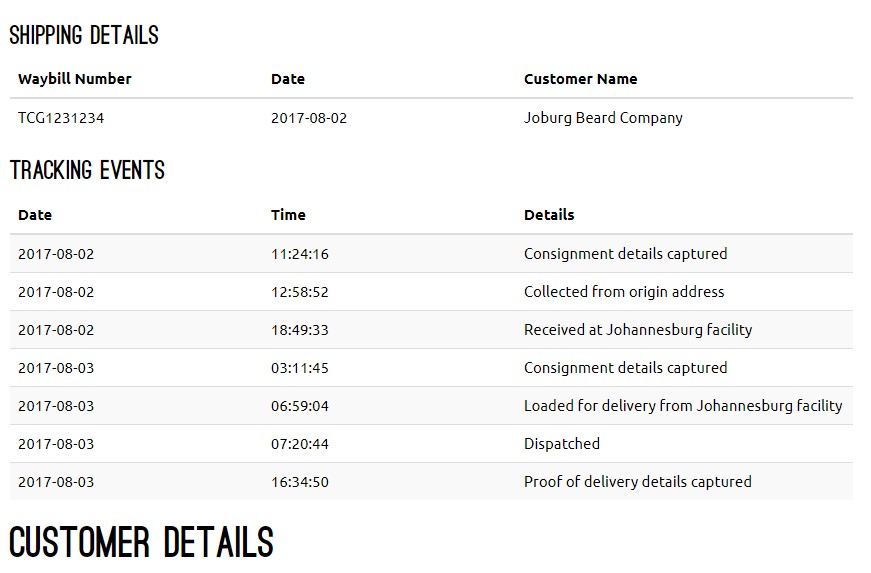
On the order page, customers will be able to see tracking for the order that they are viewing. It's displayed in a table and there is a div around it with a class that developers can use the style it.
Changelog
1.0.0
- Added simple plugin for WooCommerce tracking for The Courier guy with Bootstrap 3 modal and iFrame
1.0.1
- Removed iFrame and added API call to display tracking info on orders page and added settings page where you can enter your account username and password.
1.0.2
- Removed username and password settings page. You can now install the plugin without entering your account details and is not limited to one account.