

Woocommerce Custom Tab Lite
With the Custom Tabs plugin, You can give your products a unique touch by providing specific tabs for their products.
Plugin info
Maintenance & Compatibility
Maintenance score
Possibly abandoned • Last updated 2260 days ago • 1 reviews
Is Woocommerce Custom Tab Lite abandoned?
Possibly abandoned (last update 2260 days ago).
Compatibility
Similar & Alternatives
Explore plugins with similar tags, and compare key metrics like downloads, ratings, updates, support, and WP/PHP compatibility.
Description
FREE VERSION LIVE DEMO | FREE VERSION DOCUMENTATION LINK
Overview
With the custom tabs plugin you can add more tabs to your product to give a better picture of your products on your Ecommerce store.
It’s a useful plugin that will help you customize your product descriptions so that your customers get to browse and know more about your products and services and the best possible fashion
With this plugin you can:
- Define specific tabs for the description of your products
- Customize your product descriptions in line with your product range
Custom Tab Free Features:
- The plugin is compatible with our Support Ticket System by Phoeniixx plugin
- For every tab you get to give a title to your tab as well as the space where you can add the description that is line with the title that you have given to that tab.
- Any additional tabs that you create with the Custom Tabs plugin will be applicable to all the products on your website.
- The custom tabs plugin gives you the freedom to create as many tabs as you see fit for your product range.
FREE VERSION LIVE DEMO | FREE VERSION DOCUMENTATION LINK
Take a look at how to create custom tab in product page in woocommerce
Premium Features:
PREMIUM VERSION LIVE DEMO | PREMIUM VERSION LINK | DOCUMENTATION LINK
- Global Tab Option allows you to have a common tab on all of the product pages, irrespective of their product categories.
- Category Tab Option allows you to show a tab that is common only to same-category products. Tab specifications could only vary from category to category.
- Product-Specific Tab Option lets you have a tab that is unique to a particular product page.
- Tab Placement Option lets you sequence your tabs as per your priority.
- You could Sort, Re-order, Rename or Enable/Disable the default tabs as per your requirement.
- You can also add shortcode in the custom tabs.
PREMIUM VERSION LIVE DEMO | PREMIUM VERSION LINK | DOCUMENTATION LINK
Premium WordPress Themes
Here is our premium wordpress theme
Our Website
Support Email
NOTE
- Our plugin support the Multisite Network.
Installation
- Install WordPress
- Go to your WordPress admin panel, and then to Plugins. Click on “Add New” and then upload the zip file of the plugin using the “Upload Plugin” button you can find on top of the screen.
- For the plugin to work as it should, WooCommerce plugin has to be installed and enabled.
Frequently Asked Questions
** Coming soon
Review feed
Screenshots
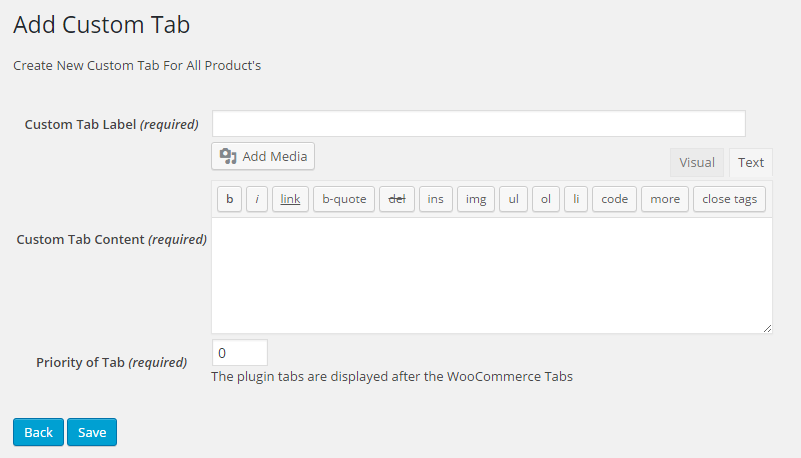
This screenshot shows the page to add a new tab.

By this page you can Enable/Disable your plugin.

This screenshot shows the page to edit existing tab.

This screenshot shows how custom tabs are shown on your site.

You can also add shortcode in the custom tabs.

You could Sort, Re-order, Rename or Enable/Disable the default tabs as per your requirement.
Changelog
1.4.4 – 24/01/2020
- Compatible with the latest version of woocommerce
1.4.3 – 18/11/2019
- Compatible with the latest version of wordpress
1.4.2 – 06/11/2019
- Compatible with the latest version of woocommerce
1.4.1 – 21/08/2019
- Compatible with the latest version of woocommerce
1.4.0 – 16/05/2019
- Compatible with the latest version of woocommerce and wordpress
1.3.9 – 28/02/2019
- Compatible with the latest version of woocommerce and wordpress
1.3.8 – 13/12/2018
- Compatible with the latest version of woocommerce and wordpress
1.3.7 – 06/11/2018
- Compatible with the latest version of woocommerce
1.3.6 – 07/08/2018
- Compatible with the latest version of woocommerce
1.3.5 – 13/04/2018
- Compatible with the latest version of woocommerce
1.3.4 – 26/10/2017
- Compatible with the latest version of woocommerce
1.3.3 – 26/09/2017
- video tutorial added
1.3.2 – 28/07/2017
- Bug fixes.
1.3.1 – 19/04/2016
- Bug Fixes.
1.3 – 05/11/2015
- Bug Fixes.
1.2 – 14/10/2015
- Fix shortcode functionallity in tabs.
1.1 – 28/07/2015
- Fix – Compatibility issues.
1.0
- Initial release.