

Filter Orders by Product for WooCommerce
Simplify order management by filtering WooCommerce orders by any specific product or product category using this plugin
Plugin info
Maintenance & Compatibility
Maintenance score
Stale • Last updated 193 days ago • 15 reviews
Is Filter Orders by Product for WooCommerce abandoned?
Likely maintained (last update 193 days ago).
Compatibility
Developers
Similar & Alternatives
Explore plugins with similar tags, and compare key metrics like downloads, ratings, updates, support, and WP/PHP compatibility.
Description
Have you ever wanted to filter your order page results by a specific product? With this plugin, now you can!
Once installed, a new filter dropdown will appear on the WooCommerce Orders screen, displaying a list of all products. Simply select a product and click the “Filter” button to view orders containing only that product.
This plugin supports filtering orders by:
- Product Name
- Product Category
Note: This plugin is compatible with both WooCommerce’s new HPOS (High-Performance Order Storage) and the legacy WordPress posts storage. Whether you’re using HPOS or the traditional storage method, this plugin will work seamlessly.
Installation
There are three different ways to install this plugin, as well as any other plugin from the WordPress.org repository.
Automatic Installation via WordPress Dashboard
- Log in to your WordPress admin dashboard.
- Navigate to
Plugins>Add New. - Search for “Filter Orders by Product for WooCommerce”.
- Click
Install Nownext to the plugin. - Once installed, click
Activate.
Manual Upload through WordPress Dashboard
- Download the “Filter Orders by Product for WooCommerce” plugin ZIP file.
- Log in to your WordPress admin dashboard.
- Navigate to
Plugins>Add New. - Click
Upload Plugin. - Click
Choose File, select the plugin ZIP file you downloaded, and clickInstall Now. - Once the installation is complete, click
Activate Plugin.
Installation via FTP
- Download the “Filter Orders by Product for WooCommerce” plugin ZIP file and extract it to your computer.
- Using an FTP client, connect to your web server.
- Navigate to
/wp-content/plugins/. - Upload the extracted plugin folder to the
/wp-content/plugins/directory on your server. - Log in to your WordPress admin dashboard.
- Navigate to
Plugins. - Locate “Filter Orders by Product for WooCommerce” in the list and click
Activate.
After the installation is complete, a new filter will appear on the WooCommerce Orders page.
Frequently Asked Questions
Currently, this plugin only works for published products. To make it work for all product statuses (e.g., draft, private), add the following code to your theme’s functions.php file:
add_action( 'wfobp_product_status', 'filter_order_by_product_status' );
function filter_order_by_product_status(){
    return 'any';
}
Review feed
Fiter Orders by Product Works Great
Great
Excellent plugin
Good improvement
Screenshots
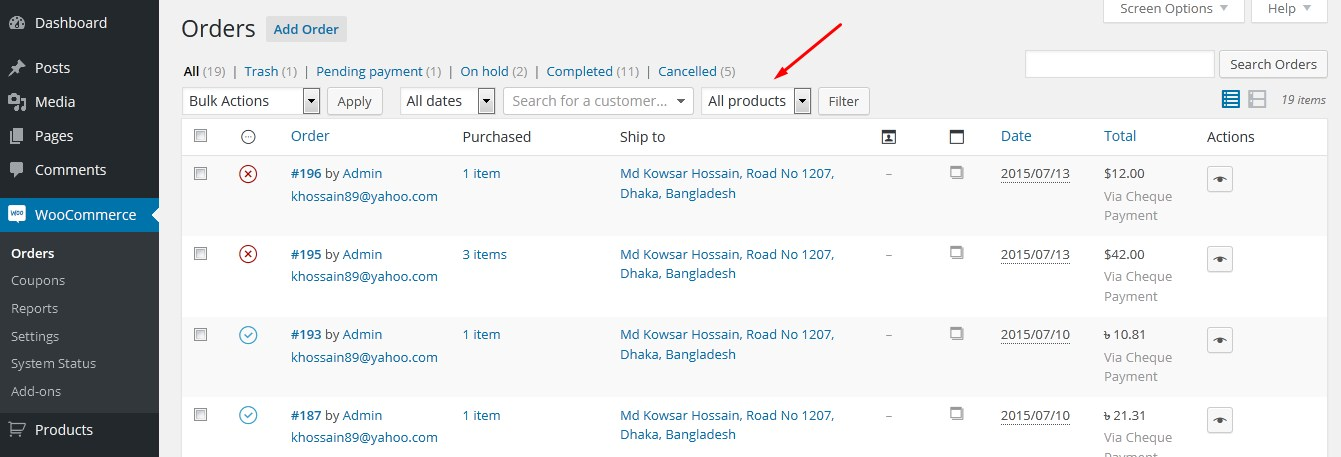
From admin panel, Click on "WooCommerce>Orders" to visit the Orders screen. There you'll see a new dropdown filter.
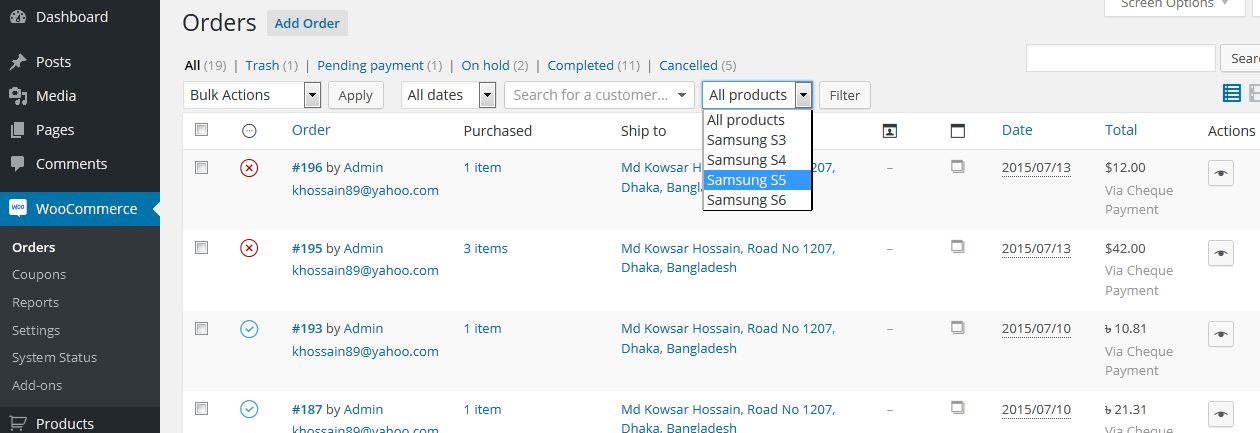
Click on that dropdown and you'll see a list of all products. Select a product and click on "Filter" button. It'll show up the orders which contains only that specific product.
Changelog
4.1.2 – Sep 21, 2025
- Tweak: Plugin name updated
4.1 – May 20, 2024
- Tweak: Readme updated
4.0 – Dec 31, 2023
- Tweak: Added WooCommerce HPOS support
3.3 – Aug 20, 2023
- Fix: Resolved PHP notice caused by incorrect use of the
is_search()function
3.1
- Readme updated
3.0
- New: Now it’s possible to filter by Product Category
- Code refactored
2.0.7
- Fix: Products with same name only appeared once before
2.0.6
- Added hook for changing product status
2.0.5
- Fixed SQL injection bug
2.0.4
- Improved code
2.0.3
- Fix: Language
2.0.2
- Fixed translation bug (Thanks to Kasperta)
2.0.1
- Fixed a minor bug
2.0.0
- New: search dropdown
- Fixed a major bug
1.0.0
- Initial release