

Woocommerce Social Media Share Buttons
Tags: facebook, twitter, pinterest, google plus, linkedin, tumblr, stumbleupon, share button, social media buttons, social media share buttons, woocom …
Plugin info
Maintenance & Compatibility
Maintenance score
Possibly abandoned • Last updated 3660 days ago • Support resolved 0% • 16 reviews
Is Woocommerce Social Media Share Buttons abandoned?
Possibly abandoned (last update 3660 days ago).
Compatibility
Developers
Similar & Alternatives
Explore plugins with similar tags, and compare key metrics like downloads, ratings, updates, support, and WP/PHP compatibility.
Description
By default the plugin adds social media share buttons to your woocommerce store products page (just below the ‘add to cart’ button). With the addition of a shortcode you can use it to add social media share buttons in posts, pages, products, events, widget etc.
You can also customize the plugin with the following features:
-
Pick from 4 layout options, button, button with counter, box with counter custom button images.
-
Select which social media share buttons to display. Pick from:
- Google+
- Tumblr
- StumbleUpon
- VKontakte
-
Use shortcode to add social media share buttons to posts, pages, products, events etc. [woocommerce_social_media_share_buttons]
-
Add shortcode to your WordPress theme, or php widget.
Installation
- Download the Woocommerce Social Media Share Buttons plugin.(woocommerce-social-media-share-buttons.zip file)
-
Extract the zip file to the ‘/wp-content/plugins/’ directory.
-
Activate the plugin through the ‘Plugins’ menu in the WordPress admin area.
- Configur your share buttons via the ‘Share Buttons’ menu option in the left admin area menu.
Frequently Asked Questions
Send us an email to [email protected] and we will try to answer them.
Installation Instructions
- Download the Woocommerce Social Media Share Buttons plugin.(woocommerce-social-media-share-buttons.zip file)
-
Extract the zip file to the ‘/wp-content/plugins/’ directory.
-
Activate the plugin through the ‘Plugins’ menu in the WordPress admin area.
- Configur your share buttons via the ‘Share Buttons’ menu option in the left admin area menu.
I will not be adding a Instragram share button to the plugin. Instagram does not actually support image sharing the same as facebook, pinterest etc. do.
The only way to post a picture to Instagram is by uploading it yourself as Instagram specifically don’t want users posting/sharing other peoples photos on its platform.
https://help.instagram.com/158826297591430
Facebook is a picky social media for sharing and looks for open graph meta tags in your sites code. This plugin includes an option to automatically add these tags, so if you are having trouble with facebook share, turn this on.
However if you have another SEO plugin installed, I recommend leaving them off, else you may have duplicate meta tags.
You can trouble shoot facebook share using their debug tool: https://developers.facebook.com/tools/debug/
Review feed
Screenshots

Woocommerce Social Media Share Buttons Settings
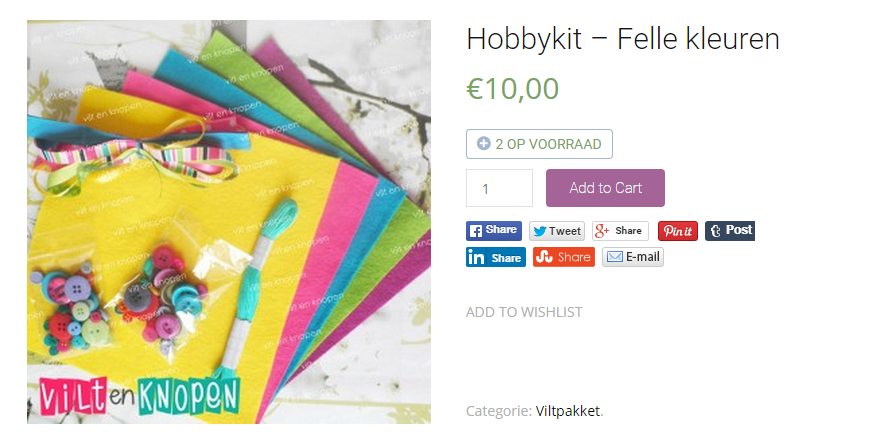
Woocommerce Social Media Share Buttons Front End
Changelog
1.0.0
First version, no changes
1.0.1
Small CSS update
1.1.0
CSS update, New share platform (VKontakte) and .mo/.po files added.
1.1.1
Small CSS fix
1.1.2
Small CSS fix
1.1.3
Shortcode placement fix
1.1.4
Small CSS fix
1.2.0
Added open graph option to help sharing settings.
1.2.1
Fixed pinterest, added share title and support for YITH Quickview
1.3.0
Checked for latest WooCommerce update, added extra customisation options like email template, share icon and more.