
WoPo File Converter
WoPo File Converter is an online file converter that supports nearly all audio, video, document, ebook, archive, image, spreadsheet, and presentation …
Plugin info
Maintenance & Compatibility
Maintenance score
Stale • Last updated 210 days ago
Is WoPo File Converter abandoned?
Likely maintained (last update 210 days ago).
Compatibility
Similar & Alternatives
Explore plugins with similar tags, and compare key metrics like downloads, ratings, updates, support, and WP/PHP compatibility.
Description
WoPo File Converter is an online file converter that supports nearly all audio, video, document, ebook, archive, image, spreadsheet, and presentation formats.
You can add the shortcode [wopo-file-converter] to the page where you want to display the converter form. To get started, use the form button and select files to convert from your computer.
WoPo File Converter Pro
- Unlimited files converted
- Convert your files via your self-hosting
- Premium Converter Form Style
- Input file extensions (e.g., enter ‘.pdf’ for the user to only be able to upload PDFs).
- Shortcodes with input and output file parameters (e.g., [wopo-file-converter input=”.doc” output=”.pdf”] are for users to select only .doc file to convert to .pdf file). ** NEW **
Demo Online: https://fileconverter.wopo.cc/
Buy it now: https://web.wopo.cc/product/wopo-file-converter-pro/
Video Tutorial: https://www.youtube.com/watch?v=SULHL6RIhvQ&list=PLkY7T3Q1c1U8_CU1BRxO015aaxnQL2XSL
Icons made by photo3idea_studio from www.flaticon.com
Installation
- Upload the plugin files to the
/wp-content/plugins/wopo-file-converterdirectory, or install the plugin through the WordPress plugins screen directly. - Activate the plugin through the ‘Plugins’ screen in WordPress
- Add shortcode [wopo-file-converter] to page you want to show app windows
Frequently Asked Questions
YES, we are using CloudConvert APIs. Our plugin get list file extension and convert engine data from CloudConvert API. You can read more about CloudConvert API on link below:
* CloudConvert API document: https://cloudconvert.com/api/v2
* CloudConvert API Terms of Use: https://cloudconvert.com/terms
We are always looking for feedback from you. Whether it’s a completely new plugin or adding some custom functionality to any existing plugin, we are always ready to do that. You can contact us at [email protected]
Review feed
Screenshots
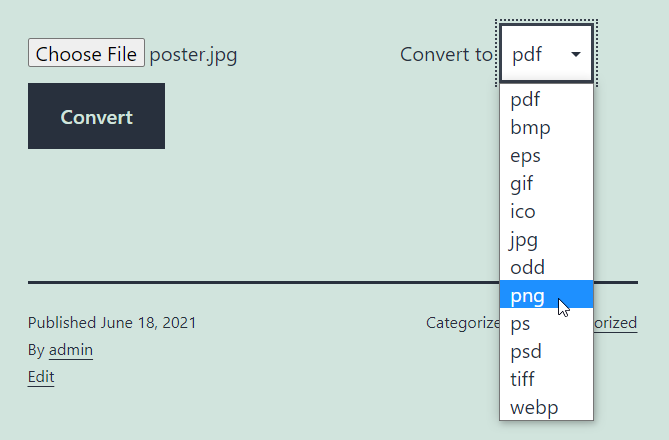
Main screenshot
Changelog
1.2.3 (September 4, 2025)
- update website domain and test wordpress 6.8.2
1.2.2 (December 14, 2024)
- Add required PHP >= 8.2.0 to update and install
1.2.1 (December 14, 2024)
- Update cloudconvert sdk 3.4.2. Requires PHP: >= 8.2.0
1.2.0 (December 28, 2023)
- Added option for Pro version Style 2
1.1.0 (November 29, 2023)
- Added option for input file extensions in the Pro version. Requires PHP: >= 8.1.0
1.0.2
- Added form class for Style 1
1.0.1
- Compatibility with WoPo File Converter Pro version
1.0
- Initial release