
Word Counter Plus
🔥 Supercharge your content workflow with Word Counter Plus — the ultimate tool for tracking, sorting, and filtering word counts in your WordPress post …
Plugin info
Maintenance & Compatibility
Maintenance score
Maintained • Last updated 160 days ago • 1 reviews
Is Word Counter Plus abandoned?
Likely maintained (last update 160 days ago).
Compatibility
Similar & Alternatives
Explore plugins with similar tags, and compare key metrics like downloads, ratings, updates, support, and WP/PHP compatibility.
Description
🔥 Supercharge your content workflow with Word Counter Plus — the ultimate tool for tracking, sorting, and filtering word counts in your WordPress posts!
Designed for bloggers, writers, editors, and content teams, this powerful yet lightweight plugin automatically calculates and displays the word count of each post — directly inside your admin dashboard. Now includes a Word Count Filter to help you quickly find posts by length ranges.
Key Features:
✅ Automatic Word Count Calculation – Instantly counts words when you create or update a post.
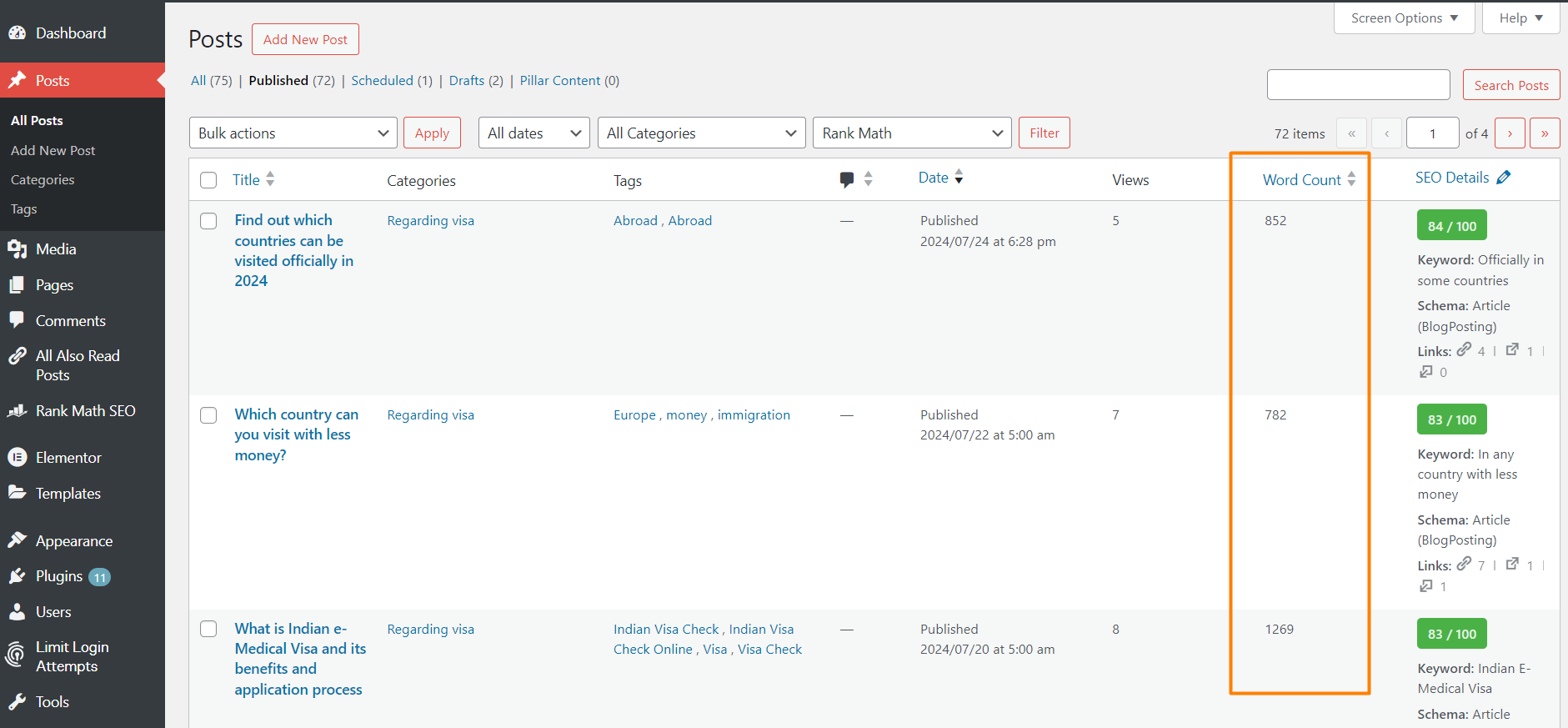
📊 Word Count Column – Adds a sortable ‘Word Count’ column to the Posts table in the admin dashboard.
🔍 Word Count Filter – Easily filter posts by word count ranges like 0–600, 601–1000, and beyond.
🧩 Seamless Integration – Designed to fit naturally into the WordPress interface with no extra clutter.
⚙️ Lightweight & Efficient – No performance hit; updates word count only on save or update.
🎯 Writing Goal Support – Great for content creators targeting specific word counts.
Stay organized, improve readability, and meet your editorial goals with precision. Whether you’re managing a blog, magazine, or marketing site, Word Counter Plus gives you the insights you need — at a glance.
Short Description
🔥 Supercharge your content workflow with Word Counter Plus — the ultimate tool for tracking, sorting, and filtering word counts in your WordPress posts!
Video Tutorial
Will be added soon.
Installation
Frequently Asked Questions
The Word Counter Plus plugin automatically calculates the word count of each post as you create or update your content. It then displays the word count in a new ‘Word Count’ column in the Posts table of your WordPress dashboard.
Yes, the word count is updated automatically every time you save or update a post. You don’t need to perform any additional actions.
No, the Word Counter Plus plugin is designed to be lightweight and efficient. It only performs word count calculations during post save and update operations, ensuring minimal impact on your website’s performance.
Currently, the Word Counter Plus plugin is designed to work with the default post type. We are working on adding support for custom post types in future updates.
Yes, you can sort your posts by word count by clicking on the ‘Word Count’ column header in the Posts table.
No, the Word Counter Plus plugin only counts words in the main content area of each post. It does not include words from custom fields or meta boxes in the word count.
Yes, we ensure that the Word Counter Plus plugin is always compatible with the latest version of WordPress. We recommend keeping your plugin updated to the latest version to ensure compatibility and access to new features.
If you encounter any issues or have questions about the Word Counter Plus plugin, you can visit our support forum on the WordPress repository or contact us directly through our support page. If you are existing user and want to use the new feature of the plugin, please deactivate and reactivate the plugin to see the new feature.
Absolutely! We welcome contributions from the community. You can contribute by providing feedback, reporting bugs, or submitting code improvements through our GitHub repository.
Yes, you can customize the columns displayed in the Posts table by using the ‘Screen Options’ tab at the top right of the screen. Simply uncheck the ‘Word Count’ option to hide the column.
The Word Count Filter lets you easily filter your posts in the admin Posts table based on predefined word count ranges. This helps you quickly locate short, medium, or long posts without manual sorting or guesswork.
To use the Word Count Filter, go to your Posts table in the WordPress dashboard. Above the table, you’ll see a dropdown labeled “Word Count Range.” Simply select a range (e.g., 0–600, 1001–2000, etc.), then click the “Filter” button to view only posts within that range.
Review feed
Screenshots
Changelog
1.2.1
Added post-filter screenshot and edited the plugin description.
1.2.0
Increase the plugin security.
1.1.0
Add Word Count Filter feature to filter posts by word count ranges. Improved code structure and performance optimizations.
1.0.0
Initial release of the Word Counter Plus plugin.