

WordCount
This plugin enables you to have an overview over the amount of words you're reading on someones blog.
Plugin info
Maintenance & Compatibility
Maintenance score
Possibly abandoned • Last updated 6183 days ago
Is WordCount abandoned?
Possibly abandoned (last update 6183 days ago).
Compatibility
Similar & Alternatives
Explore plugins with similar tags, and compare key metrics like downloads, ratings, updates, support, and WP/PHP compatibility.
Description
This plugin enables you to have an overview over the amount of words you’re reading on someones blog. It’s a simple, Drag n’ Droppable, easy to install little box with following fields:
- words (words you actually selected)
- amount last words
- time needed (the amount of time needed to read)
- words per second
- average words per second
to change it’s position at start: edit wordcount.css
-top: 50px; -right:5px;
thanks a lot to Peter-Paul Koch for the Drag-Drop script!
that’s it – enjoy!
Installation
- Upload the WordCount-files to the
/wp-content/plugins/directory - Activate the plugin through the ‘Plugins’ menu in WordPress
Should work with most themes, as long as wp_footer for hooking exists, that’s all!
Frequently Asked Questions
Review feed
Screenshots
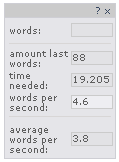
WordCount in action