

WordPress Events
WordPress Events gives you a simple interface for adding events to your site and displays them in a beautiful calendar with pop up details.
Plugin info
Maintenance & Compatibility
Maintenance score
Possibly abandoned • Last updated 4926 days ago
Is WordPress Events abandoned?
Possibly abandoned (last update 4926 days ago).
Compatibility
Similar & Alternatives
Explore plugins with similar tags, and compare key metrics like downloads, ratings, updates, support, and WP/PHP compatibility.
Description
WordPress Events gives you a simple interface for adding events to your site and displays them in a beautiful calendar with pop up details.
Simply add events in an interface you are already used to and display your calendar by adding the shortcode [calendar] to any page of post!
New in 0.2 !
Multiple user calendars! Allow individual users to have their own calendar and display different calendars by specifying a user id in the shortcode. For example [calendar user=2] will display the calendar for the user with an ID of 2.
Built in sharing generates tiny urls that when linked to opens the shared event in a pop up just as if the user had clicked on it.
Google maps integration allows you to add a map of the venue.
Download a pdf user guide from here http://fishcantwhistle.com/wp-content/uploads/2012/02/wordpress-events-user-guide.pdf
0.9 now uses ajax to load events to save on load time.
Installation
- Upload the folder
wordpress-eventsto the/wp-content/plugins/directory keeping the file structure. - Activate the plugin through the ‘Plugins’ menu in WordPress
- Add your first event by clicking on
Events->Add New Event. - Display your events in a page by adding the shortcode
[calendar]to any page or post. This will display all events from all users. - Display your upcoming events with a widget from the widgets admin area.
- Allow users to have their own calendar by assigning them the role of “Calendar User”. They will then be able to log in and add events to their own calendar.
- To show a specific user’s calendar specify the user ID in the shortcode. For example
[calendar user=2]will show the calendar for the user with the ID 2.
Frequently Asked Questions
Is there a widget to quickly display my upcoming events?
Sure is! Just go to your widgets admin page to use it! (It’s called “Events”…). The widget will show all events from all users.
Review feed
Screenshots
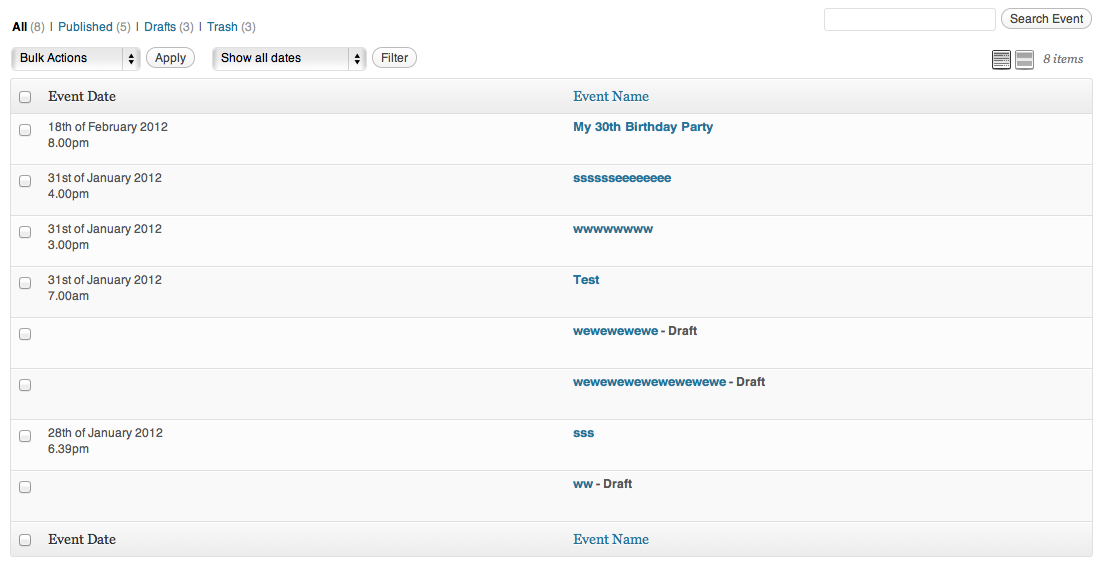
See all your events

Add/Edit an event

Your calendar will display within your theme's style. Here with a custom theme

And here within 2011

The widget!

Integrated sharing

Upon clicking on an event in the calendar a pop up will display further info.

Add an image to the event.

The new user role of "Calendar User".
Changelog
0.1
- First release
0.2
- Major feature upgrades
0.3
*Fixed date format functions for < php 5.3
0.4
*fixed bug causing user id’s to not display
0.5
*Fixed bug that was showing blank map on pop up
0.6
*Minor css issues fixed
0.7
*Calendar users now able to view only their own events as well as delete their own events
0.8
*added settings page to display author of events
0.8.1
*Fix svn update error
0.8.2
*damn those fullstops!
0.8.3
*Added option to specify the phrase to prepend the author name
0.8.4
*date field is now populated with current date and time as leaving it blank causes an error
0.9
*MAJOR UPGRADE: Now using ajax to load events rather than inline.
0.9.1
*Updated timthumb.php to a secure version