

Maintenance 22/1004297d since update
Active installs
100
Downloads
5,073
Reviews
2
Age
13.0y
Plugin info
Total downloads: 5,073
Active installs: 100
Total reviews: 2
Average rating: 2
Support threads opened: 0
Support threads resolved: 0 (0%)
Available in: 1 language(s)
Contributors: 1
Last updated: 6/27/2014 (4297 days ago)
Added to WordPress: 3/19/2013 (13 years old)
Minimum WordPress version: 2.9.2
Tested up to WordPress version: 3.9.40
Minimum PHP version: f
Maintenance & Compatibility
Maintenance score
Possibly abandoned • Last updated 4297 days ago • 2 reviews
22/100
Is World Flag abandoned?
Possibly abandoned (last update 4297 days ago).
Compatibility
Requires WordPress: 2.9.2
Tested up to: 3.9.40
Requires PHP: f
Similar & Alternatives
Explore plugins with similar tags, and compare key metrics like downloads, ratings, updates, support, and WP/PHP compatibility.
SVG Flags – Beautiful Scalable Flags For All Countries!
Rating 4.3/5 (6 reviews) • Active installs 2,000
IP Locator
Rating 5.0/5 (1 reviews) • Active installs 600
Country Flags
Rating 1.0/5 (1 reviews) • Active installs 100
Shortcode to flag
Rating 2.8/5 (4 reviews) • Active installs 30
Country Flags for Elementor
Rating 4.0/5 (3 reviews) • Active installs 1,000
Safe Report Comments
Rating 3.0/5 (7 reviews) • Active installs 200
Description
World Flag is WordPress Flag Plugin which will ease the writer/authors to add flags to posts or pages with shortcode.
Tinymce Editor button has been added to ease the usage of plugin with few clicks of button.
Installation
This section describes how to install the plugin and get it working.
- Upload the plugin folder to the
/wp-content/plugins/directory - Activate the plugin through the ‘Plugins’ menu in WordPress
- Add/Edit posts to add shortcode
[flag country="COUNTRY_CODE"](Two Letter Standard Country Code). - And yey, we are done. You can also use the tinymce addon added to create shortcodes for flags of countries of which you don’t know the shortcode.
Frequently Asked Questions
First version?
Let know anything you have got to say to me.. I will be more than just happy 🙂
Review feed
No reviews available
Screenshots
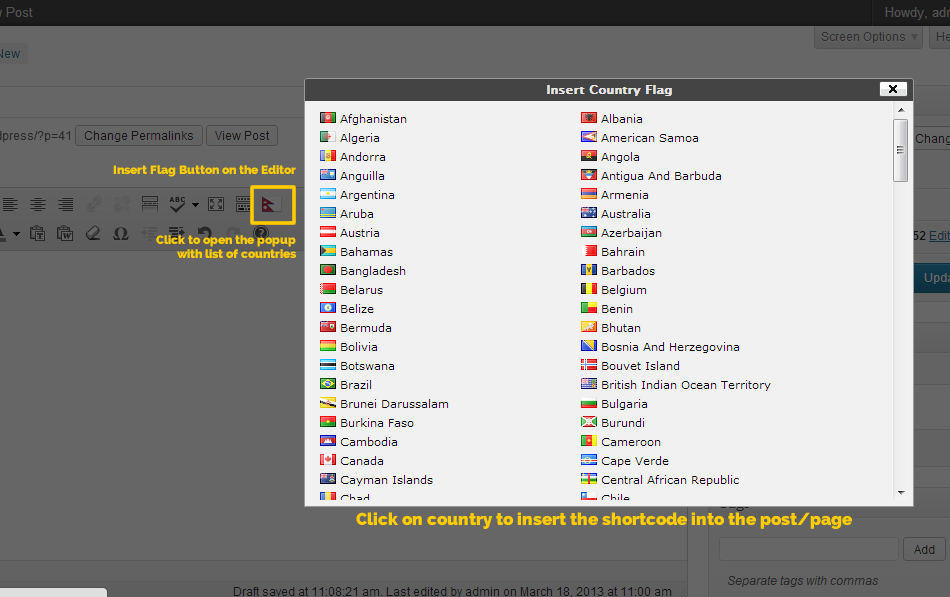
Adding Shortcode using Editor Plugin.

Plugin In action

Adding Shortcode using edit
Changelog
1.0
First Version