

WoWTag Widget
Enter your Character's name and realm and a WoWTag displaying your avatar, name, race, class, guild, level and title will be placed on your site.
Maintenance 20/1005535d since update
Active installs
10
Downloads
1,683
Reviews
0
Age
15.2y
Plugin info
Total downloads: 1,683
Active installs: 10
Total reviews: 0
Average rating: 0
Support threads opened: 0
Support threads resolved: 0 (0%)
Available in: 1 language(s)
Contributors: 1
Last updated: 12/22/2010 (5535 days ago)
Added to WordPress: 12/22/2010 (15 years old)
Minimum WordPress version: 3.0.3
Tested up to WordPress version: 3.0.5
Minimum PHP version: f
Maintenance & Compatibility
Maintenance score
Possibly abandoned • Last updated 5535 days ago
20/100
Is WoWTag Widget abandoned?
Possibly abandoned (last update 5535 days ago).
Compatibility
Requires WordPress: 3.0.3
Tested up to: 3.0.5
Requires PHP: f
Similar & Alternatives
Explore plugins with similar tags, and compare key metrics like downloads, ratings, updates, support, and WP/PHP compatibility.
WoW Armory Character
Rating 0.0/5 (0 reviews) • Active installs 20
WoW Armory
Rating 0.0/5 (0 reviews) • Active installs 10
Content character count live
Rating 3.0/5 (2 reviews) • Active installs 40
Decon Character Counter
Rating 0.0/5 (0 reviews) • Active installs 30
Special Characters Remove
Rating 0.0/5 (0 reviews) • Active installs 30
Vampire Character Manager
Rating 5.0/5 (1 reviews) • Active installs 10
Description
Enter your Character’s name and realm and a WoWTag displaying your avatar, name, race, class, guild, level and title will be placed on your site.
You can customize how it is displayed.
Installation
- Download the plugin.
- Extract the folder
wowtag-widgetto the/wp-contents/plugins/directory. - Activate the plugin through the ‘Plugins’ menu in WordPress
- Go to the
Widgetssection. There you will see the widget asWoWTag Widget - Add it to your desired sidebar. You can customize the various options of the widget from its widget customization form after placing the widget in sidebar.
Frequently Asked Questions
No FAQ available
Review feed
No reviews available
Screenshots
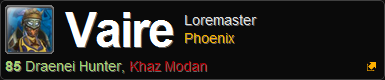
screenshot-1.png
Changelog
0.2B
Initial Widget Release