

Plugin info
Maintenance & Compatibility
Maintenance score
Possibly abandoned • Last updated 4848 days ago • 2 reviews
Is WP Ads Within Contens abandoned?
Possibly abandoned (last update 4848 days ago).
Compatibility
Similar & Alternatives
Explore plugins with similar tags, and compare key metrics like downloads, ratings, updates, support, and WP/PHP compatibility.
Description
WP Ads Within Contents gives you facility to show Ads Within Post. You can Show ads Before and After the Content.
You can also use ShortCode [AdsWithin] to place ads within contents.
You’ve two options to place ads within contents.
* Using ShortCode
* Automatically at the start or end of contents
By using ShortCode you can place ads anywhere in the post content.
Block One, and Block Two are automatic ways to place ads within your post contents.
Installation
Step 1
- Download zip file and Extract it
- Upload wp-subscriber-form folder to your /wp-content/plugins/ folder.
- Go to the ‘Plugins’ page in the menu and activate the plugin.
Step 2
- Go to Wodpress Admin Panel > Setting > Ads Within Contents
- If you want to place ads with shortcode, then place Ads Code in the ShortCode Setting -> Your Ads Code
- For automatic ways enable/disable Blocke one and two, set Ads Code there
- In Addition you can set any css style for any block
Frequently Asked Questions
What is the ShortCode for ads?
[AdsWithin]
Can I use only ShortCode to place ads within post contents?
Yes, Go to Wodpress Admin Panel > Setting > Ads Within Contents, Disable Block One and Block Two.
Review feed
Screenshots
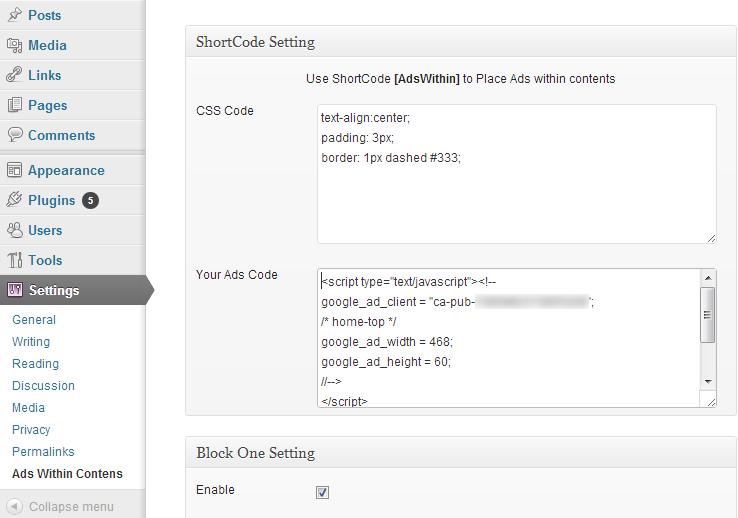
Admin Panel Setting

WP Ads Within Contents