

WP Boilerplate Shortcode
Provides a shortcode that when inserted will display the body from a referenced "boilerplate" post type.
Plugin info
Maintenance & Compatibility
Maintenance score
Possibly abandoned • Last updated 5850 days ago
Is WP Boilerplate Shortcode abandoned?
Possibly abandoned (last update 5850 days ago).
Compatibility
Similar & Alternatives
Explore plugins with similar tags, and compare key metrics like downloads, ratings, updates, support, and WP/PHP compatibility.
Description
This plugin provides a shortcode that when inserted will display the body from a referenced “boilerplate.” A boilerplate is a special post type defined by this plugin. References can be made by title, path or ID. Below is a list of shortcode attributes used by the boilerplate shortcode. Examples are given for hypothetical “Copyright” and “Payment Terms.” All attributes are optional except one of “byid“, “bypath” or “bytitle” must be specified:
-
bytitle: The full case-sensitive title of the boilerplate, i.e. “Copyright” or “Payment Terms“
-
bypath: The editable lowercase path for the boilerplate, i.e. “copyright” or “payment-terms” (vs. “/boilerplates/copyright/” or “/boilerplates/payment-terms/“)
-
byid: Refers to the internal ID from the wp_posts table for the boilerplate post, i.e. 234 or 1273
-
showtitle: “true” or “false” (defaults to “false“); if “true” boilerplate content will be prefixed with the title of the boilerplate as entered in the edit screen, or optionally with a “title” attribute you specify.
-
title: Use to override the displayed title of the boilerplate in specific cases. When “title” is specified “showtitle” is implicity set to “true.”
-
titletag: HTML element used to wrap the title when “showtitle” is explicity “true” or “title” is set (defaults to “h3.”)
-
id: The HTML “id” attribute applied to the div element that wraps the boilerplate and it’s optional title. If not specificed the div will not get have an “id” set.
-
class: The HTML “class” attribute applied to the div& element that wraps the boilerplate and it’s optional title (defailts to “boilerplate.”)
Installation
To install the WP Boilerplate Shortcode plugin do the following steps:
Manual Installation from a Direct Download:
- Download the plugin.
- Unzip the plugin’s .ZIP file.
- Create a sub directory off your WordPress site’s root named wp-content/plugins/wp-boilerplate-shortcode/ on your web host.
- Upload the plugin’s file to the sub directory just created at your web host.
- Login to your WordPress admin console.
- Select the Plugin’s “*Edit*” option which generates a listing of plugins.
- Activate this plugin.
Automatic Installation from within the Admin Console:
- Login to your WordPress admin console.
- Select “Add New” from the plugins menu.
- Search for “wp boilerplate shortcode.”
- Select the plugin and click “Install.”
- After installation is complete click “Activate.”
Once you’ve completed either the manual or automatic installation then you can either use the boilerplate shortcode or the the_boilerplate() template tag. See the FAQ for instructions on how to use the shortcode and/or the template tag.
Frequently Asked Questions
Where do add/edit my boilerplates?
Look on the left sidebar in your WordPress admin after you’ve activated the plugin for a menu called “Boilerplates.”
Can you give me examples of using the shortcode?
Sure. Here are some simple examples:
-
[boilerplate bytitle="Payment Terms"]
-
[boilerplate bypath="copyright"]
-
[boilerplate byid="971"]
Here are some more complex examples:
-
[boilerplate bytitle="Payment Terms" showtitle="true" title="Terms for Payment" titletag="strong" id="terms"]
-
[boilerplate bypath="copyright" class="boilerplate copyright"]
Where do I type the shortcode?
Type the shortcode into the body of any page, of any post, or of any custom post type where you want the boilerplate processed.
Does this plugin provide a boilerplate template tag?
Yes:
-
the_boilerplate('contact-methods'); // 'contact-methods' = the path of the boilerplate. -
the_boilerplate('Contact Methods','title'); // 'Contact Methods' = the title of the boilerplate. -
the_boilerplate(123,'id',array('showtitle'=>'true')); // 123 = boilerplate's post ID.
The array parameter in example #3 can contain any of these attributes
After Adding/Editing a Boilerplate if I click “View” I get an error. Why?
If you are still getting this error it’s because WordPress still hasn’t addressed this problem.
We decided to disallow boilerplates to be seen directly via a URL and as such when you try to view them WordPress tell you you cannot see it.
An example URL that you might see (assuming you were on the domain example.com and had a boilerplate called “Copyright“) might be as follows:
http://example.com/boilerplates/copyright/
This URL will not work because boilerplates do not get a page of their own.
Hopefully WordPress will address this soon and you’ll be able to view your boilerplates from within the admin console.
What’s the syntax for the shortcode/template tag?
If you are into things from a technical persective it looks like this (angles <> indicate placeholders, a vertical bar | indicates “or“, elipsees indicate one or more, parens indicate grouping, and braces {} indicate optional):
-
Shortcode:
[boilerplate (bytitle|bypath|byid)="(||)"
   {showtitle="(true|false)"} {title=""} {titletag=""}
   {id=""} {class="}]
For the template tag the parens are not needed for grouping and the square brackets indicate optional, which is what most docs use for optional, when it doesn’t conflict with actual syntax:
-
Template Tag:
the_boilerplate(|| [, 'path'|'title'|'id']
   [, array(['showtitle'=> 'true'|false',] ['title' => '',]
   ['titletag' => '',] ['id' => '',] ['class' => '',] ));
Review feed
Screenshots
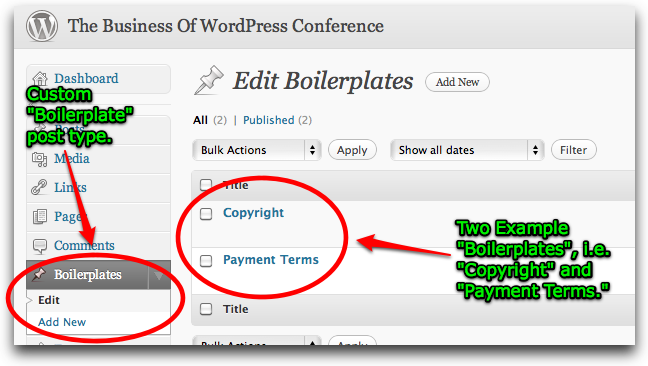
Editing Boilerplates in the WordPress admin.

The example "Copyright" boilerplate with shortcode attribute callouts.

Inserting the "Copyright" shortcode into a post.

Output of the "Copyright" shortcode on the web.

Use of
the_boilerplate()template tag.
The example "Payment Terms" boilerplate for reference.

Inserting the "Payment Terms" shortcode into a post using most of the shortcode's attributes.

Output of the "Payment Terms" shortcode on the web.
Changelog
1.0.2
- Screenshots!
1.0.1
- Added
the_boilerplate()template tag. - Restructured
readme.txtand added FAQ items and more detailed installation instructions. - Moved code structure to an encapsulated
WPBoilerplateShortcodeclass with class methods instead independent functions.
1.0
- Initial release.