

WP Captcha
wp captcha prove that the visitor is a human being and not a spam robot. captcha plugin is the best security solution that protects your Wordpress web …
Plugin info
Maintenance & Compatibility
Maintenance score
Possibly abandoned • Last updated 1890 days ago • Support resolved 0% • 18 reviews
Is WP Captcha abandoned?
Possibly abandoned (last update 1890 days ago).
Compatibility
Developers
Similar & Alternatives
Explore plugins with similar tags, and compare key metrics like downloads, ratings, updates, support, and WP/PHP compatibility.
Description
wp captcha prove that the visitor is a human being and not a spam robot. captcha plugin is the best security solution that protects your WordPress website forms from spam entries. It can be used for login, registration, password recovery, comments and much more.
Features
Here you will find the main features of Plugin.
Captcha Types
- Mathematical Captcha
- Image Captcha
- Icon Captcha
- Google Recaptcha ( V2 )
Mathematical Captcha Settings
- Addition ( + )
- Substruction ( − )
- Multiplication ( × )
- Division ( ⁄ )
- Numbers
- Words
Image Captcha Settings
- Width(px)
- Height(px)
- Random Lines
- Random Dots
- Text Color
- Noise Color
- Character Types ( Numbers, Alphabets, Alphabets And Digits )
- Text Case ( Lower Case, Upper Case, Lower & Upper Case )
- Number of Characters
- Select Fonts
Icon Captcha Settings
- Number of Icons
- Captcha Border
- Icons Color
Google Recaptcha Settings ( V2 )
- Site key
- Secret key
- reCaptcha Size
- reCaptcha Theme
- reCaptcha Type
- reCaptcha Language
Captcha Forms
- Add Captcha on WordPress Login form
- Add Captcha on WordPress Registration form
- Add Captcha on WordPress Reset password form
- Add Captcha on WordPress Comments form
- Add Captcha on Contact Form 7
- Add Captcha on Subscriber Form
- Add Captcha on MailChimp for WordPress
- Add Captcha on Jetpack contact form
- Add Captcha on BBPress New Topic form
- Add Captcha on BBPress Reply form
- Add Captcha on BuddyPress Registration form
- Add Captcha on BuddyPress Create a Group form
- Add Captcha on Awesome Support Login
- Add Captcha on Awesome Support Registration
- Add Captcha on WooCommerce Login form
- Add Captcha on WooCommerce Register form
- Add Captcha on WooCommerce Lost password form
- Add Captcha on WooCommerce Checkout form
Captcha Other Settings
- Captcha title
- Captcha empty message
- Captcha wrong message
- Hide for logged in users
- Delete settings
- Restore Settings
Installation of Plugin
This section describes how to install the plugin and get it working.
- The installation of the plugin is just like any other plugin installation for WordPress.
- Login to your WordPress site and go to Plugins > Add New.
- Install Plugins Page click on Upload from the top navigation and then click on browse.
- Go to the location on your computer where you saved the downloaded plugin zip file and upload this zipped file.
- You need to unzip the file first to get the plugin zip file.
- Now click on Install Now.
- Wait until WordPress has uploaded the file. If it’s done click on Activate Plugin.
- Now you should see a message ‘Plugin activated’ at the top of the window.
Installation
Frequently Asked Questions
Follow the next steps in order to add Captcha to your WordPress login page (form):
1. Open your WordPress admin Dashboard.
2. Navigate to WP Captcha settings page.
3. Select Different types of captcha from Captcha Types.
4. Select settings which you wants.
5. Select Forms to display Captcha.
6. Other settings you can enter custom error messages.
Review feed
Screenshots

Captcha Types Settings Page.

Mathematical Captcha Settings Page.

Image Captcha Settings Page.

Icon Captcha Settings Page.

Google reCaptcha Captcha Settings Page.

Captcha Forms Settings Page.
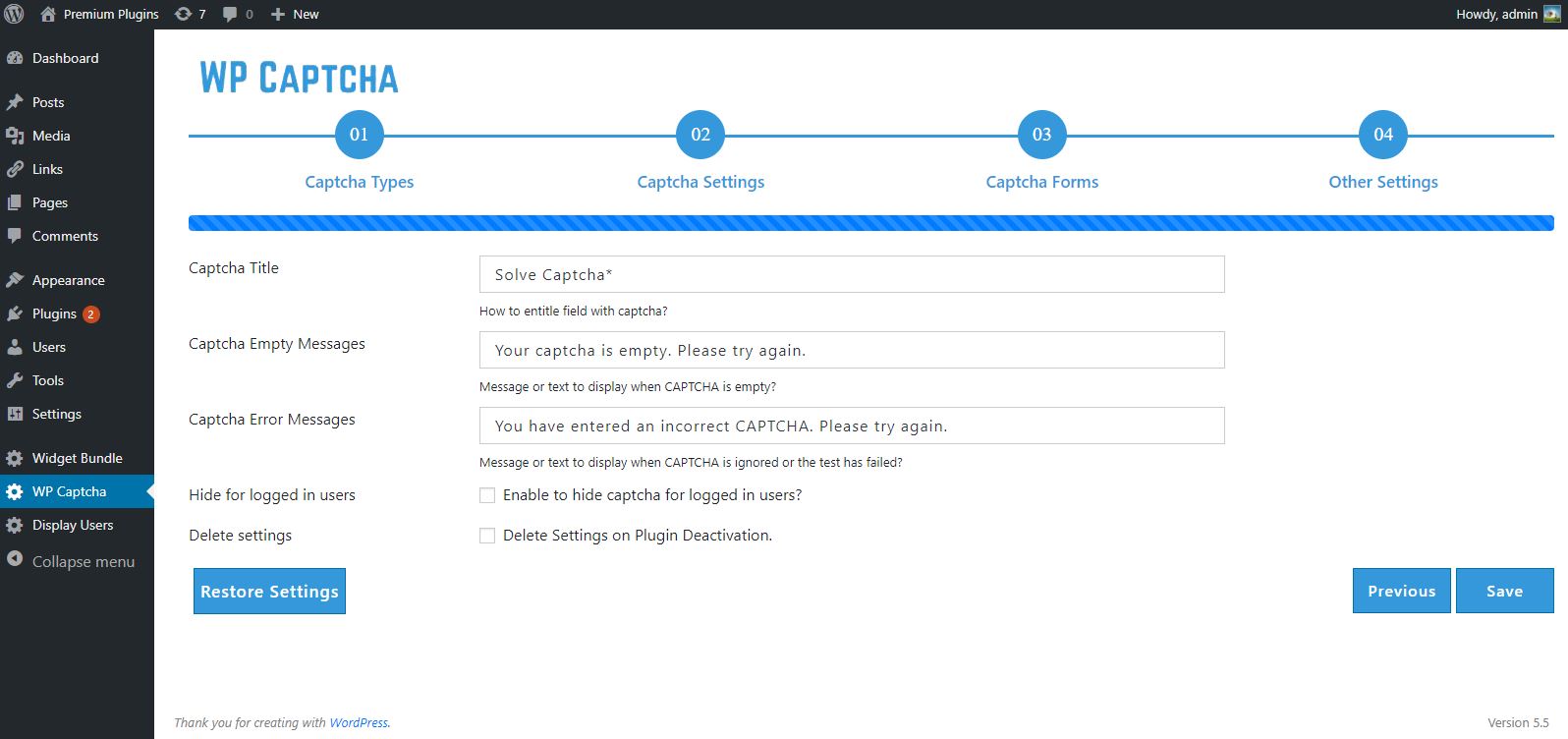
Captcha Other Settings Page.

Wordpress Login form with WP Captcha.

Wordpress Registration form with WP Captcha.

Wordpress Reset Password form with WP Captcha.

Contact Form 7 with WP Captcha.

MailChimp for Wordpress form with WP Captcha.

Awesome Support Login & Registration form with WP Captcha.

Wordpress Comments form with WP Captcha.

Subscriber form with WP Captcha.

Jetpack Contact Form with WP Captcha.

BBPress new Topic form with WP Captcha.

Buddypress create group form with WP Captcha.

Buddypress Registration form with WP Captcha.

WooCommerce Login & Registration form with WP Captcha.

WooCommerce Checkout form with WP Captcha.

Wordpress Login form with Google reCaptcha.

Wordpress Registration form with Google reCaptcha.

Wordpress Comments form with Google reCaptcha.
Changelog
2.1.0
- Resolve images extension issue
2.0.0
- Add Captcha on WooCommerce Login form
- Add Captcha on WooCommerce Register form
- Add Captcha on WooCommerce Lost password form
- Add Captcha on WooCommerce Checkout form
1.9.0
- Add Captcha on Awesome Support Login
- Add Captcha on Awesome Support Registration
1.8.0
- Add Captcha on BuddyPress Registration form
- Add Captcha on BuddyPress Create a Group form
1.7.0
- Add Captcha on BBPress New Topic form
- Add Captcha on BBPress Reply form
1.6.0
- Add Captcha on Subscriber Form
- Add Captcha on MailChimp for WordPress
1.5.0
- Add Captcha on Jetpack contact form
1.4.0
- Add Captcha on Contact Form 7
1.3.0
- Added Google Recaptcha ( V2 )
1.2.0
- Added Icon Captcha
1.1.0
- Added Image Captcha