

WP Caregiver
Adds many options for tweaking frontend and backend of your WordPress site.
Maintenance 22/1004517d since update
Active installs
10
Downloads
2,923
Reviews
2
Age
12.8y
Plugin info
Total downloads: 2,923
Active installs: 10
Total reviews: 2
Average rating: 5
Support threads opened: 0
Support threads resolved: 0 (0%)
Available in: 1 language(s)
Contributors: 1
Last updated: 11/21/2013 (4517 days ago)
Added to WordPress: 7/6/2013 (12 years old)
Minimum WordPress version: 3.6
Tested up to WordPress version: 3.7.41
Minimum PHP version: f
Maintenance & Compatibility
Maintenance score
Possibly abandoned • Last updated 4517 days ago • 2 reviews
22/100
Is WP Caregiver abandoned?
Possibly abandoned (last update 4517 days ago).
Compatibility
Requires WordPress: 3.6
Tested up to: 3.7.41
Requires PHP: f
Similar & Alternatives
Explore plugins with similar tags, and compare key metrics like downloads, ratings, updates, support, and WP/PHP compatibility.
bbPress Toolkit
Rating 4.6/5 (14 reviews) • Active installs 1,000
Tweak Option
Rating 5.0/5 (5 reviews) • Active installs 100
Style Tweaker
Rating 0.0/5 (0 reviews) • Active installs 100
LSD Simple Cache
Rating 0.0/5 (0 reviews) • Active installs 10
Debug Editor
Rating 0.0/5 (0 reviews) • Active installs 10
Description
With this plugin you can turn on/off some theme and core services of WordPress or even you can customize it too.
Frontend features
- Remove generator meta tag
- Remove RSD (Really Simple Discovery ) link
- Remove Windows Live Writer link
- Remove post relational links (prev, next)
- Remove canonical link
- Remove RSS feed links
- Remove admin bar
- Remove the Website URL field from the comment form
- Remove allowed HTML tags text from the comment form
- Quick maintenance
- Force login
- Open Graph meta tag generator
Backend features
- Disable core (WordPress) update notification
- Disable plugins update notification
- Disable themes update notification
- Hide login error messages
- Define custom login error message
- Enable “All Settings” item in Settings menu
- Enable Link Manager feature
- Enable Featured image support
- Enable excerpt field for pages
- Enable TinyMCE Editor for excerpt
- Enable categories for pages
- Display IDs in post/page list
- Customize WP Mail
- Remove WordPress version from footer
System information
- Server time
- Memory usage
- SQL Queries
- Post revisions
- Disc usage
Arbitrary section 1
Installation
- Download the plugin from wordpress.
- Extract all the files.
- Upload everything (keeping the directory structure) to the /wp-content/plugins/ directory.
- Activate the plugin through the ‘Plugins’ menu in WordPress.
Frequently Asked Questions
I made a translation file. How to add?
Send it via E-Mail to <blintux [@t] gmail [dot] com> and I have implemented this for the next release of the plugin.
I found a bug. How do I report this?
If you think you’ve found a bug, please post your findings here on the support forum.
Review feed
No reviews available
Screenshots
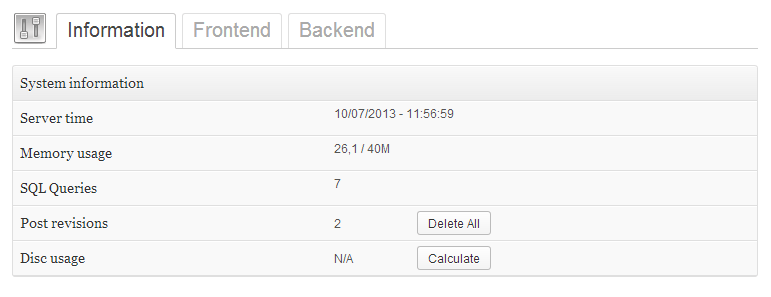
System information

Frontend options

Backend oprions
Changelog
Versione 0.3.0
- New feature: Custom login error message
- New feature: Remove allowed HTML tags text from the comment form
- New feature: Enable categories for pages
- Bugfix: Remove admin bar not work correctly
- Bugfix: Excerpt TinyMCE Editor line wrap problem
- All function compatible with WordPress 3.7
- Supported WordPress versions: 3.6 – 3.7
Versione 0.2.1
- Fix for missing css and js files
Versione 0.2.0
- Added disc usage info
- Added Open Graph meta tag generator (og:title, og:description, og:url, og:image, og:type, og:site_name)
- Added translation support
- Added Hungarian language file
- Interface improvements
- Bug fixes
Versione 0.1.1
- Fixed admin access issue in quick maintenance mode
Versione 0.1.0
- First Release