

WP Cloudflare Guard
Connecting WordPress with Cloudflare firewall, protect your WordPress site at DNS level. Automatically create firewall rules to block dangerous IPs.
Plugin info
Maintenance & Compatibility
Maintenance score
Possibly abandoned • Last updated 3267 days ago • 3 reviews
Is WP Cloudflare Guard abandoned?
Possibly abandoned (last update 3267 days ago).
Compatibility
Similar & Alternatives
Explore plugins with similar tags, and compare key metrics like downloads, ratings, updates, support, and WP/PHP compatibility.
Description
Connecting WordPress with Cloudflare firewall, protect your WordPress site at DNS level. Automatically create firewall rules to block dangerous IPs.
Features
- Blacklist IP if attempt to login with bad usernames
Integrations (Coming soon as add-ons)
How does WP Cloudflare Guard different from Cloudflare’s official plugin?
At the time of writing, Cloudflare’s official plugin doesn’t block any IP for WordPress when other plugins discover dangerous activities. Here comes WPCFG! WPCFG focus on integrating other plugins with Cloudflare.
Compatibility
- Works with Cloudflare’s official plugin
- Works with Sunny (Purging CloudFlare caches for WordPress)
Things You Need to Know
- You need PHP 7.0 or later
- You need WordPress 4.7 or later
- You need a Cloudflare account (free plan is okay)
- This plugin was not built by Cloudflare, Inc
If you like the plugin, feel free to rate it or donate via PayPal. Thanks a lot! 🙂
For Bloggers
If you have written an article about WP Cloudflare Guard, do let me know. For any questions, shoot me an email at [email protected]
For Developers
WP Cloudflare Guard is open source and hosted on GitHub. Feel free to make pull requests.
Who make this plugin?
Tang Rufus, a freelance developer for hire.
I make Typist Tech also.
Support
To save time so that we can spend it on development, please read the plugin’s FAQs first.
Before requesting support, and ensure that you have updated WP Cloudflare Guard and WordPress to the latest released version and installed PHP 7 or later.
We hang out in the WordPress support forum for this plugin.
If you know what GitHub is, use GitHub issues instead.
Installation
Via WordPress admin dashboard
- Log in to your site’s Dashboard (e.g. www.your-domain.com/wp-admin)
- Click on the
Pluginstab in the left panel, then click “Add New” - Search for
WP Cloudflare Guardand the latest version will appear at the top of the list of results - Install it by clicking the
Install Nowlink - When installation finishes, click
Activate Plugin
Via Manual Upload
- Download the plugin from wordpress.org
- Unzip it
- Upload it to
wp-content/plugins/ - Go to the WordPress plugin menu and activate it
Via WP CLI
$ wp plugin install wp-cloudflare-guard --activate
Frequently Asked Questions
Installation Instructions
Via WordPress admin dashboard
- Log in to your site’s Dashboard (e.g. www.your-domain.com/wp-admin)
- Click on the
Pluginstab in the left panel, then click “Add New” - Search for
WP Cloudflare Guardand the latest version will appear at the top of the list of results - Install it by clicking the
Install Nowlink - When installation finishes, click
Activate Plugin
Via Manual Upload
- Download the plugin from wordpress.org
- Unzip it
- Upload it to
wp-content/plugins/ - Go to the WordPress plugin menu and activate it
Via WP CLI
$ wp plugin install wp-cloudflare-guard --activate
What version of PHP do I need?
PHP 7 or later.
Is this plugin written by Cloudflare, Inc.?
No.
This plugin is a Typist Tech project.
Can I install WP Cloudflare Guard, Sunny and Cloudflare’s official plugin at the same time?
Yes, all of them work together without problems.
- Install WP Cloudflare Guard if you want to protect your site from bad IPs
- Install Sunny if you want to purge CloudFlare’s cache automatically
- Install the official plugin if you can’t see the real IP from visitors
What if WP Cloudflare Guard blacklisted my IP?
- Login CloudFlare
- Select your domain
- Go
Firewall - Release you IP under
Access Rules
Does this plugin available in my language?
English works out of the box.
Traditional Chinese language pack is available here.
You can add your own translation at translate.wordpress.org.
How to get support?
Use the WordPress support forum for this plugin at https://wordpress.org/support/plugin/wp-cloudflare-guard.
Make sure you have read the plugin’s FAQs at https://wordpress.org/plugins/wp-cloudflare-guard/faq/. And, updated WP Cloudflare Guard and WordPress to the latest released version before asking questions.
If you know what GitHub is, use GitHub issues instead.
How can I support this plugin?
If you like the plugin, feel free to:
- Give ot a 5-star review on WordPress.org
- Donate via PayPal. Thanks a lot! 🙂
- Translate it at translate.wordpress.org.
Besides, WP Cloudflare Guard is open source and hosted on GitHub. Feel free to make pull requests.
Last but not least, you can hire me. Shoot me an email at [email protected] or use this contact form.
What if I want more?
Hire me!
Shoot me an email at [email protected] or use this contact form.
Review feed
Screenshots
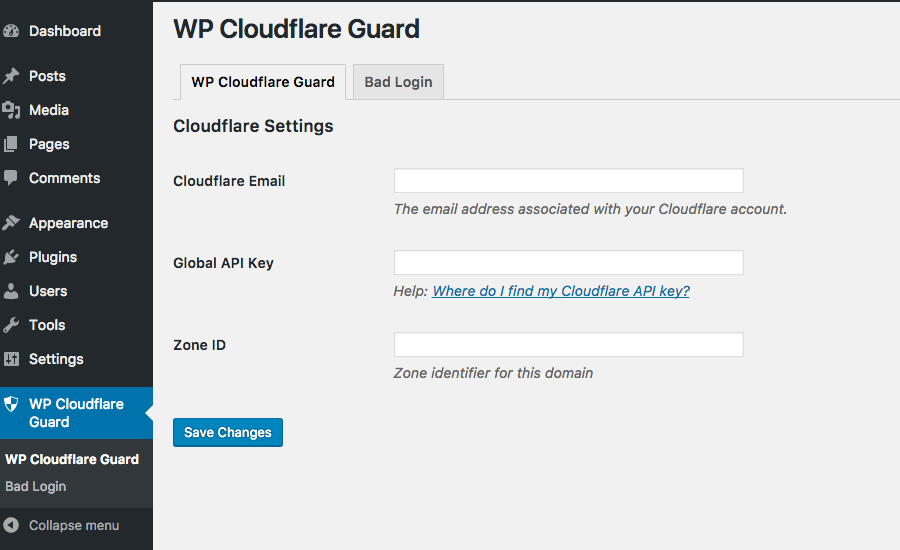
Cloudflare Settings

Bad Login Settings

Cloudflare Firewall Access Rules
Changelog
Full change log available at GitHub
0.2.0
- Code refactor
0.1.3
- Add yoast i18n module
- Fix PHP undefined notices
0.1.2
- Better translation support
0.1.1
- Better translation support
0.1.0
- First release