

WP-CollectiveAccess
Display your CollectiveAccess collections inside your Wordpress website.
Plugin info
Maintenance & Compatibility
Maintenance score
Possibly abandoned • Last updated 4217 days ago
Is WP-CollectiveAccess abandoned?
Possibly abandoned (last update 4217 days ago).
Compatibility
Similar & Alternatives
Explore plugins with similar tags, and compare key metrics like downloads, ratings, updates, support, and WP/PHP compatibility.
Description
About WP-CollectiveAccess
WP-CollectiveAccess is a wordpress plugin to display collections informations & media from museum or digital archives
inside WordPress, using web services.
WP-CollectiveAccess is a project lead by idéesculture, a small french company, involved in CollectiveAccess development
through french translation & a dedicated module for Musées de France museums, tiny devs… We provide CollectiveAccess
services to museum, tourism offices in France & french-speaking countries.
This project was funded by Pro-Memoria, an italian company providing CollectiveAccess services.
About CollectiveAccess
CollectiveAccess is an opensource web-based suite of applications providing a framework for management, description, and discovery
of complex digital and physical collections.
CollectiveAccess is a registered trademark by Whirl-i-Gig in the USA. It has been brought by a collaboration between and
partner institutions in North America and Europe with projects in 5 continents.
Installation
- Unzip WP-CollectiveAccess.zip inside the
/wp-content/plugins/directory - Activate the plugin through the ‘Plugins’ menu in WordPress
- Adapt configuration through Settings > CollectiveAccess
Frequently Asked Questions
How to test WP-CollectiveAccess with a default & empty wordpress installation ?
WP-CollectiveAccess has been tested with WordPress 3.9, using default theme (aka Twenty Fourteen).
To test this plugin inside a fast-to-deploy setup :
- Install WP-CollectiveAccess plugin and activate it
- Install wordpress-importer plugin and activate it
- (optional) Read this blog post
about the sample wordpress data we’ll deploy - Download the zip of the XML & the WIE files we will import
- Go to Tools -> Import -> WordPress
- Select the file that has the “XML” extension.
- Install Widget Importer & Exporter plugin and activate
it. It is used to import widgets data similar to original demo. - Go to Tools -> Widget Importer & Exporter
- Click on “Select file” or similar button there.
- Select the file that has the “wie” extension (demos.pixelthemes.com-twentyfourteen-demo-setup-widgets.wie)
- Go to Appearance -> Menu section.
- In “Select a menu to edit”, choose “Testing menu” and click Select
- Bottom of the page, tick “Top primary menu” and click Save menu
Where can I have more information ?
Please take a look at README.md in the same directory. Don’t hesitate to contact me (gautiermichelin) at [email protected]
Review feed
Screenshots
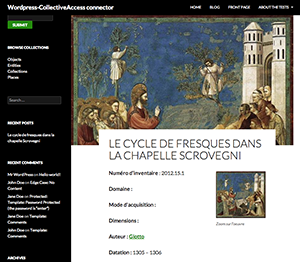
Detail view

Search View

Browse View
Changelog
0.5.1
- [x] Improved linked object : display, with nice thumbnail & a subview
0.5
- [x] Customization : page title (for search, browse & detail view) ;
- [x] Customization : override the default view by a custom view for a single request (post or get $view with a string, for exemple allow to display with an intro the content of a set) ;
- [x] Customization : through templates via admin settings ;
- [x] Customization : create customized views inside views/local
- [x] Customization : page header image through CSS
- [x] Records displayed : objects, entities, places, events, collections
- [x] Internationalization & translations : english (default), french (fr_FR), italian (it_IT)
- [x] TilePic viewer
- [x] Hierarchy viewer
0.4.9
- development phase for 0.5, planned for end of july
0.1.2
- expanding views to each part of the plugin
0.1.1
- supporting views & subviews for easier customisation (take a look at /views & /views/local)
0.1
- first working version