

WP Database Backup – Unlimited Database & Files Backup by Backup for WP
Create & Restore Database Backup easily on single click. Manual or automated backups (backup to Dropbox, Google drive, Amazon s3,FTP,Email).
Plugin info
Maintenance & Compatibility
Maintenance score
Stale • Last updated 183 days ago • 101 reviews
Is WP Database Backup – Unlimited Database & Files Backup by Backup for WP abandoned?
Likely maintained (last update 183 days ago).
Compatibility
Languages
Similar & Alternatives
Explore plugins with similar tags, and compare key metrics like downloads, ratings, updates, support, and WP/PHP compatibility.
Description
WP Database Backup plugin helps you to create Database Backup and Restore Database Backup easily on single click. Manual or Automated Database Backups And also store database backup on safe place- Dropbox,FTP,Email,Google drive, Amazon S3
Features
- Create Database Backup
WP Database Backup plugin helps you to create Database Backup easily on single click. - Auto Backup – Backup automatically on a repeating schedule
- Website Migration – Migration Your Site with Just One Click!
- Download backup file direct from your WordPress dashboard
- Easy To Install(Very easy to use)
WP Database Backup is super easy to install. - Simple to configure(very less configuration), less than a minute.
- Restore Database Backup
WP Database Backup plugin helps you to Restore Database Backup easily on single click. - Multiple storage destinations
- Store database backup on safe place- Dropbox, Google drive, Amazon s3, FTP, sFTP, Backblaze, Email
- Reporting- Sends emailed backups and backup reports to any email addresses
- Exclude Table
- Database backup list pagination
- Search and Replace in database backup file.
- Search backup from list(Date/ Database Size)
- Sort backup list (Date/ Database Size)
- Save database backup file in zip format on local server And Send database backup file to destination in zip format
- Documentation
Subscribe to Backup for WP Cloudstorage
- We are excited to introduce a new feature for the Backup for WP plugin , our Backup For WP Cloudstorage.
- Affordable Pricing: Only $1 per 50GB of storage per website per month, with a flexible pay-as-you-go model.
- 14-Day Free Trial: Start with a 14-day free trial to experience the benefits of cloud storage without any upfront cost.
- Scalable Storage: Easily adjusts to your storage needs, providing as much space as required for your backups.
- Secure Cloud Storage: All backups are stored securely in the cloud, protecting your data from unauthorized access
Support
We try our best to provide support on WordPress.org forums. However, We have a special team support where you can ask us questions and get help. Delivering a good user experience means a lot to us and so we try our best to reply each and every question that gets asked.
Bug Reports
Bug reports for WP Database Backup are welcomed on GitHub. Please note GitHub is not a support forum, and issues that aren’t properly qualified as bugs will be closed.
Credits
This plugin uses the following third-party libraries:
-
Google APIs Client Library for PHP
- Author: Google
- URL: https://github.com/googleapis/google-api-php-client
- License: Apache License, Version 2.0 (the “License”)
- License URL: http://www.apache.org/licenses/LICENSE-2.0
-
PHP Secure Communications Library
- Author: phpseclib
- URL:https://github.com/phpseclib/phpseclib
- License: MIT License (or any other applicable license)
- License URL: http://opensource.org/licenses/MIT
-
PhpConcept Library – Zip Module
- Author: Vincent Blavet
- URL:http://www.phpconcept.net
- License: License GNU/LGPL
-
phpFileTree
- Author: Cory S.N. LaViska’s
- URL: https://www.abeautifulsite.net/blog/2007/06/php-file-tree/
Installation
- Download the plugin file, unzip and place it in your wp-content/plugins/ folder. You can alternatively upload it via the WordPress plugin backend.
- Activate the plugin through the ‘Plugins’ menu in WordPress.
- WP Database Backup menu will appear in Dashboard->Backups. Click on it & get started to use.
Frequently Asked Questions
Follow the steps listed below to Create Database Backup
Create Backup:
1) Click on Create New Database Backup
2) Download Database Backup file.
Restore Backup:
Click on Restore Database Backup
OR
1)Login to phpMyAdmin
2)Click Databases and select the database that you will be importing your data into.
3)Across the top of the screen will be a row of tabs. Click the Import tab.
4)On the next screen will be a location of text file box, and next to that a button named Browse.
5)Click Browse. Locate the backup file stored on your computer.
6)Click the Go button
This is generally caused by an access denied problem.
You don’t have permission to write in the wp-content/uploads.
Please check if you have the read write permission on the folder.
if the site is very large, it takes time to create the database backup. And if the server execution time is set to low value, you get go to blank page.
There may be chance your server max execution time is 30 second. Please check debug log file.
You will need to ask your hosting services to increase the execution time and the plugin will work fine for large data.
You can also try to increase execution time. Please make below changes – Add below line
php.ini
max_execution_time = 180 ;
Also Please make sure that you have write permission to Backup folder and also check your log file.
If you want more features then please contact us at
Review feed
Amazing plugin for database backups
Wordpress 5.9
Screenshots

Database and full backup history with options to download, restore, or remove backups.
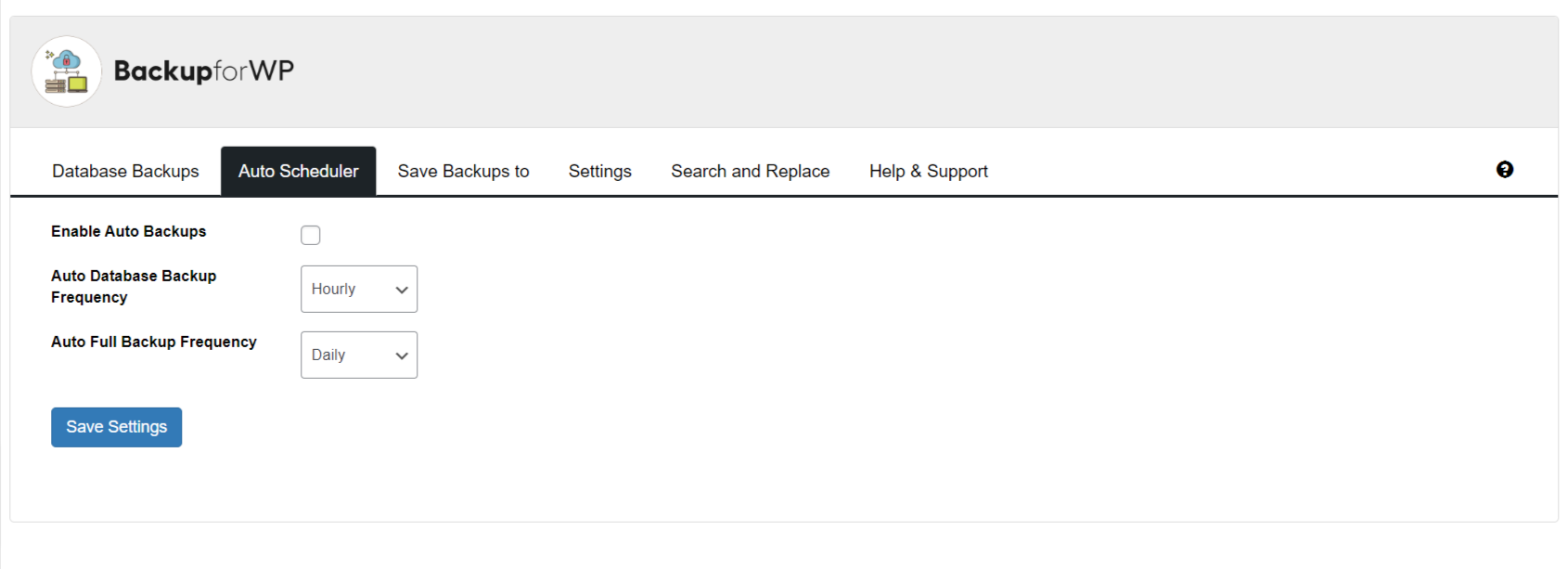
Auto scheduler settings with options to enable automatic backups and set database or full backup frequency.

Configure options for FTP, local backup, and email, with Google Drive, Amazon S3, and Dropbox.
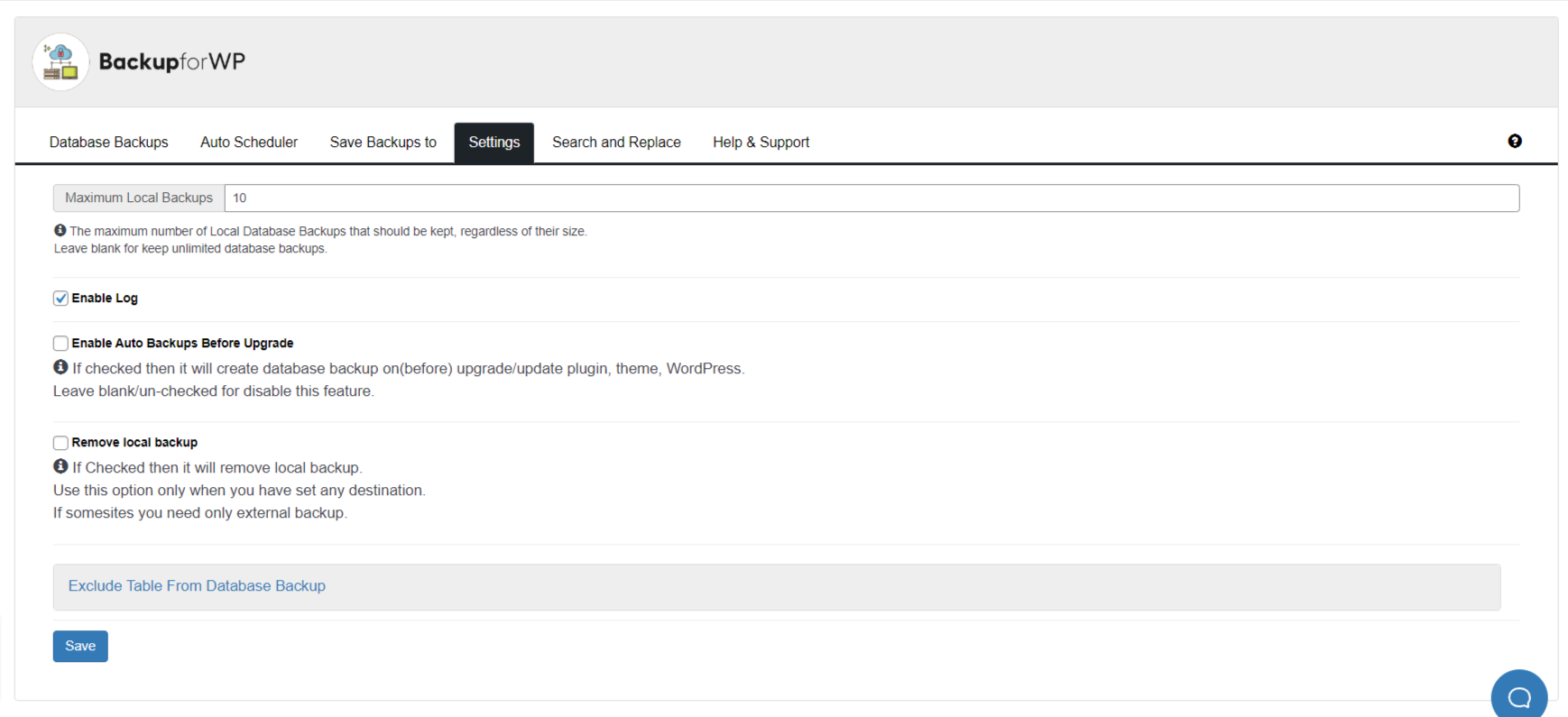
Backup for WP plugin settings screen showing backup and log configuration options.
Changelog
7.7
- 24-07-2025
- Fix: Receiving Backup Completion Emails Despite Email Notifications Not Being Configured #118
- Fix: Notification e-mails – URL of website is not clickable #124
- Fix: Notification e-mails – Website information is formatted with escaped HTML tags #125
- Fix: Log files are not created #128
- Improvement: Performance improvements #131
- Compatibility: PHP warning in PHP 8+ #130
7.6
- 09-05-2025
- Test: Tested upto WP 6.8
- New: Added Premium Plugin option
7.5
- 18-03-2025
- New: Feature of Website Migration
7.4
- 17-12-2024
- Improvement: Improve UX #97
- Improvement: Modify the UI of the “Access your Data” button under the Cloud Backup section #105
- Improvement: Change tag on wordpress plugin page #107
- Improvement: Code Improvement Part 3 #108
- Security Fix: Unauthenticated BackUp Exposure disclosed by Noah Stead (TurtleBurg)
- Test: Tested upto WP 6.7
7.3
- 26-09-2024
- Improvement: DB Incremental Backup improvements.
- Fix: Promo Notification dismiss issue #103
7.2
- 20-09-2024
- Fix: Backup stuck on DB Backed up when using Incremental backup.
- Improvement: Added resume capability to DB backup for Incremental backup.
7.1
- 09-09-2024
- Fix: Timeout and Write Failures Due to Large Database #96
- Improvement: Incremental backup for Backblaze #85
7.0.1
- 28-08-2024
- Fix: Backup not starting after update 7.0
7.0
- 27-08-2024
- New: Data Anonymization
- New: Backup time and scheduling
- New: BackupforWP Cloud Storage Service
- New: Incremental backup for Backblaze
6.12.1
- 27-07-2024
- Fixed: Fatal error on PHP 7.2 and below after updating to version 6.12 #89
6.12
- 24-07-2024
- Improvement: Code & Performance Improvement according to Plugin check #90
- Compatibility: Tested with WordPress version 6.6
- Fixed: Multiple backups are getting created #89
6.11
- 13-06-2024
- Improvement: Added support for backblaze. #85
6.10
- 24-05-2024
- Improvement: Unable to translate the language using Loco Traslate #31
6.9
- 08-04-2024
- Improvement: Make an option to delete all plugin data on uninstall #77
- Improvement: Wrong polish encoding #83
- Compatibility : Tested with WordPress 6.5 #82
6.8
- 17-02-2024
- Fixed: Setting in the email notification is not being saved. #78
- Improvement: PHP version compatibility and other readme changes #76
6.7
- 07-12-2023
- Added: Option to delete all the Backup lists at once #70
- Added: Support for database backup using SFTP #64
- Fixed: 1-click unsubscribe for email notification #24
- Compatibility: Tested with WordPress 6.4 #72
- Fixed: Auto Backup is not working for DropBox #58
- Fixed: Plugin is not being deactivated in multisite #74
- Improvement: readme txt improvements #22 #28
6.6
- 22-09-2023
- Added: Support for background backup for plain permalink structure #67
- Improvement: DB backup leads to fatal error for large tables #68
- Added: Button to stop the background backups process. #62
- Fixed: Error in php log and console #66
- Compatibility: Tested with WordPress 6.3 #61
6.5.1
- 04-08-2023
- Fixed: Warnings is showing on wp database-backup. #59
6.5
- 26-07-2023
- Fixed: Dropbox says “Not Configured” but its connected and authenticated. #51
- Added: Data anonymous on the clone website for the GDPR integration. #20
6.4
- 03-07-2023
- Fixed: The backup progress bar gets stuck while creating the backup #53
- Fixed: A Fatal error appears after clicking on “Create New Database backup” #52
Full changelog available at changelog.txt