

WP Double Protection
This plugin allows a second password option and thus making your website doubly protected.
Plugin info
Maintenance & Compatibility
Maintenance score
Possibly abandoned • Last updated 3837 days ago • 2 reviews
Is WP Double Protection abandoned?
Possibly abandoned (last update 3837 days ago).
Compatibility
Similar & Alternatives
Explore plugins with similar tags, and compare key metrics like downloads, ratings, updates, support, and WP/PHP compatibility.
Description
You can see more, on how to use the plugin here in this blog WP Double Protection
Plugin’s Features:
- Allow user to use two different password for the website and thus makes the website extra secure.
- Once the plugin is activated and until the user has not set his second password in the user profile, the second password will be same as the first password.
- Once the second password is set from the user profile, the user would now need to enter the corresponding passwords while login.
- To reset the second password the user has to follow the default lost password link and it will reset the second password to the newly chosen main password and then the user would have to again set a different second password from the user profile
You can also help me make the plugin better by contributing to the plugin in Github
Installation
- Upload “wp-double-protection” folder to the “wp-content/plugins” directory.
- Activate the plugin through the “Plugins” menu in WordPress
Frequently Asked Questions
Q. What happens when I forgot the first or second password?
A. When you forget either of the password, reset your password using the normally, and once you set your primary or main or first password, the second password is also set to the main or primary or first password until the second passoword is set again from user profile.
Q. What happens if I reactive the plugin?
A. With version 1.1, the reactivating of plugin does not reset the second password. Only resetting password resets the second password to the new first or main password.
Review feed
Screenshots
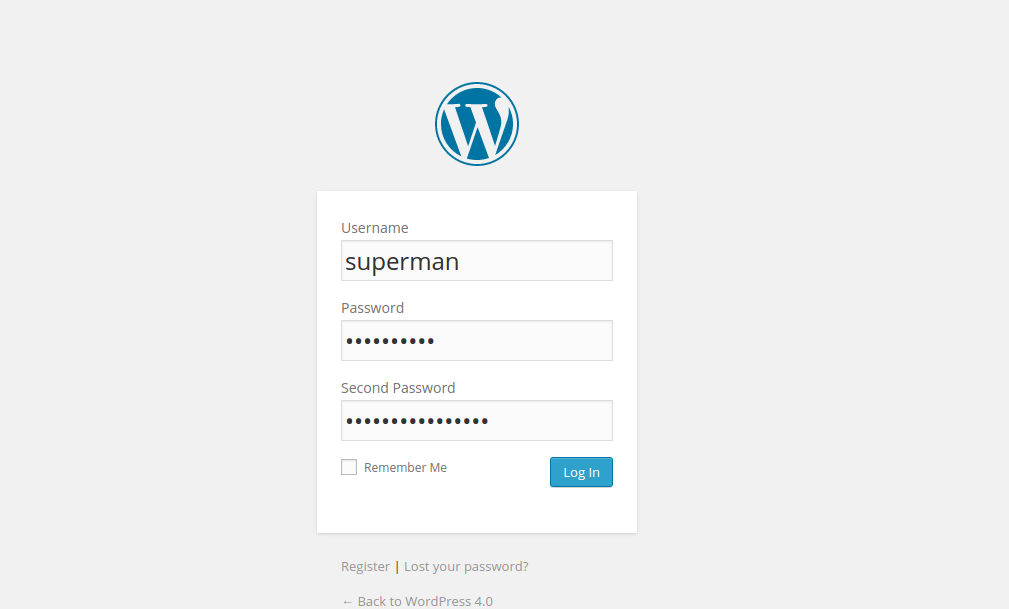
WP login

User Profile
Changelog
1.2 (25th Dec 2014)
- Added localization and made the plugin translation ready.
1.1 (9th Oct 2014)
- Allowed to keep the second password for the users after reactivating the plugin.
- No resetting of second password on reactivating the plugin.
1.0 (6th Oct 2014)
- First release.