

WP e-Commerce Simple Product Options
WP e-Commerce extension that allows you to add simple "product options" to products without having to create or manage variations.
Plugin info
Maintenance & Compatibility
Maintenance score
Possibly abandoned • Last updated 3888 days ago • 1 reviews
Is WP e-Commerce Simple Product Options abandoned?
Possibly abandoned (last update 3888 days ago).
Compatibility
Similar & Alternatives
Explore plugins with similar tags, and compare key metrics like downloads, ratings, updates, support, and WP/PHP compatibility.
Description
WP e-Commerce extension that allows you to add simple “product options” to products without having to create or manage variations.
Installation
- Upload the plugin to the
/wp-content/plugins/directory - Activate the plugin through the ‘Plugins’ menu in WordPress
- Create your product options under the “Products” menu
- Assign product options to your products
Frequently Asked Questions
The options aren’t displayed on the product page
It’s likely that your theme doesn’t include the hooks you need. You’ll need to ensure that your theme contains the standard WP e-Commerce hook
“wpsc_product_form_fields_begin”. You can see the official WP e-Commerce version here, in wpsc-single_product.php here: https://github.com/wp-e-commerce/WP-e-Commerce/blob/3.8.14/wpsc-theme/wpsc-single_product.php#L77
The options chosen are supposed to be displayed during checkout – where are they?
The current stable release of WP e-Commerce doesn’t have the hooks to allow external plugins to display info like this during checkout. They’re coming in a future version – watch this space
Can I change the price charged according to the option chosen?
No, if you want the product options to affect stock, or pricing then you should use WP e-Commerce’s built in “Variations” functionality
Where can I see which product options have been chosen
Product options are shown against the sale under Store Sales in your WordPress Dashboard menu
Can I order the options as they’re shown to the customer?
Yes, install a taxonomy ordering plugin – I recommend https://wordpress.org/extend/plugins/taxonomy-terms-order/ Once you’ve set an order in the admin area, that will be honoured on the front end.
Review feed
Screenshots

Product Options Menu

Product Options Setup

Adding Product Options to a Product
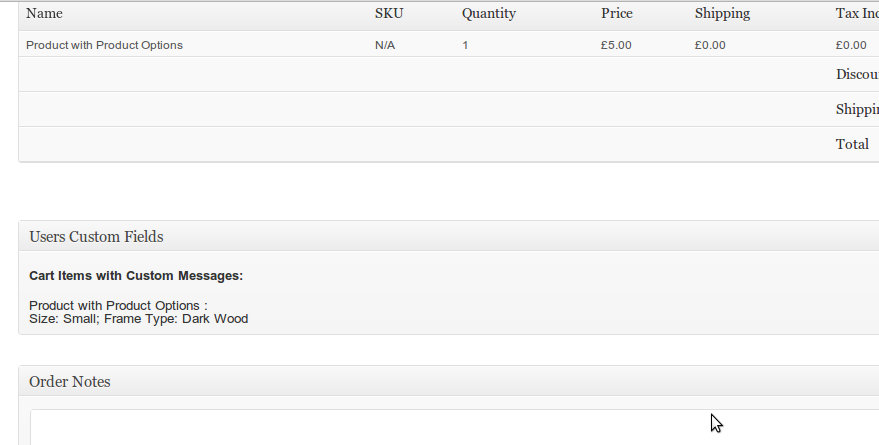
Product Option choices recorded against a sale

Product options on the frontend
Changelog
2.0
Compotibility with forthcoming WP e-Commerce 4.0
1.8
Support for WP e-Commerce 3.8.11
1.7
Fix error where product options couldn’t be deleted
1.6
Allow option sets to be ordered
1.5
Allow options to be ordered using taxonomy ordering plugins such as https://wordpress.org/extend/plugins/taxonomy-terms-order/
Development kindly sponsored by Adam at Bauserman Group.
1.4
Minor tweaks.
1.3
Work alongside personalisable products
1.2
Added more flexible filters
1.1
Add some filters to allow layout customisation
1.0
Minor tweaks. Also hook into proposed checkout / cart hooks for future WP e-Commerce version to display choices during checkout
0.3
Avoid PHP warnings on products with no options
0.2
Compatability with official hooks added in next WP e-Commerce release
0.1
First release