

WP Glossary Hover
When hovering over a word or phrase show the user created definition.
Maintenance 22/1002798d since update
Active installs
30
Downloads
4,287
Reviews
3
Age
11.8y
Plugin info
Total downloads: 4,287
Active installs: 30
Total reviews: 3
Average rating: 3.7
Support threads opened: 0
Support threads resolved: 0 (0%)
Available in: 2 language(s)
Contributors: 1
Last updated: 8/4/2018 (2798 days ago)
Added to WordPress: 6/5/2014 (11 years old)
Minimum WordPress version: 3.5.1
Tested up to WordPress version: 4.9.28
Minimum PHP version: f
Maintenance & Compatibility
Maintenance score
Possibly abandoned • Last updated 2798 days ago • 3 reviews
22/100
Is WP Glossary Hover abandoned?
Possibly abandoned (last update 2798 days ago).
Compatibility
Requires WordPress: 3.5.1
Tested up to: 4.9.28
Requires PHP: f
Similar & Alternatives
Explore plugins with similar tags, and compare key metrics like downloads, ratings, updates, support, and WP/PHP compatibility.
Heroic Glossary – Block for building Glossaries, Dictionaries and more
Rating 3.8/5 (10 reviews) • Active installs 4,000
Free Dictionary
Rating 0.0/5 (0 reviews) • Active installs 10
Simple WP Glossary
Rating 0.0/5 (0 reviews) • Active installs 10
WordSnap – Instantly Define and Hear Any Word
Rating 5.0/5 (1 reviews) • Active installs 0
Glossary Pages
Rating 0.0/5 (0 reviews) • Active installs 0
Description
WP Glossary Hover adds helpful tooltips to user defined glossary terms. Terms are highlighted and when hovered over shows the term definition.
Features
- Only highlight first occurrence of term.
- Specify if glossary terms are case sensitive.
- Enable by post type, i.e. specify if posts, pages, etc. are parsed for terms.
- Protect certain html tags, e.g. headers, links, quotes, etc., from being parsed for terms.
- Uses jQuery UI Tooltips, with ability to custom various settings and themes.
- Style highlighted terms, i.e. change color and underline style.
Installation
Using The WordPress Dashboard
- Navigate to the ‘Add New’ in the plugins dashboard
- Search for ‘WP Glossary Hover’
- Click ‘Install Now’
- Activate the plugin on the Plugin dashboard
Uploading in WordPress Dashboard
- Navigate to the ‘Add New’ in the plugins dashboard
- Navigate to the ‘Upload’ area
- Select
wp-glossary-hover.zipfrom your computer - Click ‘Install Now’
- Activate the plugin in the Plugin dashboard
Using FTP
- Download
wp-glossary-hover.zip - Extract the
wp-glossary-hoverdirectory to your computer - Upload the
wp-glossary-hoverdirectory to the/wp-content/plugins/directory - Activate the plugin in the Plugin dashboard
Frequently Asked Questions
Installation Instructions
Using The WordPress Dashboard
- Navigate to the ‘Add New’ in the plugins dashboard
- Search for ‘WP Glossary Hover’
- Click ‘Install Now’
- Activate the plugin on the Plugin dashboard
Uploading in WordPress Dashboard
- Navigate to the ‘Add New’ in the plugins dashboard
- Navigate to the ‘Upload’ area
- Select
wp-glossary-hover.zipfrom your computer - Click ‘Install Now’
- Activate the plugin in the Plugin dashboard
Using FTP
- Download
wp-glossary-hover.zip - Extract the
wp-glossary-hoverdirectory to your computer - Upload the
wp-glossary-hoverdirectory to the/wp-content/plugins/directory - Activate the plugin in the Plugin dashboard
Review feed
No reviews available
Screenshots

A screenshot of the general options tab for the plugin.
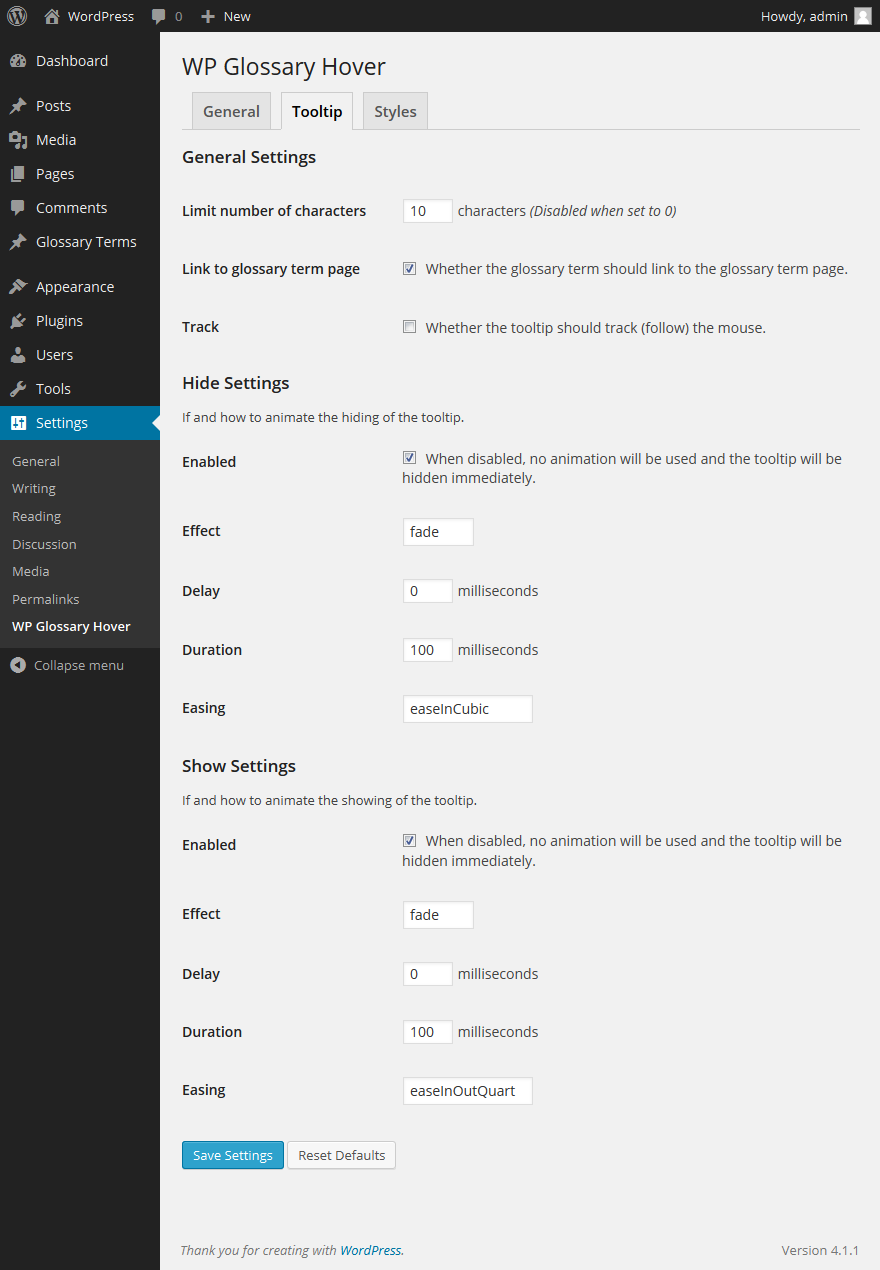
A screenshot of the tooltip options tab for the plugin.

A screenshot of the styles options tab for the plugin.

A screenshot of the tooltip in action.
Changelog
1.3.1
- Escape regular expression references
1.3.0
- Add ‘u’ modifier to term regex pattern, support ‘non-Latin’ characters.
- Update to jquery-ui 1.11.4.
- Only show the bottom border for tooltips.
1.2.3
- Fix errors in versions of php earlier than php 5.4.
- Remove the ‘…’ when not limiting the characters in the definition.
1.2.2
- Fix encoding between html and xml entities.
1.2.1
- Decode html entities before adding them as xml.
- Add new link underline style
none. - Remove extra markup
<!DOCTYPE><html><body></body></html>generated by DomDocument. - When limiting the number of characters in the definition tooltip, end at the end of a word, and trim all non alpha-numeric characters.
1.2.0
- Enabled comment support for glossary terms.
- Added to enable links to glossary term pages.
- Added setting to limit the tooltip length.
- Escape html sepcial characters in definition.
- Strip tags in tooltip definition, instead of escaping tags.
- Fix description for
Enabled Post Typessetting.
1.1.0
- Fix fatal error on install.
- Remove test code in uninstall.php.
1.0.1
- Update README.txt.
1.0.0
- First release of plugin.