

WP Google Search
This plugin gives a very simple way to integrate Google Search into your WordPress site.
Plugin info
Maintenance & Compatibility
Maintenance score
Possibly abandoned • Last updated 1339 days ago • 28 reviews
Is WP Google Search abandoned?
Possibly abandoned (last update 1339 days ago).
Compatibility
Developers
Similar & Alternatives
Explore plugins with similar tags, and compare key metrics like downloads, ratings, updates, support, and WP/PHP compatibility.
Description
If you would like a Google search feature on your WordPress site, you only need to register to Google Custom Search, get your Google Search Engine ID, and enter it in the plugin settings page.
Then your custom search engine is ready for use, just put the new Google search box widget on the sidebar, and enjoy it!
In this way the plugin enables you to insert Google search into your website, or a collection of websites easily. You can search both web pages and images.
You can define if you want to search only on your site (or given sites), or the entire web.
It is possible to customize your search features, the look and feel (layout, themes, custom colors and fonts, thumbnails), and much more.
All these settings can be specified on the Google Custom Search Engine admin site: https://www.google.com/cse/
Your changes will appear instantly on your site automatically.
After you registered to Google Custom Search Engine and get your Google Search Engine ID, you need to enter the ID in the plugin settings page: Settings -> WP Google Search
Use WP Google Search widget or [wp_google_searchbox] shortcode to place search box on your site.
Search results can be displayed on a normal page or in a popup window. Use Full Width layout or Overlay (popup) layout on Google Custom Search Admin site to setup it.
It does not require any coding or other complicated operation.
Please find more information in the product documentation:
WP Google Search Documentation
Available languages
- English
- Spanish – translated by Ogi Djuraskovic – http://firstsiteguide.com
- Serbian – translated by Ogi Djuraskovic – http://firstsiteguide.com
- Portuguese (BR) – translated by Gabriel Froes
- Swedish – translated by Tobias – http://ComClick.se
- Danish – translated by Alexander Leo-Hansen – http://alexanderleohansen.dk
- Russian – translated by Timofeev Ilya
Installation
- Upload the plugin to the ‘/wp-content/plugins/’ directory.
- Activate it through the ‘Plugins’ menu in WordPress.
- Register to Google Custom Search Engine and get your Google Search Engine ID here: https://www.google.com/cse/
- Enable the plugin and enter Google Search Engine ID: Settings -> WP Google Search (See screenshots for more information.)
Frequently Asked Questions
Review feed
Does what is says but could be better with...
Screenshots

Google Custom Search

Basic Setup, get your search engine ID
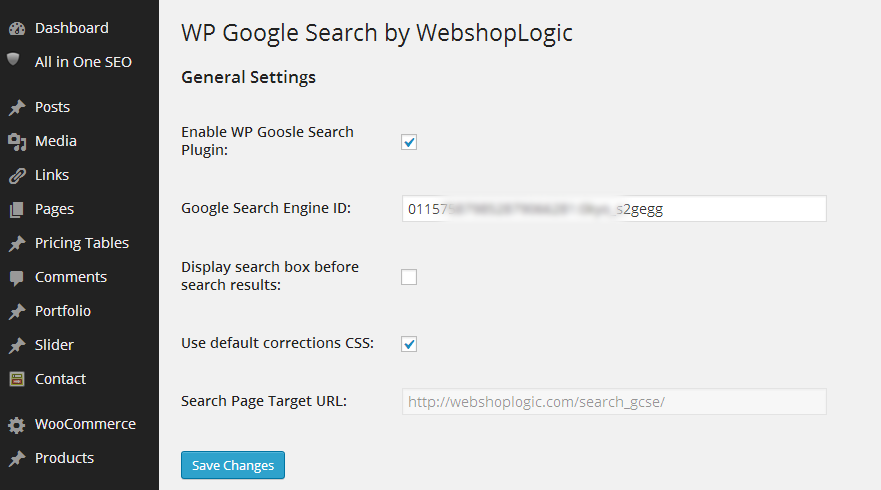
Enter search engine ID into plugin admin panel

Place WP Google Search widget on sidebar
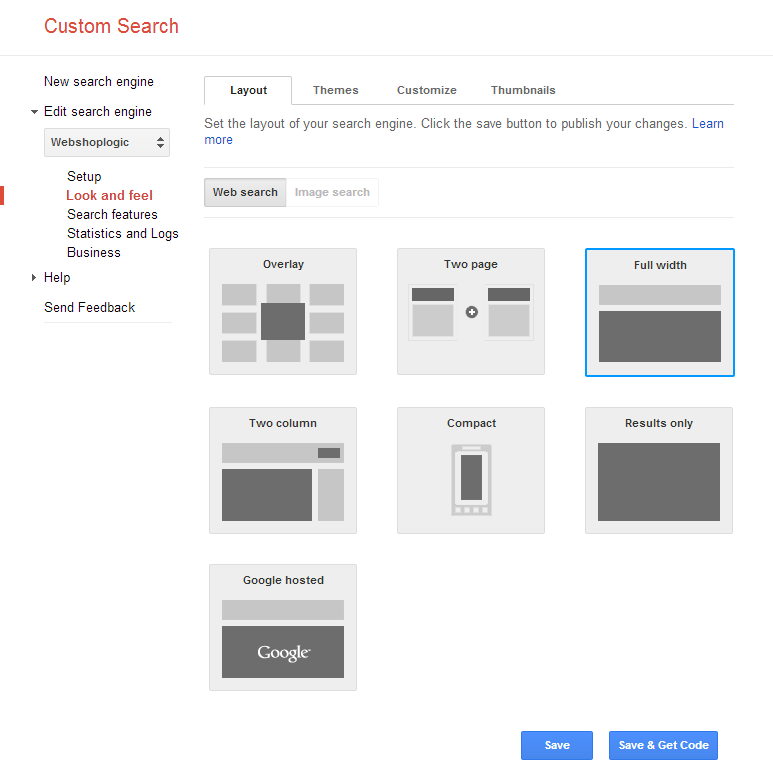
Customization example (select layout)
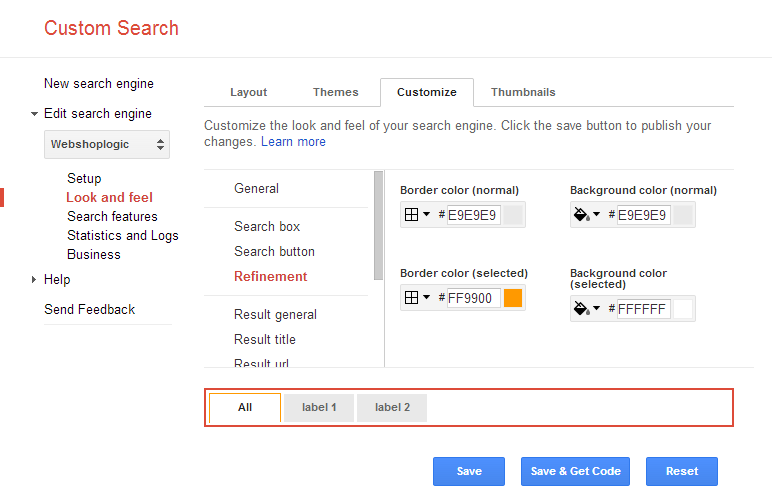
Customization example (look and feel - colors)
Changelog
1.1.0
New version for the latest WP version
1.0.9
- Modify: Change Text Domain from wgs to wp-google-search
1.0.8
- Minor adjustments
1.0.7
- Fix Notice: Undefined index: use_default_correction_css2, css3 in wp-google-search.php on line 69 and 72
1.0.6
- Eliminate old style constructor call in WGS_Widget
- Add css correction v2 and v3 (v1 is deprecated)
1.0.5
- Add Russian translation
- Add target link blank option
1.0.4
- Add Swedish translation
- Add Danish translation
1.0.3
- Add “Support Overlay Display” option, for display search results in overlay window, without loading another page.
1.0.2
- Portuguese (BR) translation
- Re-create search page during re-activation if it does not exist
1.0.1
- Use new HTML5-valid div tags according to Google documentation: You can use HTML5-valid div tags as long as you observe these guidelines: The class attribute must be set to gcse-XXX, Any attributes must be prefixed with data-.
- Eliminate Enable plugin checkbox in settings page
- Eliminate donation button inside settings page
- Descriptions are added to settings page
- Spanish and Serbian translations
1.0.0
- First version