

WP Growl
Show your WordPress admin notices in a growlike / better way, and snooze them whenever you see fit.
Plugin info
Maintenance & Compatibility
Maintenance score
Possibly abandoned • Last updated 3293 days ago • 2 reviews
Is WP Growl abandoned?
Possibly abandoned (last update 3293 days ago).
Compatibility
Similar & Alternatives
Explore plugins with similar tags, and compare key metrics like downloads, ratings, updates, support, and WP/PHP compatibility.
Description
Show your WordPress admin notices in a growlike / better way, and snooze them whenever you see fit.
This WordPress plug-in aims to make admin notices more colorful and noticable so they are really an addition to your admin.
In addition to making them more noticable WP Growl also makes it possible to snooze notices for you so you can really keep focus on the work you should do now.
And last but not least, WP Growl is here to fight those annoying notices being abused for advertising! We try to hide any notices being used by plug-ins.
If you notice any abuse or want to get involved visit the WP Growl GitHub Repository.
Installation
The plugin is available from the WordPress plugin repository
- Upload the plugin files to the
/wp-content/plugins/wp-growl-notificationsdirectory, or install the plugin through the WordPress plugins screen directly. - Activate the plugin through the ‘Plugins’ screen in WordPress
- Use the Settings->Plugin Name screen to configure the plugin
- (Make your instructions match the desired user flow for activating and installing your plugin. Include any steps that might be needed for explanatory purposes)
You can also install WP Growl trough composer
composer require dannyvanholten/wp-growl-notifications
or if you make use of WPackagist
composer require wpackagist-plugin/wp-growl-notifications
Frequently Asked Questions
Review feed
Improved admin notices
Screenshots
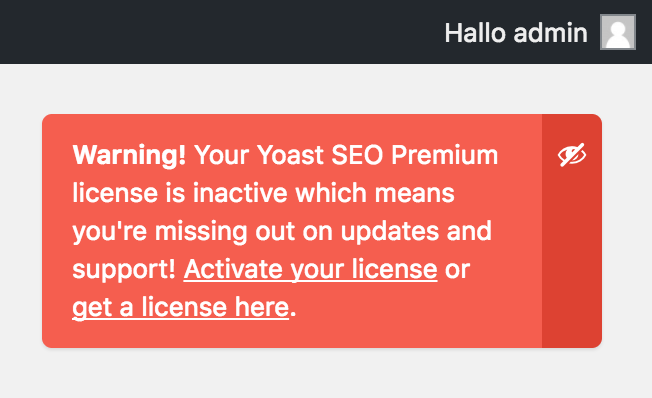
A non-dismissable message like this one from Yoast is now snoozable trough the eye icon.

You can select how long you would like to snooze this message.

Dismissble message are now more prominent in color, and auto dissappear after 6 seconds.
Changelog
1.0
Fixed:
* Readme.txt is now according to WordPress standards
Added:
* Added screenshots to the WordPress assets
* Added Dutch, German, Spanish & Portuguese translations.
0.9
Added:
* The repo is set up and all the styling, javascript functions are in order.