

WP Help
Site operators can create detailed, hierarchical documentation for the site's authors, editors, and contributors, viewable in the WordPress admin …
Plugin info
Maintenance & Compatibility
Maintenance score
Possibly abandoned • Last updated 711 days ago • 54 reviews
Is WP Help abandoned?
Possibly abandoned (last update 711 days ago).
Compatibility
Developers
Languages
Similar & Alternatives
Explore plugins with similar tags, and compare key metrics like downloads, ratings, updates, support, and WP/PHP compatibility.
Description
Site operators can create detailed, hierarchical documentation for the site’s authors, editors, and contributors, viewable in the WordPress admin. Powered by Custom Post Types, you get all the power of WordPress to create, edit, and arrange your documentation. Perfect for customized client sites. Never send another “here’s how to use your site” e-mail again!
NEW: You can now pull in help documents from another WP Help install, and they will be automatically updated when the source documents change (even additions and deletions!). Perfect for WordPress multisite installs, or consultants with a large number of client installs.
Installation
-
Upload the
wp-helpfolder to your/wp-content/plugins/directory -
Activate the “WP Help” plugin in your WordPress administration interface
-
Visit “Publishing Help” in the menu to get started (note that you can change the location and title of this menu item)
Frequently Asked Questions
Anyone who can save posts. So by default, Authors, Editors, Administrators, and Contributors
Anyone who can publish_pages. So by default, Editors and Administrators.
Just like you’d reorder pages. Change the Order setting for the page, in the Attributes meta box. To make something be first, give it a large negative number like -100.
Use WordPress’ internal linking feature. When launched from a help document, it will only search for other help documents.
Edit the help document you want to be the default. Check the “Set as default help document” checkbox, and save. This will now be the default document.
Documents that came from another WP Help install that is currently connected, cannot be edited (your changes would just be overwritten anyway). In order to edit these documents, you need to disconnect from sync permanently, or edit the at their source WP Help install.
Enabling sync will delete any documents that came in via another sync source. But it will not delete locally-created documents.
Not right now. But what you can do, is have a WP Help install that aggregates another WP Help install and is then itself used as a source for the combination of the two sites docs, to be delivered to a third site.
You cannot internally sort synced documents — just move the whole “chunk” of synced documents around.. Also, if a local help document is the only document in its level, it won’t get a drag handle, because there’s nothing to reorder. Give it a sibling, and you’ll be able to order them how you like.
Review feed
Easy and Effective
Great plug-in. Create documentation in the admin panel.
Super plugin. Been using for years.
Used for many years
This is great!
Screenshots
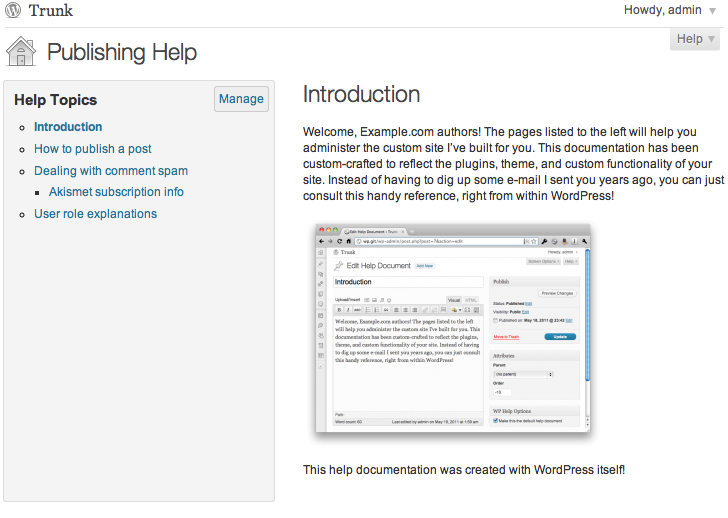
The Publishing Help screen, which lists and displays available help documents.
Changelog
1.7.0
- Block Editor (Gutenberg) support
- Video display improvements
- Smaller build
1.6.0
- CSS improvements (props @mrwweb).
- Switch from CoffeeScript to ES6 and Babel.
- Responsive styles.
1.5.4
- Bump supported WordPress version.
1.5.3
- Make add/manage buttons use proper permissions.
- Update styles.
- Bump minimum WordPress version.
1.5.2
- Make permissions more filterable.
1.5.1
- Fix a PHP error on the dashboard.
1.5.0
- Updated to Mark’s 2016 plugin framework for easier maintenance.
1.4.1
- More complete French translation.
1.4
- Added a Hebrew translation.
1.3
- Make the
wp_list_pages()call filterable. - Added Serbian, Turkish, and Japanese translations.
- Use a Dashicon for WordPress 3.8+.
- RTL CSS styles.
1.2
- New or updated translations for Gujarati, Norwegian, and Brazilian Portuguese.
- CSS fixes for WordPress 3.5.
- More robust AJAX saving when save events overlap.
1.1
- Feature: drag and drop reordering of the documents list.
- Feature: local /wp-admin/ links are rewritten when shared through the API so that they’re wp-admin-relative and thus work on the destination site.
- Improvement: more consistent cap checks, so plugins can consistently customize who can do what.
- Improvement: restore settings form to previous state when “cancel” is clicked.
- Bug fix: sort order is now synced.
1.0
- Feature: sync help documents from another WP Help install.
- Feature: rename the page title.
- Feature: rename the document list title.
- Feature: choose the location of the menu item (Dashboard submenu, or one of three top level positions).
- Feature: easier access to creation, editing, and management of documents.
- Feature: dashboard widget.
- Improvement: better UI for selecting the default document.
0.3
- Translation for: French. Squashes a PHP Notice. Add an action hook so people can add their own styles.
0.2
- Translations for: Bulgarian, German, Spanish, Mexican Spanish, Macedonian, Dutch, Brazilian Portuguese, and Russian.
0.1
- Initial version