

WP HTML5 Outliner
Adds an HTML 5 outline plus a heading-level outline to the WordPress Toolbar.
Plugin info
Maintenance & Compatibility
Maintenance score
Possibly abandoned • Last updated 2214 days ago
Is WP HTML5 Outliner abandoned?
Possibly abandoned (last update 2214 days ago).
Compatibility
Similar & Alternatives
Explore plugins with similar tags, and compare key metrics like downloads, ratings, updates, support, and WP/PHP compatibility.
Description
WP HTML5 Outliner (WPH5O) adds an HTML 5 outline plus a heading-level outline to the WordPress Toolbar.
Features
- Matches the outlines provided by the W3C Markup Validation Service. Caveat: In an HTML 5 outline, the W3C validator may hide some of the headings in an
if any of them are empty. WPH5O will not. This difference is presentational, not structural. - Adds an ‘Outline’ node to the Toolbar. Outlines are displayed in a dropdown box, with the option to view them in a new browser window.
- Runs only on pages or posts the user can edit. Administrators can view outlines for any page or post. Administration Screens are not outlined.
Installation
Frequently Asked Questions
What is an HTML 5 outline?
An HTML 5 outline represents the sections of an HTML document. Each section corresponds to an element from one of three categories:
Sectioning root: <blockquote>, <body>, <details>, <dialog>, <fieldset>, <figure>, <td>
Sectioning content: <article>, <aside>, <nav>, <section>
Heading content: <h1>, <h2>, <h3>, <h4>, <h5>, <h6>
Sections may be nested to create subsections.
Source: W3C HTML 5.2 Specification
What is a heading-level outline?
A heading-level outline represents the sections of an HTML document. Each section corresponds to a heading element. Sections may be nested to create subsections.
Sources: W3C Quality Assurance, W3C HTML 5.2 Specification
Why do these outlines matter?
Each outline shows how well a page meets web standards for marking up document structure. User agents, particularly screen readers, use the heading-level outline to aid navigation. However, no web browsers or assistive technologies make use of the HTML 5 outline. So, really, the question is this: Why does that outline matter?
Although user agents still haven’t implemented the HTML 5 outline (introduced in 2008), developers aren’t giving up on it. And they have their reasons. The MDN web docs highlight some problems solved by HTML 5 document structure.
Sources: W3C Web Accessibility Initiative, W3C HTML 5.2 Specification
Is there developer documentation?
Yes. The source code conforms to WordPress Inline Documentation Standards. Fork this plugin at the WPH5O GitHub page.
Review feed
Screenshots

HTML 5 outline in a Toolbar dropdown box. Theme: Twenty Nineteen. Context: Homepage. WordPress Version: 5.0.

Heading-level outline in a Toolbar dropdown box. Theme: Twenty Nineteen. Context: Homepage. WordPress Version: 5.0.
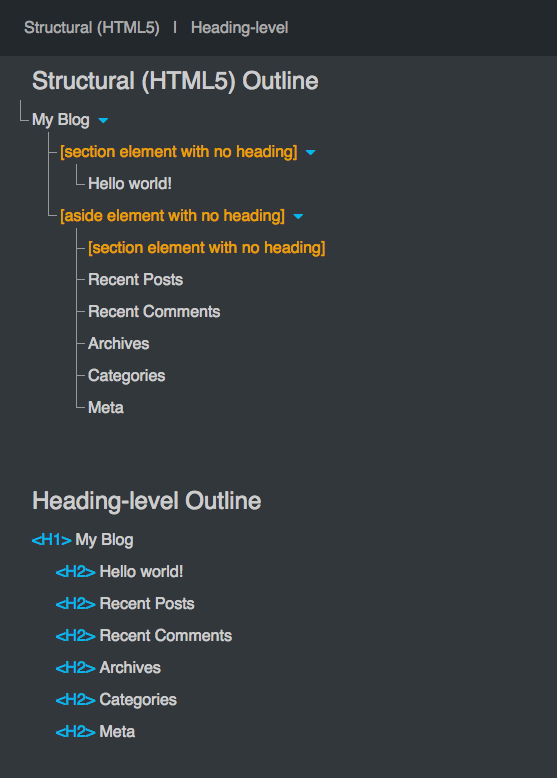
HTML 5 outline and heading-level outline in a new window. Theme: Twenty Nineteen. Context: Homepage. WordPress Version: 5.0.
Changelog
1.3.0
- Change text domain to plugin slug.
- Add i18n support to JS files.
- Edit readme section titled “Why do these outlines matter?”.
1.2.0
- Add function to load plugin’s text domain.
- Ensure ‘No outline was created’ message replaces heading-level outline if source has no headings.
1.1.0
- Fix notices for empty headings in an hgroup element that also contains non-heading elements.
- Shorten Toolbar node title to “Outline”.
1.0.0
- Release the plugin!